Aircraft
Phantom 4 Pro / Pro+ User Manual
22
©
2017 DJI All Rights Reserved.
ON OFF
Auto Hold
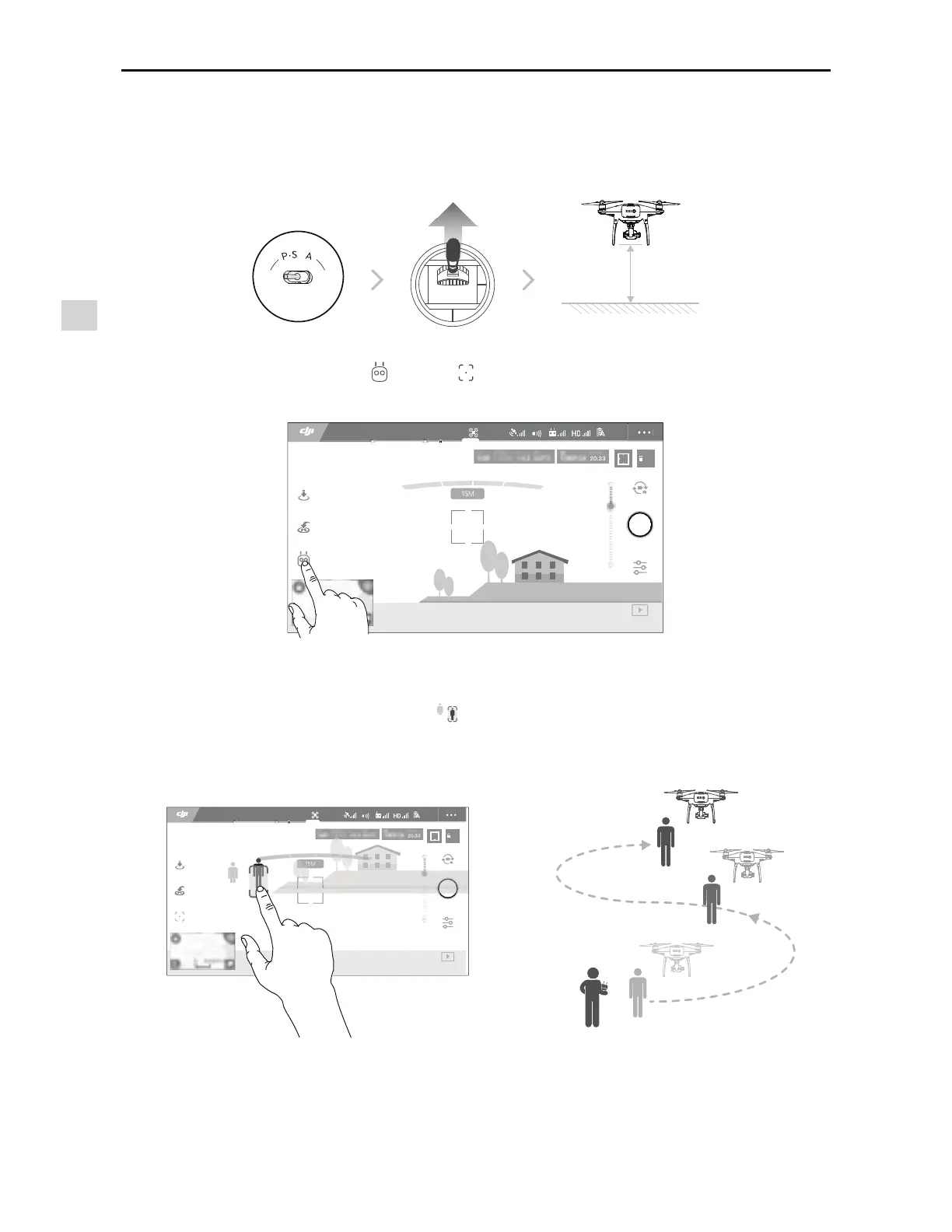
2. Launch the DJI GO 4 app and tap , then tap , read and understand the prompts.
3.
5BQPOUIFTVCKFDUZPVXBOUUPUSBDLUIFOUBQUPDPOmSNTFMFDUJPO*GUIFTVCKFDUJTOPUBVUPNBUJDBMMZ
recognized, drag a box around it. The box
will turn green when tracking is in progress. If the box
UVSOTSFEUIFPCKFDUDPVMEOPUCFJEFOUJmFEBOEZPVTIPVMEUSZBHBJO
2 meters
Using ActiveTrack
Ensure the aircraft is in P-mode, then follow the steps below to use ActiveTrack:
1. Take off and hover at least 6 feet (2 meters) above the ground.
AE
09:29
61%
P-GPS
12
H 10.0MD 30M
VS 2.0M/S VPS 2.0MH.S 10.0 M/S
*O'MJHIU(14
AE
09:29
61%
P-GPS
12
H 10.0MD 30M
VS 2.0M/S VPS 2.0MH.S 10.0 M/S
૦ச
*O'MJHIU(14



 To Next Page