Digital Monitoring Products
CellCom‑LTE
Programming and Installation Guide
34
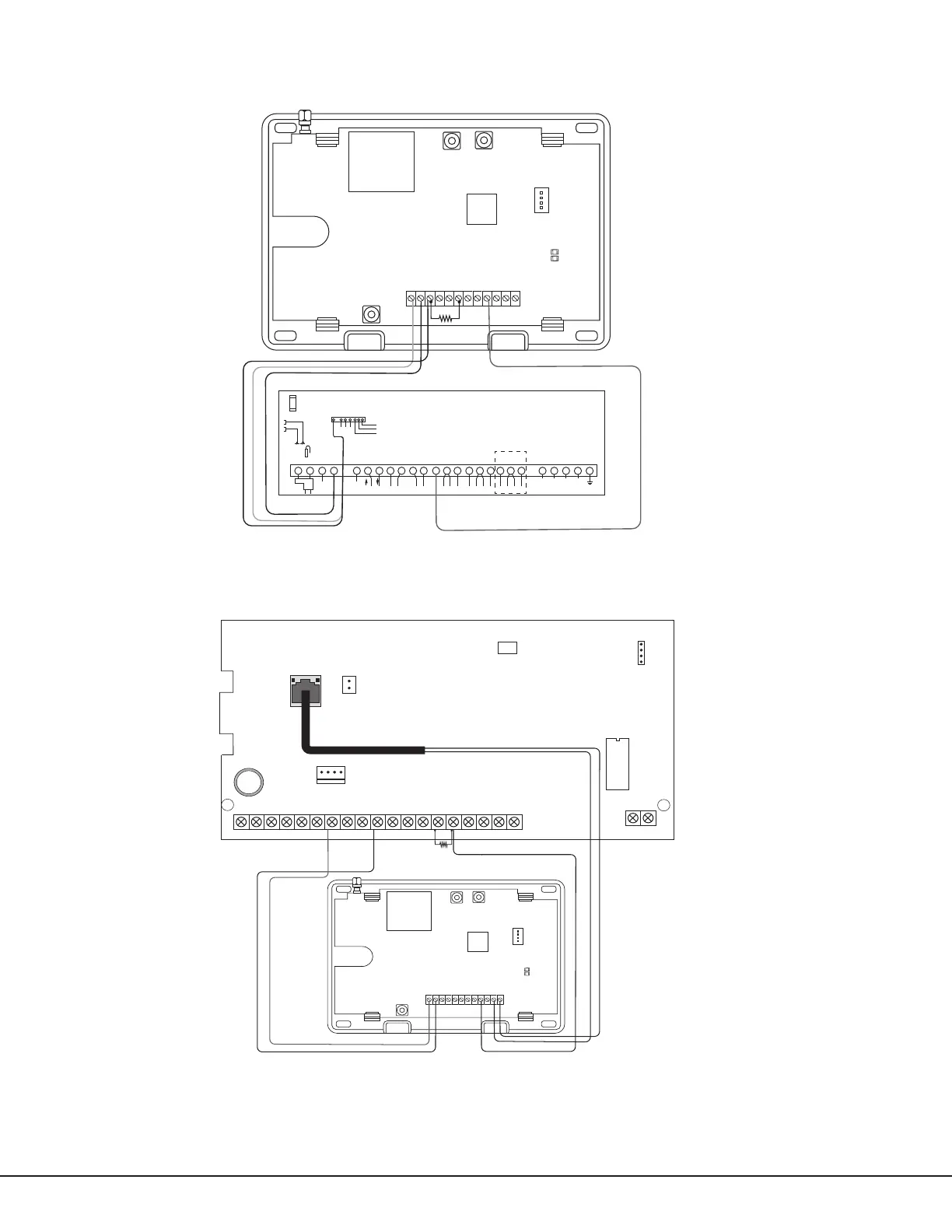
Ademco Vista 20P to CellCom‑LTE for Remote Arming/Disarming
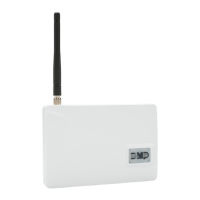
DMP XRSuper6 to CellCom‑LTE for Remote Arming/Disarming
PROG
B
R
RESETLOAD
+DC- Z1 Z2 Z3
G
T
R
+Z4-
O1 O2
1 2 3 4 5 6 7 8 9 10 11 12 13 14 15 16 17 18 19 20 21 22 23 24 25
+ +-
HI
HI
HI
LO
LO
LO
LO
HI
HI
LO
LO
HI
HI
LO
LO
HI
TIP
(BROWN)
RING
(G RAY )
TIP
(GREEN)
RING
(RED)
+
-
BLACK
RED
SYNC
COM
DATA
(USE SA4120XM-1
CABLE)
1 2 3 4 5 6 7 8
OUT 17
+12 AUX
GND
OUT 18
VISTA 20P ONLY
Ademco Vista 20P
PROG
B
R
RESETLOAD
+DC- Z1 Z2 Z3
G
T
R
+Z4-
O1 O2
AC
1
2
3
4 5 6 7
8
10
11 12 13 14
15
16 17 18
19
9
27
28
+B
BELL
GND
SMK
GND
RED
YEL
GRN
BLK
Z1
Z2 Z3 Z4
Z5
Z10+
Z10-
AC
-B
GND
GND
J3
RED
PROG
J8
XRSuper6
J16
Reset
J7
RJ SUP
1k Ω
Figure 17: Ademco Vista 20P to CellCom-LTE
Figure 18: DMP XRSuper6 to CellCom-LTE


 To Next Page