eBox-3300
6
PERIPHERALS
C
ONNECTING THE USB AND SPEAKER/EARPHONE
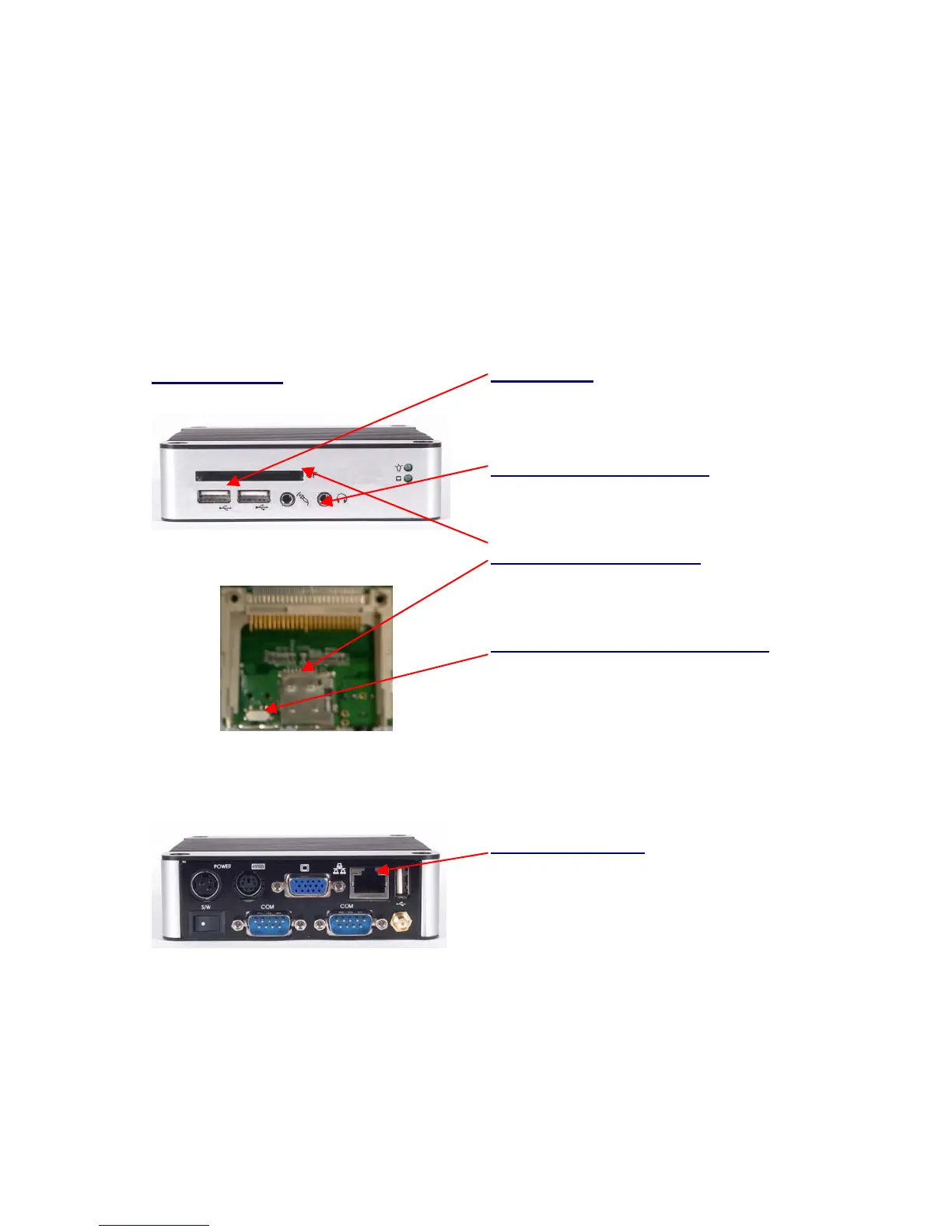
eBox-3300 provides USB port (Two in front & one at the back).
Front cabinet
(Inside CF slot)
USB Ports
The USB ports is available for connection
to USB devices such as CD-ROM
Microphone/Earphone
The eBox-3300 supports for Microphone
Input and Speaker Output
Micro-SD and CF slot
For connection to Device with Compact
Flash Card and Micro-SD (T-flash).
Secondary IDE Master/Slave
Adjust for Compact Flash device to be
Secondary IDE Master or Slave
CONNECTING THE LAN
Connecting to LAN
There is an available RJ-45 LAN jack for
connection to the hub of your intranet;
and via your server for internet service
(see diagram for RJ-45 LAN jack).


 To Next Page