20 21
12. PC-Software
12.1 Software installieren
- Installieren Sie das für Ihr System passende Programmfile „PortableCapture Plus”
von der mitgelieferten CD-ROM.
- Kontrollieren Sie ggf. auf „www.dnt.de” das Erscheinen einer neuen Version und
laden Sie diese zur Installation herunter.
12.2 Programm starten
- Verbinden Sie Ihren Rechner über das USB-Kabel mit dem Mikroskop (Speicher-
karte aus dem Mikroskop entfernen, sonst wird nur diese vom Rechner erkannt)
und starten Sie das Programm „PortableCapture Plus” auf Ihrem Rechner. Je nach
Betriebssystem erscheint dieses auch als Desktop-Icon:
27
2. Start Microscope
Connect your Microscope to your PC USB port, start the
software by clicking the
icon generated on the
desktop after installation and you will see the following
screen pop up.
When the Microscope is disconnected from your PC
USB port, the following message will pop up.
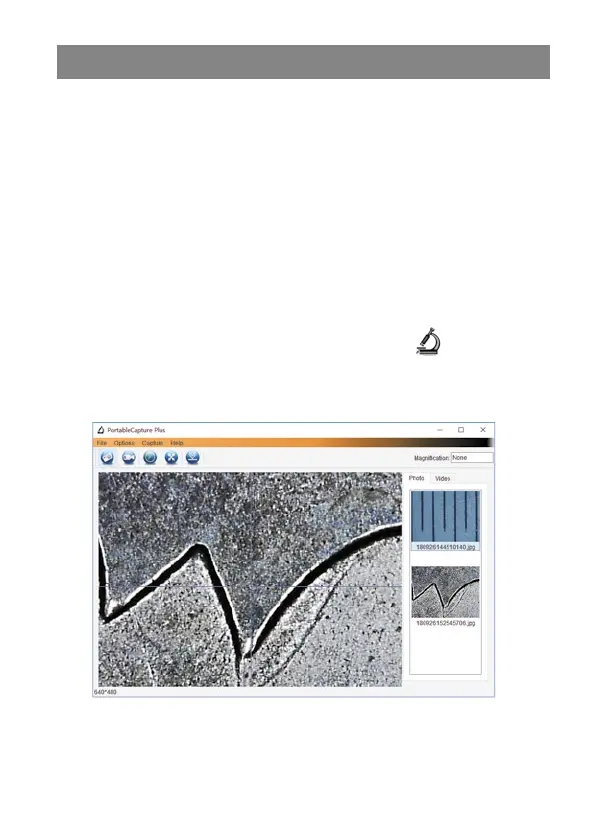
- Bei ordnungsgemäßem Anschluss erscheint das Startbild des Programms und die
Abbildung des Mikroskopbildes:
- Erscheint statt des Kamerabildes die Meldung: „Kein Gerät erkannt, verbinden Sie
das Mikroskop mit der USB-Schnittstelle”, schalten Sie das Mikroskop aus (evtl.
noch eingelegte Speicherkarte entfernen), beenden das Programm, schalten das
Mikroskop ein und starten das Programm erneut.
27
2. Start Microscope
Connect your Microscope to your PC USB port, start the
software by clicking the icon generated on the
desktop after installation and you will see the following
screen pop up.
When the Microscope is disconnected from your PC
USB port, the following message will pop up.



 To Next Page