34
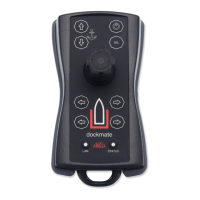
• “sel” (CMD) button
The “sel” button has 2 functions.
The 1
st
function is Take Command.
The 2
nd
function can be chosen during the installation: “High Mode” or “DPS”.
o Take Command
Pressing the “sel” button makes the Dockmate the active steering position.
Depending on your boat’s propulsion system and Dockmate configuration, you may
need to first manually activate the station the Dockmate Receiver is connected to.
o High Mode
Pressing and holding the “sel” button for 1s or more will (de)activate the “High Mode”
function on the Volvo Penta joystick or Mercury/Zeus Joystick Piloting 2 system. Note
that the boat needs to have this feature installed. If not, this function is disabled, and
pressing this button has no effect.


 To Next Page