23
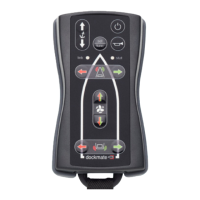
4.2.2. DOCKMATE TWIST FEATURES
This section applies if your Dockmate TWIST is connected to a control head with levers.
If you have a Dockmate TWIST connected to a joystick system (Volvo Penta Joystick EVC-D or EVC-E,
or Mercury Joystick Piloting 1 or 2), please skip to point 4.3. If you have a Dockmate VECTOR, please
skip to point 4.4.
• On/Off button
Press and hold the on/off button for 2s to turn the remote on.
Press the on/off button 3 times quickly or hold the on/off button for 3s to shut the remote off.
When this button is pressed (even shortly) while another button is pressed, all inputs are
inhibited for safety, so Dockmate’s outputs go to neutral, until all buttons are released
again.
In case of emergency, press the On/Off button to force Dockmate’s outputs to neutral.


 To Next Page