38
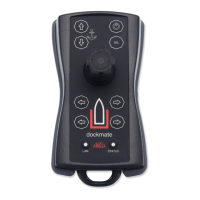
• Buzzer & vibrator
Indicates no communication, low battery, warning, or error.
• Bow thruster buttons
By pressing the left button (port), the bow thruster will push the bow to port.
By pressing the right button (starboard), the bow thruster will push the bow to starboard.
These buttons only operate a bow thruster if installed on the boat and your Dockmate
Receiver is configured for it. Otherwise, this has no effect.
• Stern thruster buttons
By pressing the left button (port), the stern thruster will push the stern to port.
By pressing the right button (starboard), the stern thruster will push the stern to starboard.
These buttons only operate a stern thruster if installed on the boat and your Dockmate
Receiver is configured for it. Otherwise, this has no effect.
When your thruster(s) are proportional and the Dockmate Receiver is configured with a
CAN bus thruster module (Vetus V-CAN, Sleipner S-Link, ABT-TRAC Link, or CMC-
CANopen), the maximum output of your thrusters can be configured during the
Dockmate installation or sea trial.


 To Next Page