42
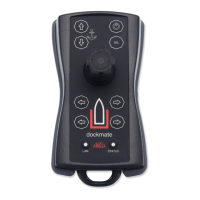
• “sel” button
The “sel” function is Take Command.
Pressing the “sel” button makes the Dockmate the active steering position.
Depending on your boat’s propulsion system and Dockmate configuration, you may
need to first manually activate the station the Dockmate Receiver is connected to.
• Anchor winch buttons
By pressing the upper button, you lower the anchor.
By pressing the lower button, you raise the anchor.
This behaviour can be switched in the Dockmate Settings, during the installation or sea trial.
These buttons only operate an anchor winch if installed on the boat and your Dockmate
Receiver is configured for it. Otherwise, this has no effect. When pressed together, you can
choose between windlass 1 and 2 (2 or 4 beeps), if the Dockmate Receiver is fitted with a twin
anchor winch module.


 To Next Page