38 Dolby
®
Digital Cinema System Manual Issue 0.92 (Preliminary)
Installing a Dolby Digital Cinema System
6. Press <Enter> to select the default setting (1) for a single auditorium, or enter the
desired auditorium number, and press <Enter>.
The
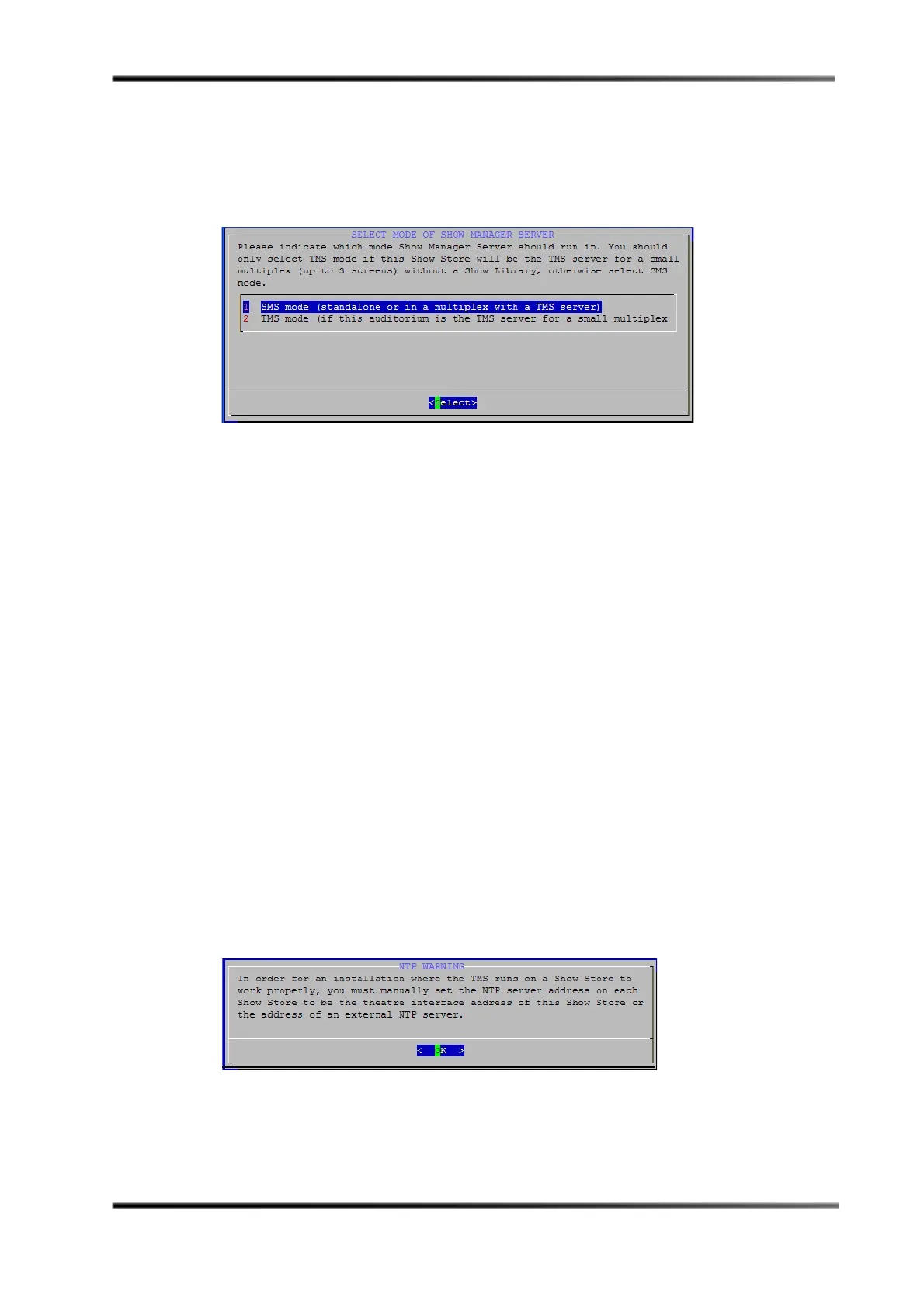
Select Mode of Show Manager Server screen appears, which asks you to specify the
Show Manager Server mode, as shown in Figure 3-26. The default is
SMS mode.
Figure 3- 26
Figure 3-26 Select SMS or Show Manager Mode for this Unit
7. Select TMS mode only if there are three or fewer screens and this DSS220 is the Show
Manager Server. Select
SMS mode for all other configurations, for example:
• There is only one screen.
• There are three or fewer screens and this DSS220 is not the Show Manager Server.
• A DSL100 is installed.
• A third-party Show Manager is controlling this unit.
If you press <Enter> to select
SMS mode (default), the Select Cinema Processor screen
appears, with three options:
No cinema processor (for other cinema processors), CP650,
and
CP750, as shown in Figure 3-28. No cinema processor is applicable for any cinema
processor that is not a CP650 or CP750. Proceed to step 8.
If you select
TMS mode, the NTP warning screen appears, as shown in Figure 3-27. If you
see this message, you must proceed using one of the following options:
• Manually set the NTP server address of each DSS220 (refer to Figure 3-37) using
the IP address of an external NTP server (recommended for best accuracy).
• Manually set the NTP server address of this DSS220 using the IP address of an
external NTP server, and enter the theatre network address on this DSS220 (refer
to Table 3-1) as the NTP server address on the other units (refer to Figure 3-37).
• Manually set the NTP server address on the other DSS220s (refer to Figure 3-37)
using the theatre network address on this DSS220 (refer to Table 3-1).
When you select
OK in the NTP Warning screen, the Select Cinema Processor screen
appears, as described above. Proceed to step 8.
Figure 3- 27
Figure 3-27 NTP Warning Screen


 To Next Page
 Loading...