2
3
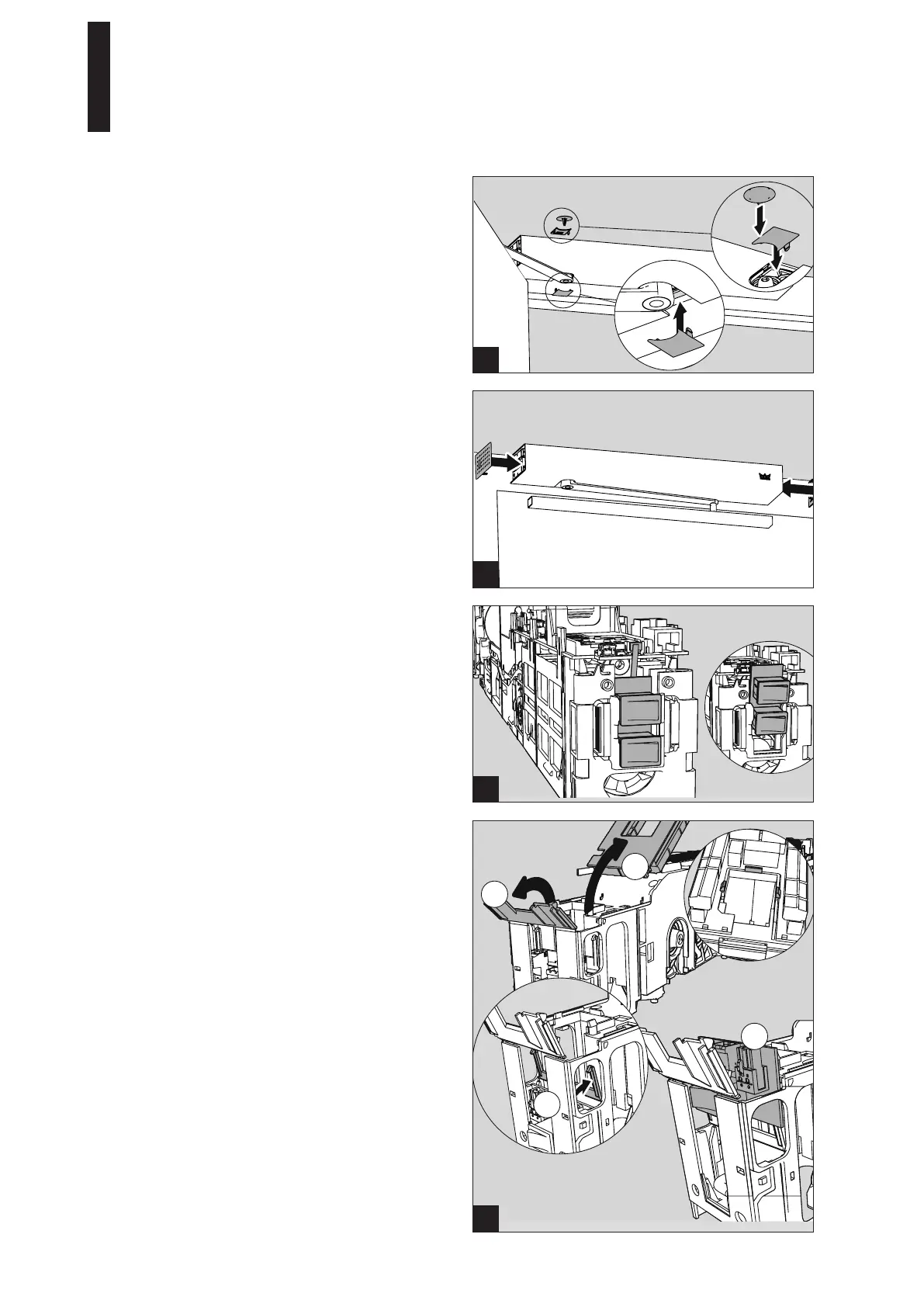
2. Attach the axle covers.
3. Attach the side covers.
On the side with the program switch, the insertion
depth can be varied by means of notches to
compensate for minor discrepancies in the length of
the cover hood.
3.
4.
1.
2.
1
2
5.15 Installing a Double-Leaf Door (Optional)
Perform the following steps before installing the drives:
1. Pull the connection cable out of both drives.
2. Pull the PCBs with the internal program switches up
and out.
3. On the drive that is not installed on the mains
connection side, push the 3 clamps on the terminal
board inwards and remove the terminal board.
4. Open both flaps above the mains connection PCB.
5. Pull out the plug.
6. Remove the mains connection PCB.
7. Close the two flaps and attach the terminal board.
ED 100, ED 250
—
22 DORMA





 To Next Page