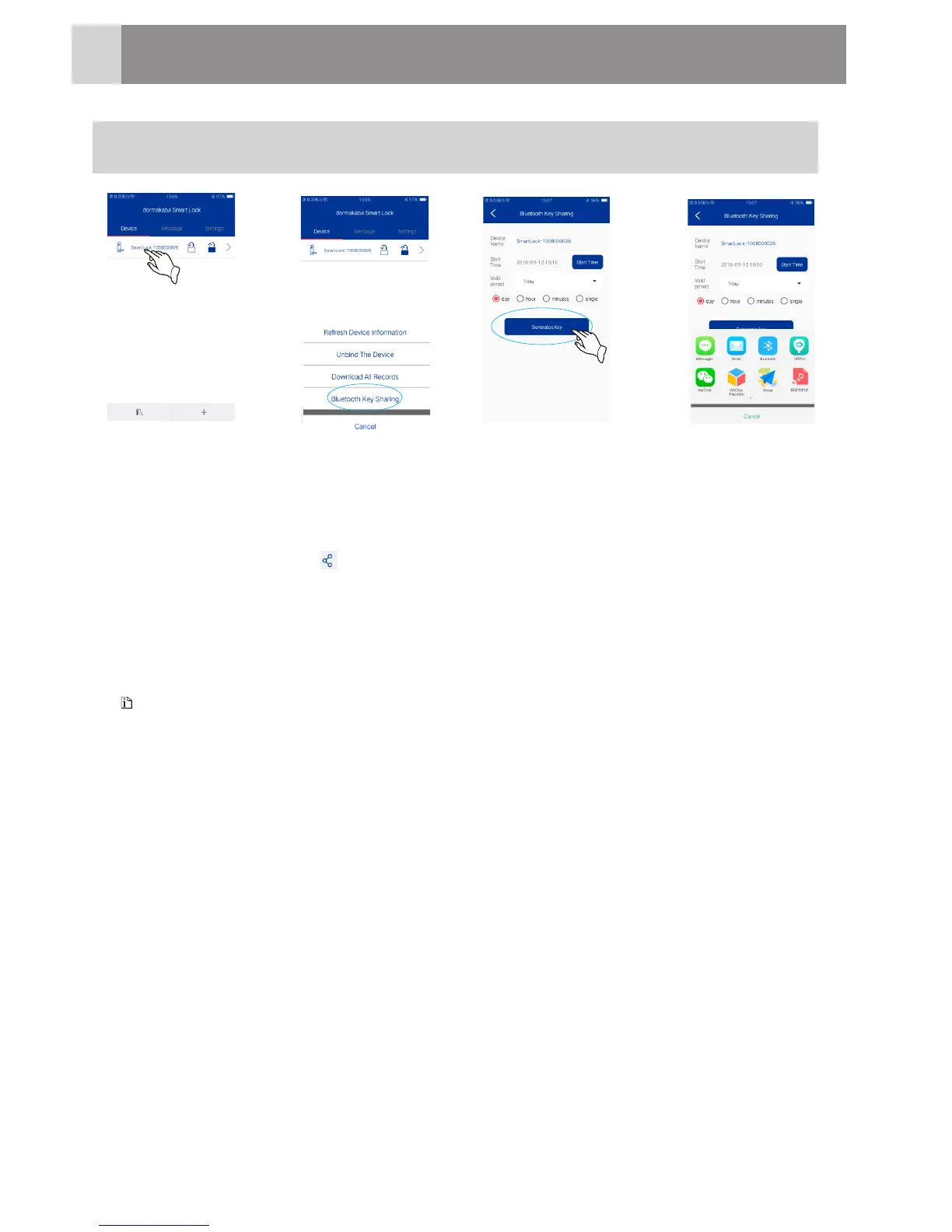
Bluetooth Key Sharing
Enter the device management interface, long press the connected device, pop
up a selection menu and click “Bluetooth key sharing”;
Choose the start date, time and valid period, and click “generates key”.
Click the sharing icon “ ”to share the new key to other users via email, Wechat,
QQ, etc. The receiver can input the key to open the door.
á
á
á
‚
ƒ
Only the administrator is equipped with “Bluetooth Key Sharing” on the management
interface.
When single valid term is selected, only 10 Bluetooth key can be shared,10+ keys can be
shared but the door cannot be opened.
The shared keys will be valid within 24 hours; if you select other time ranges, the
Bluetooth key sharing is not restricted.
Note
ƒ
‚
1
HowtoUse
19







 To Next Page