06-2023 dormakaba Canada Inc. RAC5 MFC Installation Guide – PK3738 | 23
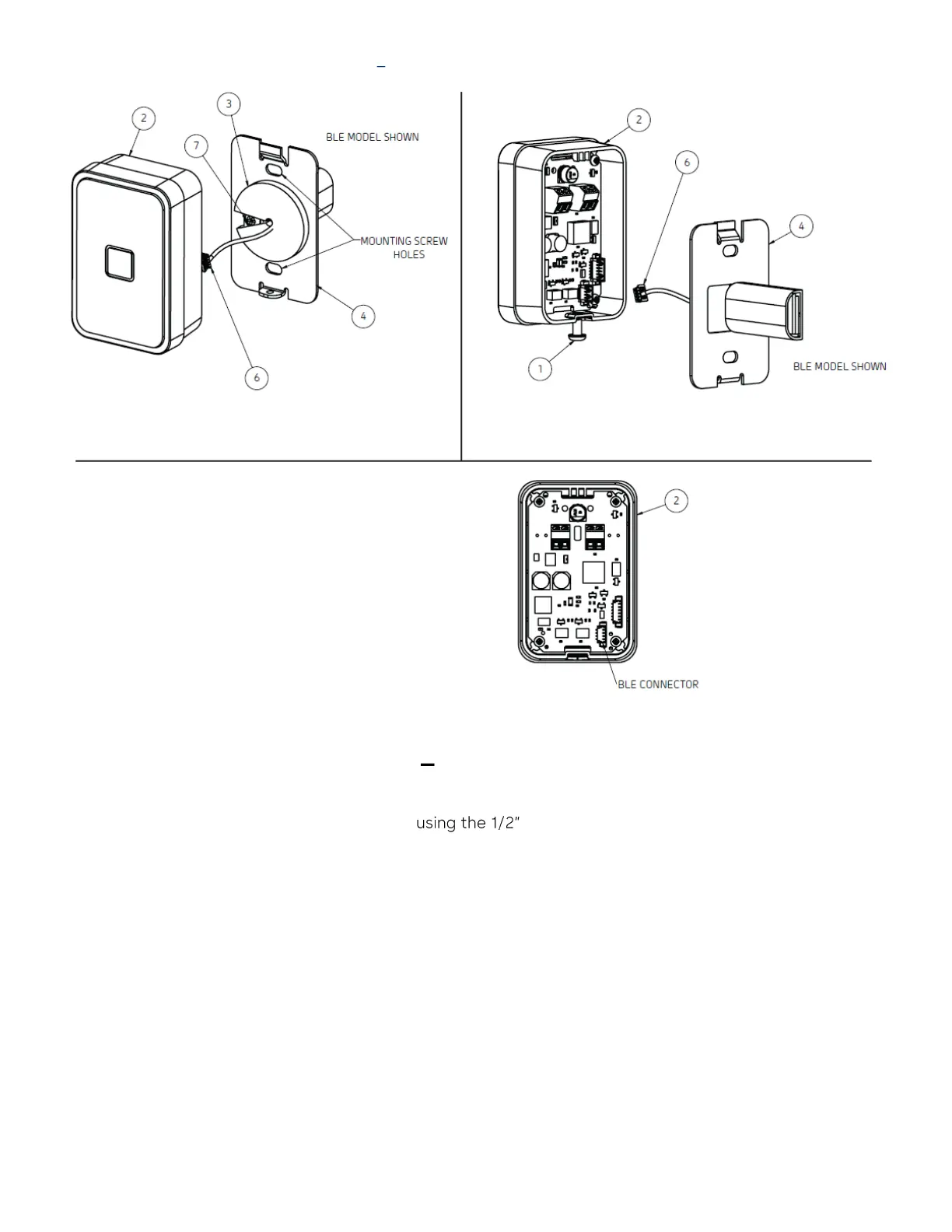
Figure 13 RFID Wall Reader (Surface Mount)
RFID Wall Reader Instructions Surface Mount
1. Pull cable(s) for RAC through hole in the back plate and, if applicable, through the gasket then screw the
mounting plate of the reader to the panel machine screws
2. Adhere the round gasket (in hardware bag) to the back plate (item #4) with the cutout located so the
gasket does not cover the screw (item #7) as shown in Figure 13 A, if not installed
3. Connect cables for RAC5 as per Annex E or F
4. Connect BLE cable to BLE connector (Figure 13 C)
5. Hook the top of the reader enclosure (item #2) onto the top of the mounting plate (item #4) and secure
together with the included screw (item #1), tightened at the bottom of the reader


 To Next Page