12 13
b. 10x magnification:
a top white light is switched on. A message “TOP WHITE” is appear-
ed on the screen.
■ the third pressing is caused a switching on of oblique white light.
A message “oblique white” is appeared on the screen.
■ the fourth pressing transfers the top white light source to the mode of
a variable color ink verifying. This mode is an alternate switching on of
either an oblique white light source or a top white light source. The bank -
note security mark printed in a variable color ink will alternately change
its color because of the difference in the light incidence angles on the
viewing table.
When you choose this OVI control mode, a type of illumination is also
depended on current magnification mode:
a. no magnification (1х):
a mixed light consisted of Top white light for variable ink control and
IR light is switched on. A message “Variable color” is appeared on
the screen for few seconds, then it will be replaced with a message
“Variable color + IR” which means a current type of illumination.
b. 10x magnification:
a top white light for variable ink control is switched on. A message
“Variable color” is appeared on the screen.
■ The fifth pressing switches off the white illumination and sets the IR illu-
mination mode. There is displayed the “White off” message for several
seconds. After the time has expired, there is a message about the cur-
rent illumination mode, i.e. “IR”.
■ Any further pressing results in switching over in the same way as at
the first pressing, the second one etc.
3. A function of IR key is also depended on current magnification mode:
a. when there is no magnification (1х)
it is switched between IR mode and IR Blink mode and displayed a
message (“IR” or “IR Blink” correspondingly) for several seconds. After
the time has expired, there is displayed a message about the current
illumination mode, i.e. “IR” or “IR Blink”. A banknote wideband illumina-
tion by IR light within a 800 nm – 1000 nm band takes place in IR mode.
UNIVERSAL COUNTERFEIT DETECTOR DORS 1300 UNIVERSAL COUNTERFEIT DETECTOR DORS 1300
In IR blink mode, periodical switching of the emission wavelength from
850 nm to 940 nm and vice-versa takes place to verify the IR blink
marks. If they are existed on a banknote (document), the image of the
IR blink mark is started to blink on the screen.
b. when there is 10x magnification
it is switched on IR light only. A message “IR” is appeared on the screen.
4. UV key
switching UV lamps on/off.
■ The first pressing switches on a combined illumination UV+IR.
“UV 365 nm” message is displayed for several seconds. After the time
has expired, a message about the current illumination mode is isplayed,
i.e. “UV+IR”.
■ Further pressing switches off the UV-illumination. The The IR
mode is on. The “UV off” message is displayed for several
seconds. After the time has expired, a message about the
current illumination mode is displayed, i.e. “IR”.
■ Any further pressing results in switching in the same way as at the first
pressing, at the second one etc.
The on-screen menu provides an access to the device functions and settings.
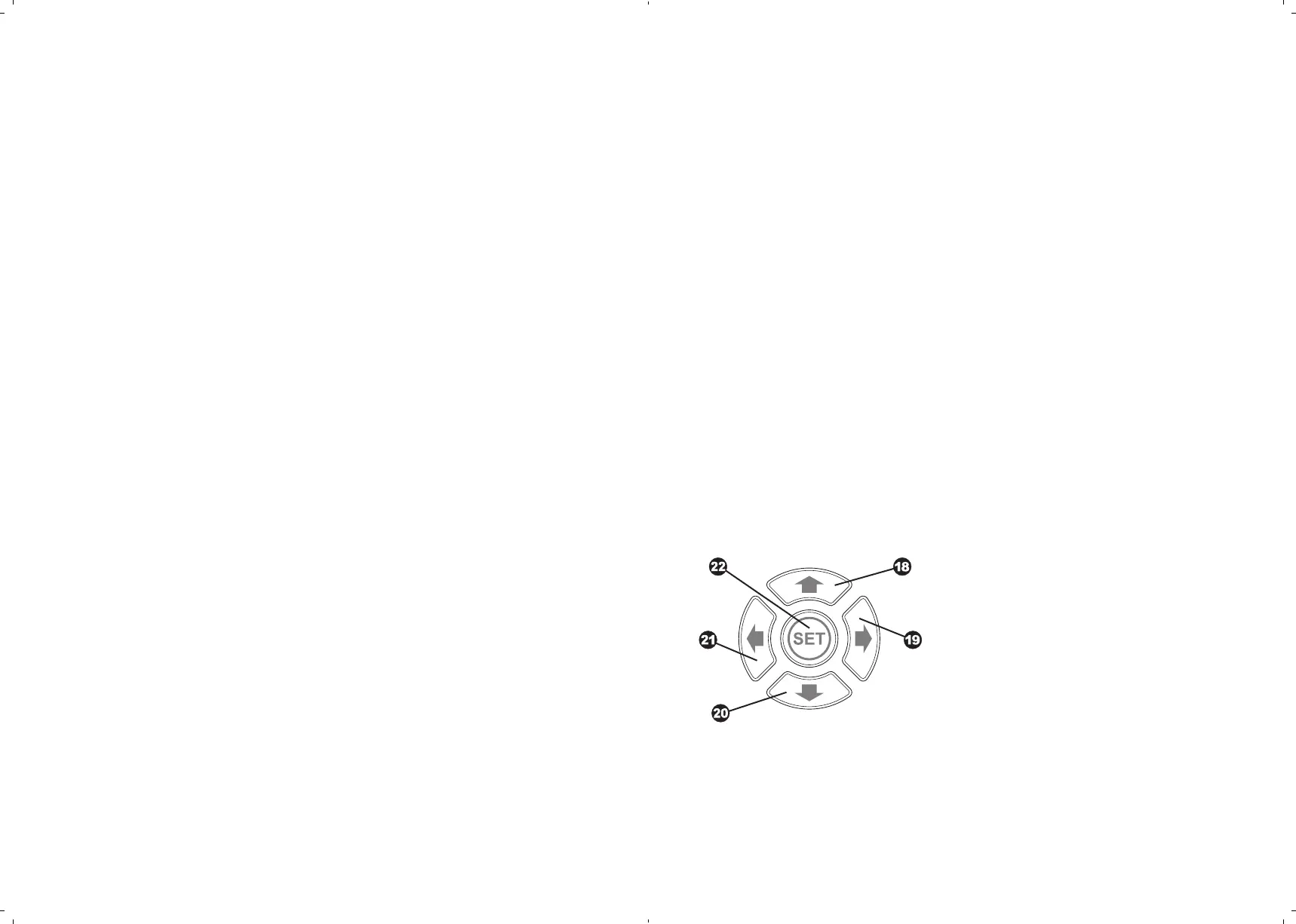
To control the on-screen menu, use a group of 5 keys
.
Fig. 3 shows the loca-
tion and the marking of these keys.
Key ↑ (Up)
Key → (Right)
Key ↓ (Down)
Key ←
(Left)
SET key
(Set)
Fig. 3. The on-screen menu control keys
Table 1 is explained the functions of the menu operation keys. After the device
has been switched on, the menu is disabled. To enter the menu, press SET
key . Then use the keys 18, 19, 20, 21 to select the required menu item. To
enter the selected menu item, press SET.
↑



 To Next Page