14 15
table 1. The functions of the on-screen menu control keys
Key pressing Functions
“SET”
In the disabled menu mode – enter the menu mode.
In the menu mode – selection of the end menu item.
In the mode of value change for the selected menu item
– exit from the menu item accompanied by saving of the
changed value.
and
In the menu mode – moving up/down through the menu
items.
In the mode of value change for the selected menu item –
change of the value (increase, decrease, moving through
the list).
In the menu mode:
- enter the menu item value change
- enter the lower submenu
In the mode of value change for the selected menu item
– no response
Lower submenu exit to the top submenu/ menu.
In the mode of value change for the selected menu item
– exit from the menu item without saving of the changed
value.
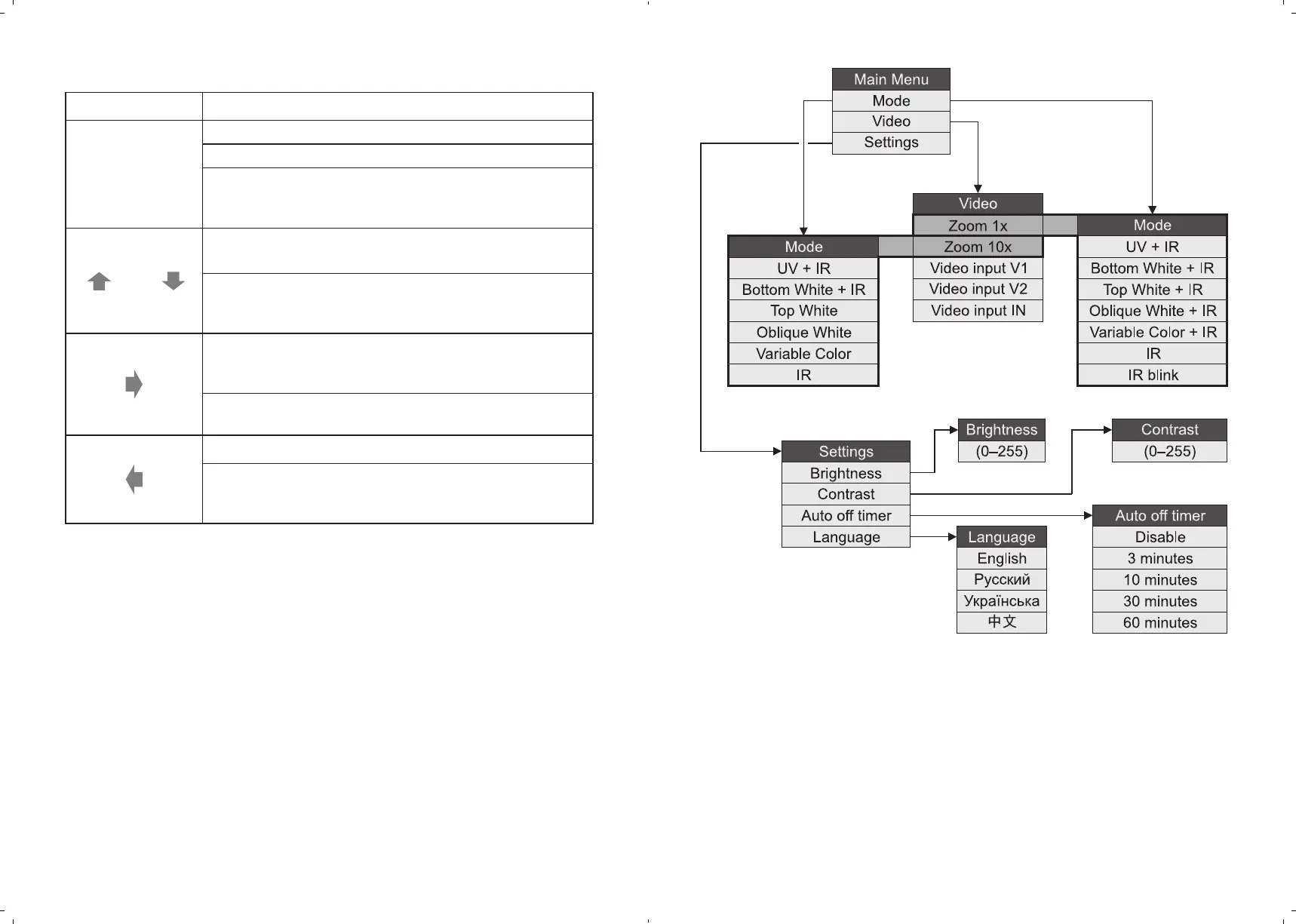
To set the required value for the menu item, use the keys ↑ and ↓. Press SET to
confirm the value you choose. Press ← to cancel the selected value or in case
of an error. Fig. 4 shows the menu structure.
UNIVERSAL COUNTERFEIT DETECTOR DORS 1300 UNIVERSAL COUNTERFEIT DETECTOR DORS 1300
Fig. 4. Structure of the DORS1300 menu



 To Next Page