2322
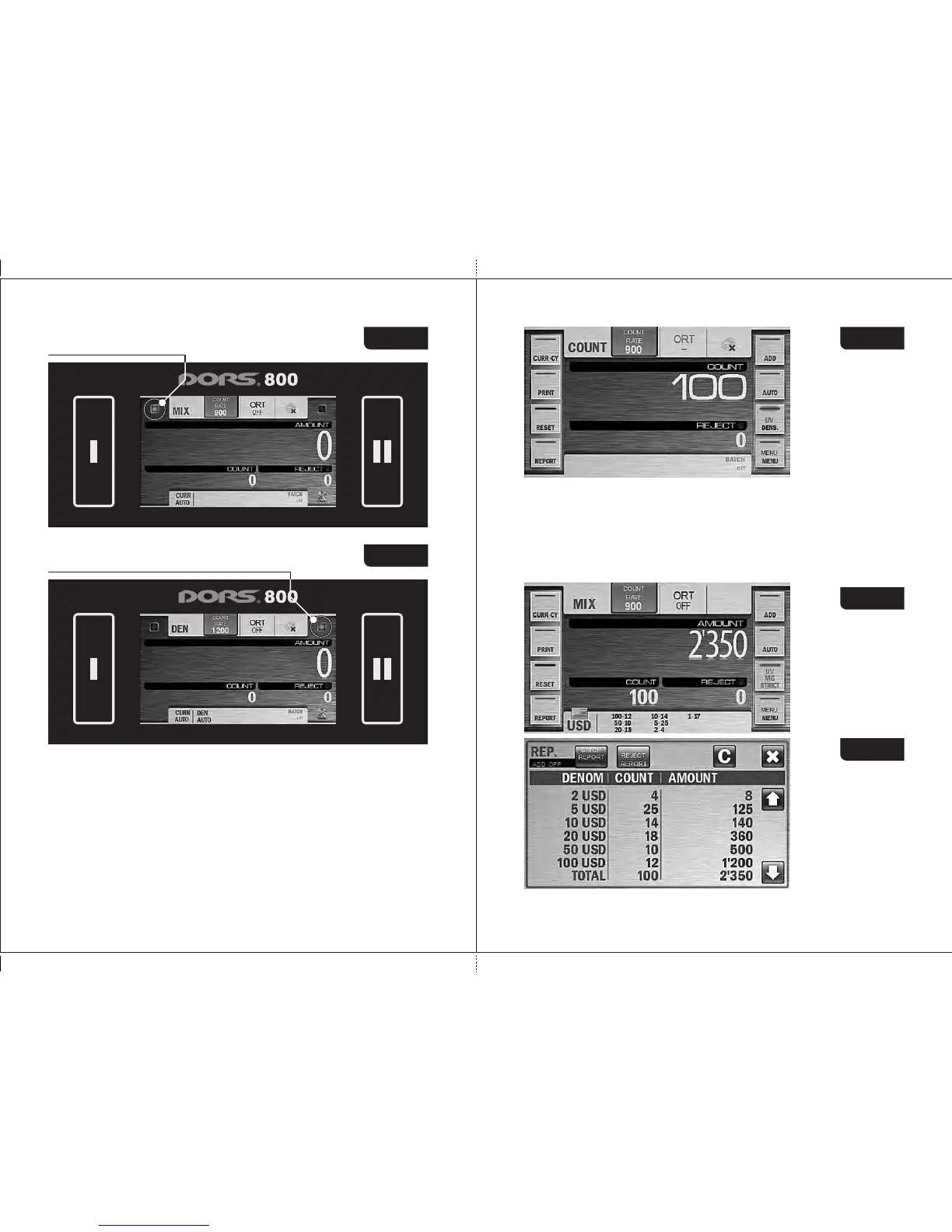
Green highlight User «II»
Figure 35
1.2 Keys «I» or «II» are used for the start of count in the manual start
mode. To start, press the button of the active user.
2 Key/indicator of the counting mode
The sorter is counted banknotes in three modes: «COUNT», «MIX»,
«DEN». A mode is selected by a repetitive pressing of the mode key. At the
same time this key is the indicator of the selected operation mode.
2.1 «COUNT» is a piece counting mode. The notes are counted without
recognition of their denominations and counterfeit detection, the display
is shown the number of the counted and rejected banknotes (see
Fig. 36).
DORS 800 BANKNOTE SORTERDORS 800 BANKNOTE SORTER
2.2 MIX is the counting mode for mixed denominations of certain currency
with their authentication, calculation of the total amount, the number of
counted banknotes and amounts of each denomination.
The display is shown the total amount of the counted banknotes, the
numbers of rejected and accepted banknotes (see Fig. 37). The
detailed report on each denomination's number and amount is
available by pressing the key «REPORT» (submenu «Batch Report»,
see Fig. 38). For more details on submenu «REPORT», see
subsection Operating Keys (Key «REPORT»).
Figure 37
Green highlight User «I»
Figure 34 Figure 36
Figure 38



 To Next Page