2524
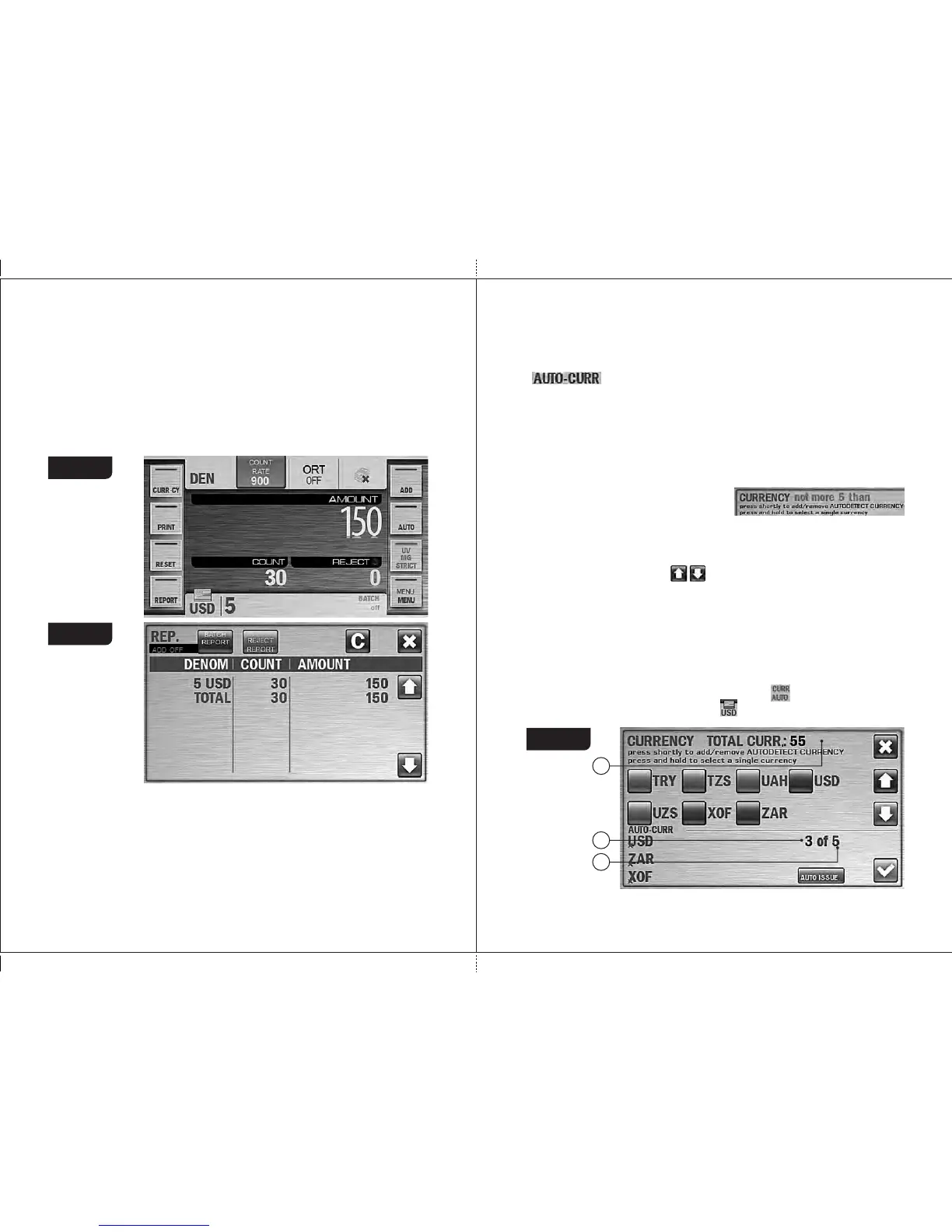
Figure 39
Figure 40
3 Key «CURRENCY»
3.1 By pressing the CURRENCY key, the CURRENCY submenu is
appeared (see Fig. 41), and a user can choose the currency to be
counted and denomination. (The set of supported currencies is
depended on the software version.) Currency selection is available only
for modes «MIX» and «DEN», denomination selection is available only
for mode «DEN».
By default, the automatic mode of currency recognition is activated; it
DORS 800 BANKNOTE SORTERDORS 800 BANKNOTE SORTER
2.3 «DEN» is the counting mode for the certain denomination of banknotes
with their authentication, calculation of the total amount and the number
of counted banknotes, and the recognition of denomination's issue. The
denomination and its issue are recognized by the first banknotes in the
batch. It's possible to choose the denomination manually (see
submenu «CURRENCY»).
The display is shown the total amount of counted banknotes, the
numbers of rejected and accepted banknotes (see Fig. 39).
The detailed report on number and amount of counted notes for each
denomination is available by pressing the «REPORT» key (see Fig.
40, submenu «SUM Report»).
means that the currency is recognized by the first banknote in the batch
(see Fig. 42).
In the bottom left corner of the screen there is a list of auto currencies
( ), i.e. those currencies that can be recognized automatically (if
more than one currency is chosen).
The letters on the Fig. 41 have the following meanings:
A: Number of auto currencies chosen by user. In order to delete any of those
currency, just push its name in the list of auto currencies.
B: Number of all available auto currencies (it's depended on a software
version). If a user tries to exceed this
number, the blinking message on
unavailability is appeared on a screen
C: Total number of currencies stored in sorter's non-volatile memory (it's
depended on a software version). In the middle of a screen there is a list of
currencies. If the number of currencies in this list (C) is more than 8, you can
slide this list using buttons .
In order to add any currency to Auto currencies list (A), tick a box left of a
currency name (or click a currency name). A color of a box is changed from
grey to blue to confirm your choice.
Repetitive click deletes a currency from the Auto currencies list.
When you press and hold (at least 1 second) a currency name, it chooses
the currency as a single one.
NOTE: if the only currency is chosen, its name is appeared at the top of a
screen (see Fig. 42); also at the main screen a sign is replaced with a name
of chosen currency (at Fig. 43 it's USD - ).
С
А
В
Figure 41


 To Next Page