2726
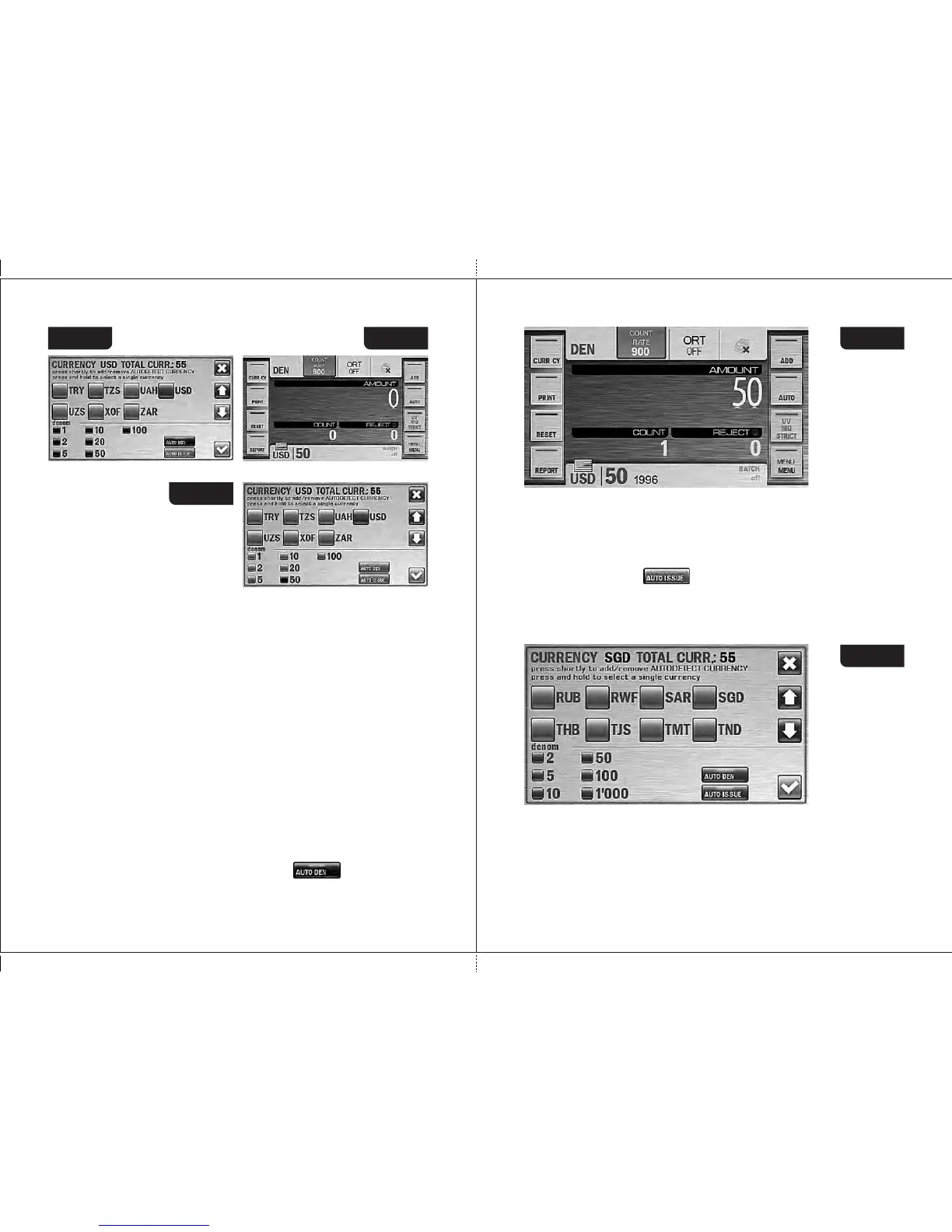
Figure 42 Figure 43
3.2 In the «DEN» mode it is possible to count banknotes of the selected
currency with a manually chosen denomination value. Choose a single
currency, and the list of Auto Currencies at bottom left corner of the
screen will be replaced with a list of all denominations of selected
currency (see Fig. 42). By default the «auto denomination» mode is
activated, i. e. a denomination is detected by the first note in the batch;
in this case the check-boxes at the left of denominations are highlighted
in blue. If it's required that the banknotes of the certain denomination get
into the stacker, press the the required denomination; in this case, the
check-box at the left of selected value become blue while the other
check-boxes become grey (see Fig. 44). For the user’s convenienc e ,
the selected value of denomination in mode «DEN» is shown on the
main screen at the right of the selected currency (see Fig. 43). To return
to automatic denomination mode, press the key at the right of
the denominations list (see Fig. 42).
DORS 800 BANKNOTE SORTERDORS 800 BANKNOTE SORTER
Figure 45
Figure 44
3.3 The DEN mode has the option of banknote sorting by a year of their
issue (a year when they were put in circulation).
When you activate this option, the sorter will accept only the banknotes
of the same currency, denomination, and year of issue as the first note
of a batch. All other banknotes will be rejected.
Touch a button to activate this option (a button will be
highlighted in blue).
The year of issue of the counted banknotes will be indicated in a main
screen of DEN mode at the right of denomination's value (see Fig 45).
3.4. Singular currency.
Depending on a currency set of your sorter, it can handle so-called
singular currencies.
A singular currency is one whose properties are sensibly different from
other currencies that makes impossible to recognize it automatically
along with other currencies.
Figure 46



 To Next Page