2928
DORS 800 BANKNOTE SORTERDORS 800 BANKNOTE SORTER
5 Key «RESET»
Key is used to clear the counting results of the stacker after it has been
emptied (the reject pocket shall also be empty). To avoid an accidental data
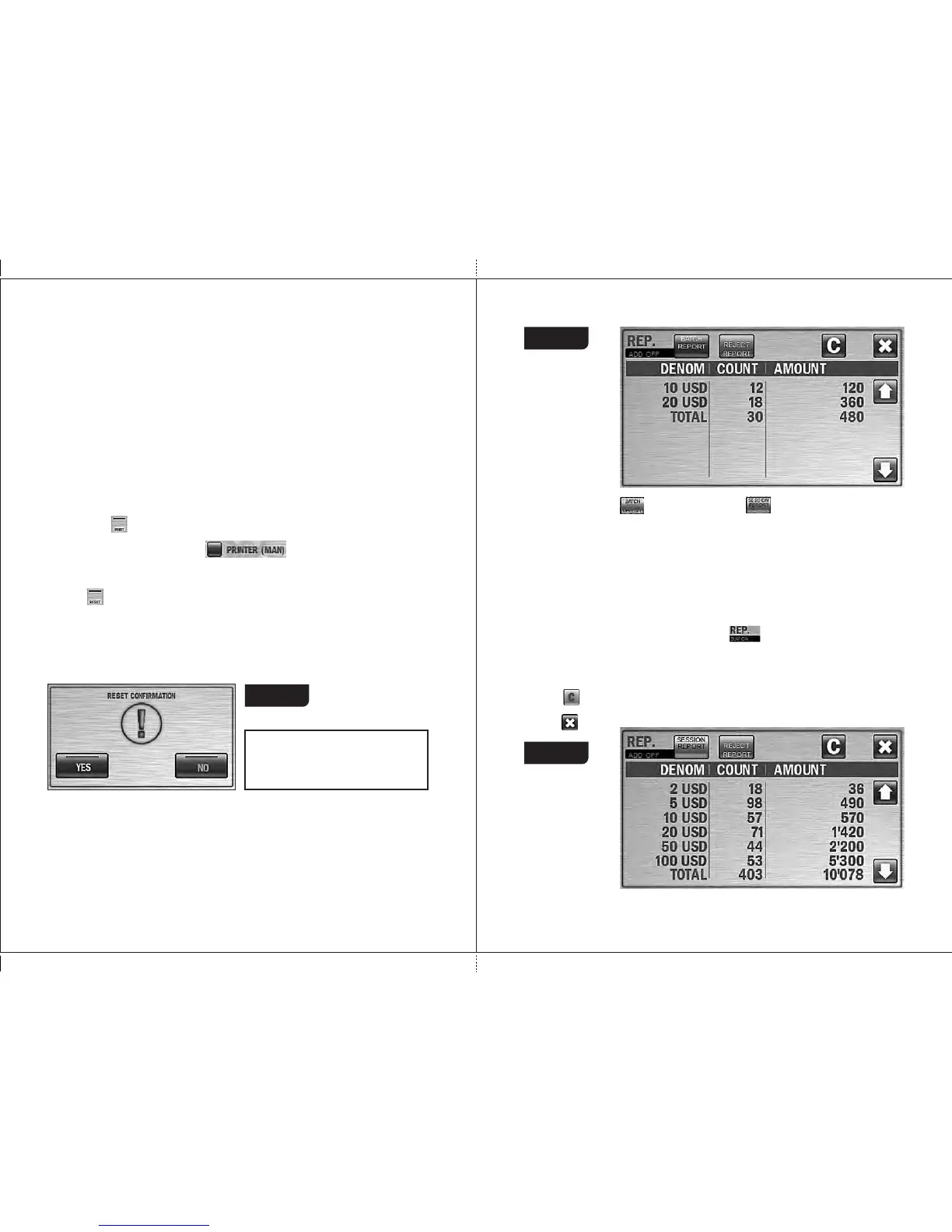
reset, confirmation is required. (see Fig. 47).
A long pressing (about two seconds) on the center of main menu is cleared
the results without confirmation (the function is the most useful for the
extended visual mode).
If a singular currency is chosen, it's impossible to add any other
currency to Auto Currencies list.
To cancel a choice of a singular currency, just choose any other
currency.
In currencies list a singular currency is marked by different color (see
Fig. 46 where it marked by yellow).
A symbol of selected currency (or AUTO mode symbol) is at the bottom
left corner of a main screen (see Fig. 37 and Fig. 43). This symbol is
also a hot key to get access to CURRENCY submenu (it's useful, for
example, when an extended visual mode is activated).
In the MI X mode , rig h t of a currency symbol there is a list of
denominations of this currency with numbers of counted notes where
counted denominations are bold (see Fig. 37).
4 PRINT key
The key ( ) makes printed the results of counting, under conditions that
a relevant printer is connected to the sorter
and a manual printing mode ( ) is activated (refer to p. 18,
Fig. 21).
Attention!
An option of reset confirmation
can be disable in your sorter.
Figure 47
6 Key «REPORT»
By pressing the «REPORT» key, the REPORT submenu is appeared (see
Fig. 48), it makes you to look through the information on the counted and
rejected banknotes.
Figure 48
The report on the counted banknotes is available in two versions:
– Batch report ; – Session report .
For both versions, there are the columns of «denomination»,
«count», «amount».
Denomination is the column where all denominations of counted
banknotes are listed
Count is the list of banknotes number for all listed denominations.
Amount is the total amounts for all denominations.
Total is the total number and the total amount of all counted banknotes.
The batch report (see Fig. 48) shows all the counted banknotes that got
into the stacker during the last counting.
If the accumulation mode (ADD) is on , the batch report will include
the total amount of the banknotes counted in this mode.
The session report (see Fig. 49) is listed all the banknotes counted since
the moment the sorter's switched on (see article 2 of subsection
Operation).
The key is used to clear the reports. To avoid an accidental clearing of
the results, confirmation is required (see Fig. 47).
Key is used for exit from the submenu.
Figure 49



 To Next Page