31
30
DORS 800 BANKNOTE SORTERDORS 800 BANKNOTE SORTER
A report on the rejected banknotes is available in two versions:
– reject pocket report (Blue ; highlight)
– Advanced reject pocket report ( .Green highlight)
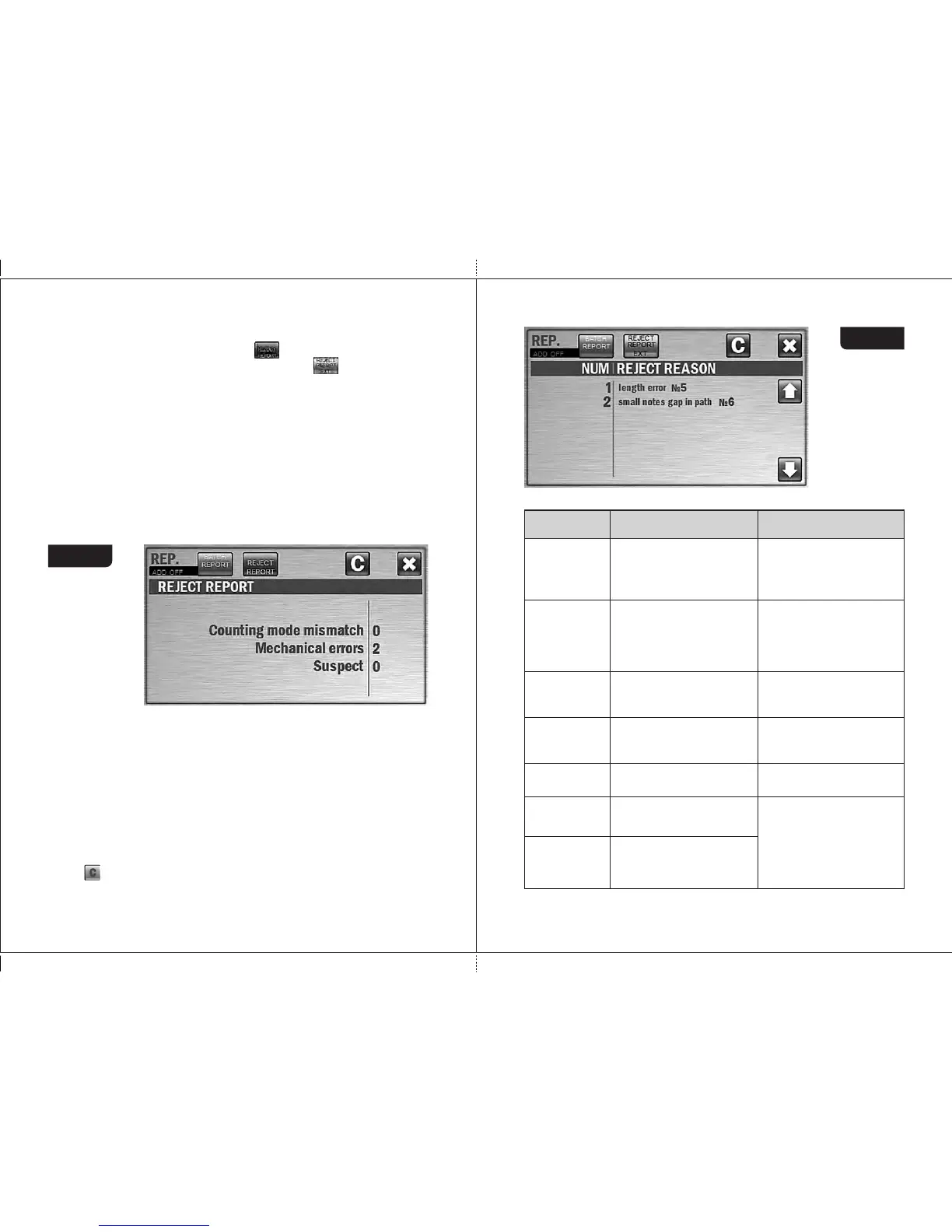
The reject pocket report (see Fig. 50) is contained possible reasons of
rejection and the number of banknotes rejected due to each of these
reasons.
«Counting mode mismatch» means banknotes do not correspond to the
selected settings and the operation modes (for example, a mix of various
denominations is counted in the DEN mode or user tried to count different
currencies in one batch).
«Mechanical errors» means a banknote skew in the path which prevents
their correct recognition.
«Suspect banknotes» means banknotes do not correspond to the key
features of the specified currency.
Figure 50
The advanced reject pocket report (see Fig. 51) is contained more exact
reason of rejection for each rejected note.
The number (NO) means the number of the banknote in the reject
pocket (in some cases like «double» error, the number in the list can be
different from a note's number in a real batch).
The REJECT REASON column is included the reason of rejection and the
sequence number of each rejected note in the counted batch (in the
brackets).The complete list of reject reasons is given in Table 1.
The key is used to clear the reports. To avoid an accidental clearing of
the results, confirmation is required (see Fig. 49).
Figure 51
Table 1
Rejection
reason
Description
Teller's actions
Unknown
note
Banknote does not match the
main currency features,
currency and denomination
cannot be recognized.
Remove the banknote and
recount it. In case of repeated
rejection, verify the authenticity of
the banknote using currency
reference book and
multifunctional detector like DORS
1250 or DORS 1300.
Currency (X Y)
where
X – currency,
Y – denom.
In MIX or DEN modes the
currency of banknote does not
match the specified one.
Remove the banknote.
Remove the banknote.
denom (X Y)
where
X – currency,
Y – denom.
In DEN mode the
denomination of banknote
does not match the specified
one.
Orientation
Banknote orientation does not
match the specified one.
Place the banknote into the
hopper according to the
specified orientation.
Continuous chain in path
(short side of note is too long
or the gap between two notes
is too short).
Remove the banknotes that
got stuck together. Adjust the
feeder gap («-» means gap
decrease) for operation with
the thinner banknotes. To get
the required gap, turn screw 1
(Figure 1) clockwise.
Suspect
note
Currency and denomination
are detected, but authenticity
is suspected.
Remove the banknote and recount
it. In case of repeated rejection,
verify the authenticity of the
banknote using currency reference
book and multifunctional detector
like DORS 1250 or DORS 1300.
Small gap
in path
Small gap
in feeder
Continuous chain between
separating and feeding rollers
(short side of note is too long
or the gap between two notes
is too short).


 To Next Page