DORS 800 BANKNOTE SORTERDORS 800 BANKNOTE SORTER
35
34
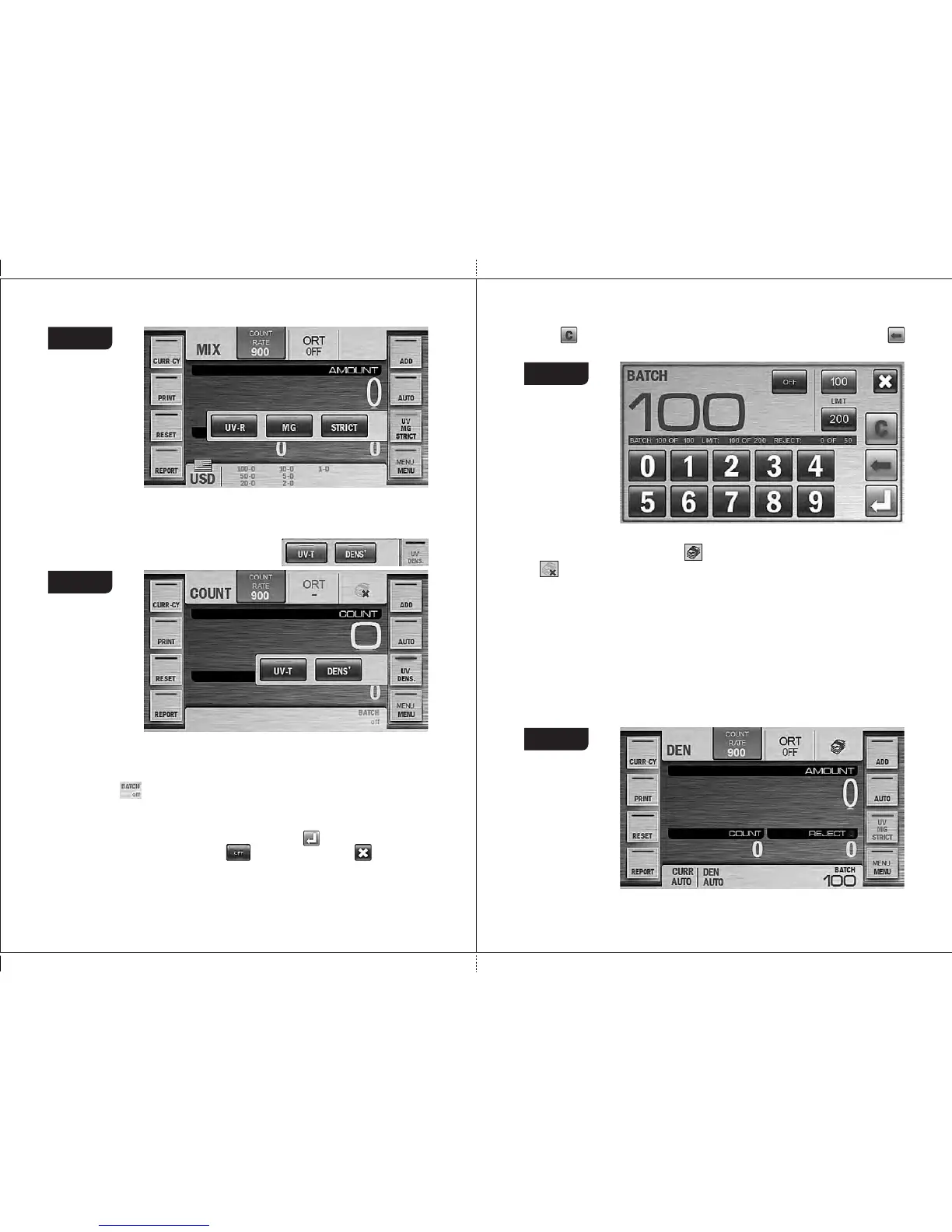
In COUNT mode this key calls a pop-up menu (ahead of a main screen)
where you can turn on/off such kinds of detection as UV-T, DENSITY (see Fig.
53). An activated kind of detection is highlighted by blue color (see Fig. 53), an
disactivated one becomes grey:
Note: a text on the key DETECTION is highlighted depending on chosen
kind of detection.
Figure 52
Figure 53
10 Key «BATCH»
Press the key to call the BATCH submenu that is available for
modes «DEN» and «COUNT» (and unavailable in «MIX»mode) (see Fig.
54) which provides possibility to select the batch size and the stacker limit.
You can enter BATCH mode by pressing the key (for the batch size >0)
and disabled by pressing the key . By pressing the key you cancel
the unsaved changes and exit to the main menu. The batch size is set with
the numerical keys. Any batch size since 1 until 999 is available.
Key is used to clear the current batch size. Single pressing of the key
deletes the digit from the right to the left.
The fast access key to BATCH mode is available on the main screen in the
top right corner (see Fig. 55). means that batch mode is on.
means that batch mode is off.
The batch size is indicated on the main screen in the bottom right corner
(see Fig. 55). Once the batch size is reached, the indicator is started to
blink, and in 10 seconds message «BATCH IS READY» is appeared on the
screen. If the number of the banknotes in the stacker is less than the batch
size, the message is: «add X», where X is the number of banknotes
required to complete the batch of the selected size, in 10 seconds message
«ADD BANKNOTES» is appeared on the screen.
Note : The batch size indicator is also the hot key for a quick access to the
«BATCH» submenu.
Figure 54
Figure 55



 To Next Page