DR
®
TRIMMER/MOWER
™
Assembly & Operating Instructions 20
To Adjust the Belt Tension through the Trimmer Control
Cable
If the trimmer head stops spinning when the bail bar is engaged and the machine is operating
under a heavy load, the belt may be too loose and the trimmer control cable may need to be
adjusted to put more tension on it. The adjuster is located on the right handlebar, just above the
throttle control lever.
Before making any adjustments to the trimmer control cable, check that the belt is mounted on
the correct side of the idler pulleys (see page 18, Figure 25), and is not frayed, worn or stretched.
Tools Needed:
• (2) 1/2" open-end or adjustable wrenches
WARNING! Before performing any maintenance procedure, the engine should be stopped
and the spark plug wire disconnected.
To increase tension on the belt:
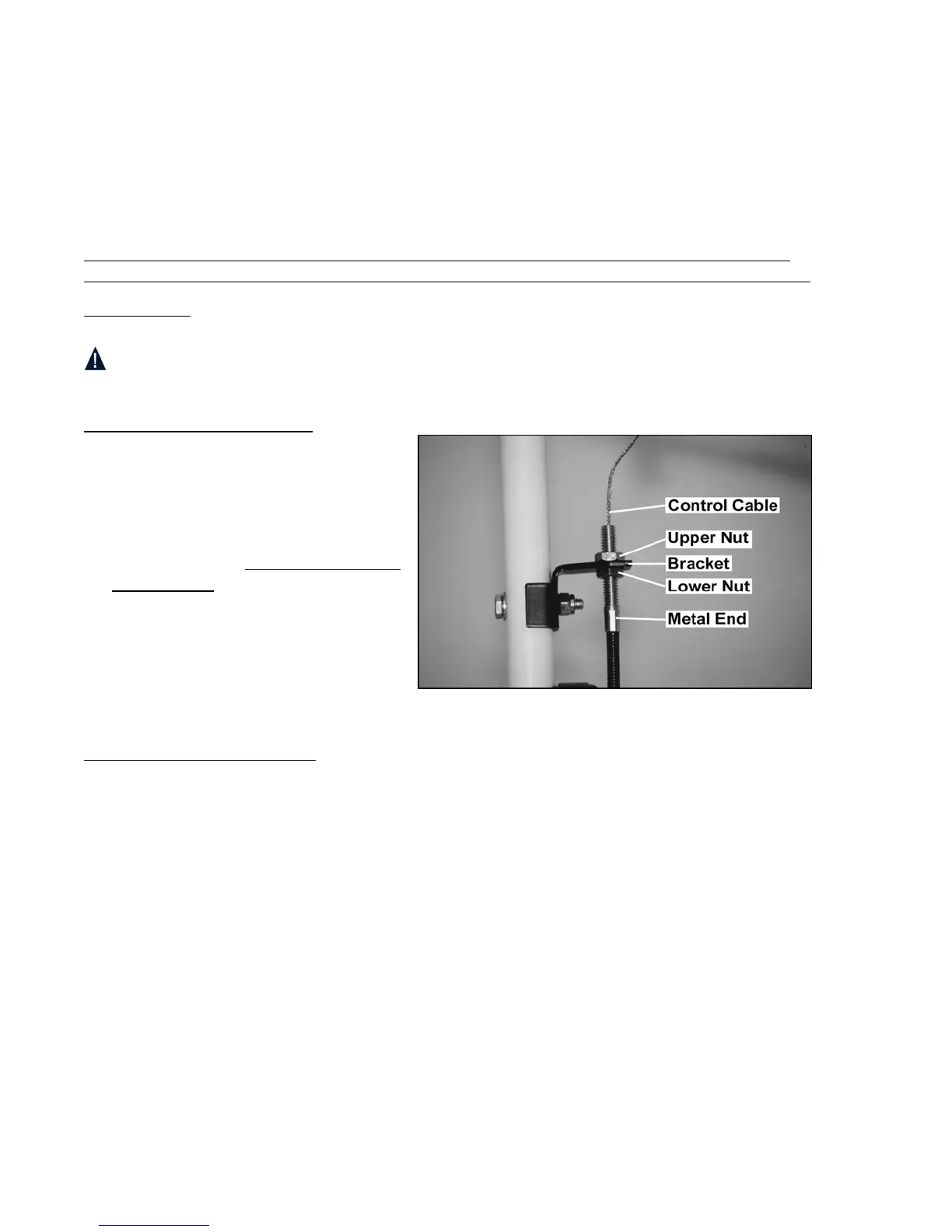
1. Loosen the upper control cable
adjustment nut, leaving about 1/8" of
space between the nut and bracket
(Figure 31).
2. Gently grip the metal end of the black
cable with pliers, making sure you DO
NOT crimp it. At the same time,
tighten the lower nut until it is flush
and snug against the bracket (Figure
31).
If the trimmer head keeps spinning after
the bail bar is released the belt may be too
tight.
To decrease tension on the belt:
Repeat the above steps, except this time loosen the lower nut, then tighten the upper nut.
Figure 31





 To Next Page