EasyManua.ls Logo

Dräger 8000 NC - Page 30

Dräger 8000 NC
54 pages
Print Icon
To Next Page IconTo Next Page
To Previous Page IconTo Previous Page
Loading...
Operation
Controlling
humidity
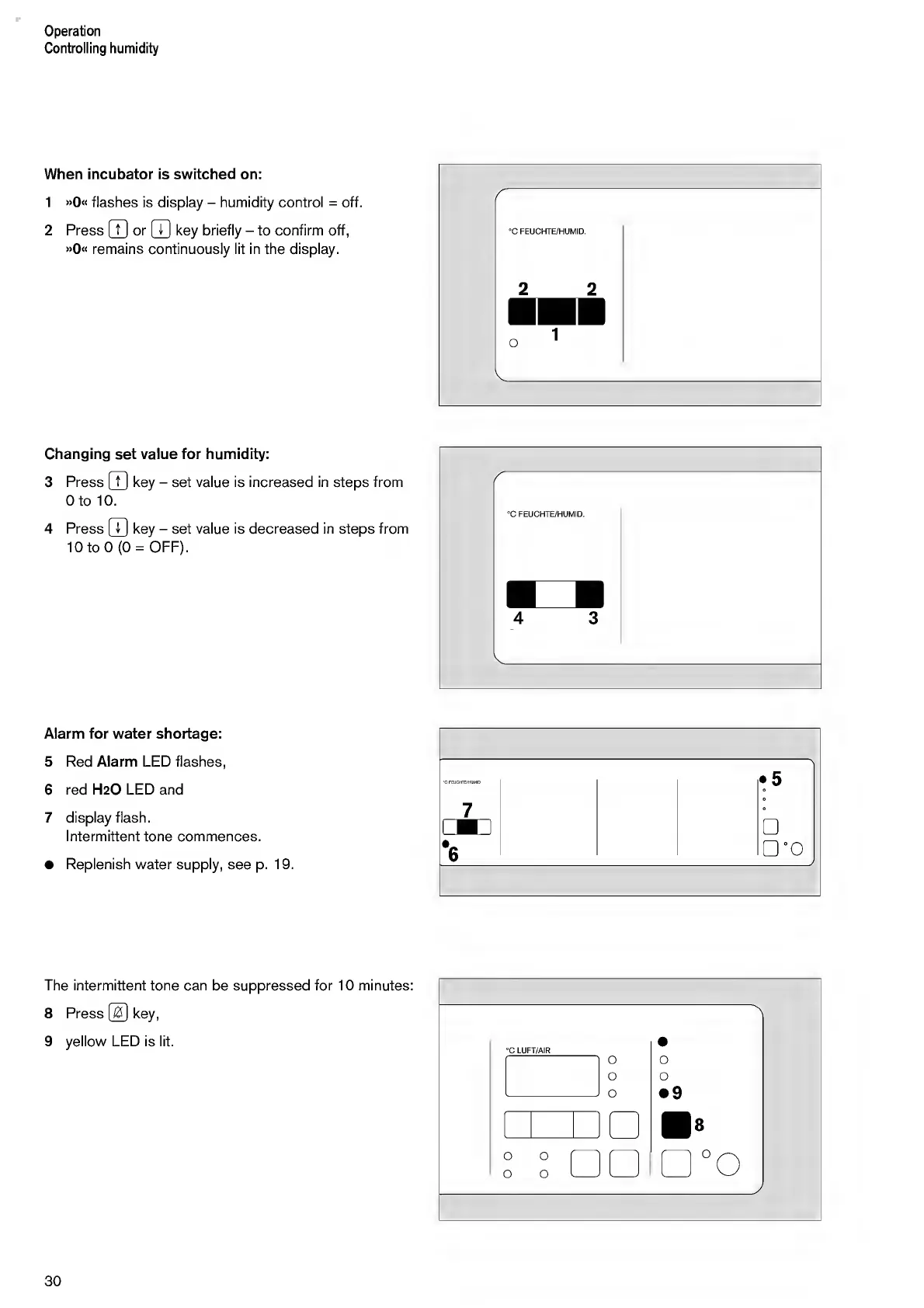
When
incubator
is
switched
on:
1
»
0
<<
flashes
is
display
-
humidity
control
=
off.
2
Press
[
7
]
or
[XI
key
briefly
-
to
confirm
off,
»
0
«
remains
continuously
lit
in
the
display.
r
°C
FEUCHTE/HUMID.
2
2
Changing
set
value
for
humidity:
3
Press
(
7
]
key
-
set
value
is
increased
in
steps
from
0
to
10.
4
Press
|T]
key
-
set
value
is
decreased
in
steps
from
10
to
0(0
=
OFF).
Alarm
for
water
shortage:
5
Red
Alarm
LED
flashes,
6
red
H
2
O
LED
and
7
display
flash.
Intermittent
tone
commences.
Replenish
water
supply,
see
p.
19.
The
intermittent
tone
can
be
suppressed
for
10
minutes:
8
Press
@
key,
9
yellow
LED
is
lit.
30

Other manuals for Dräger 8000 NC

Related product manuals