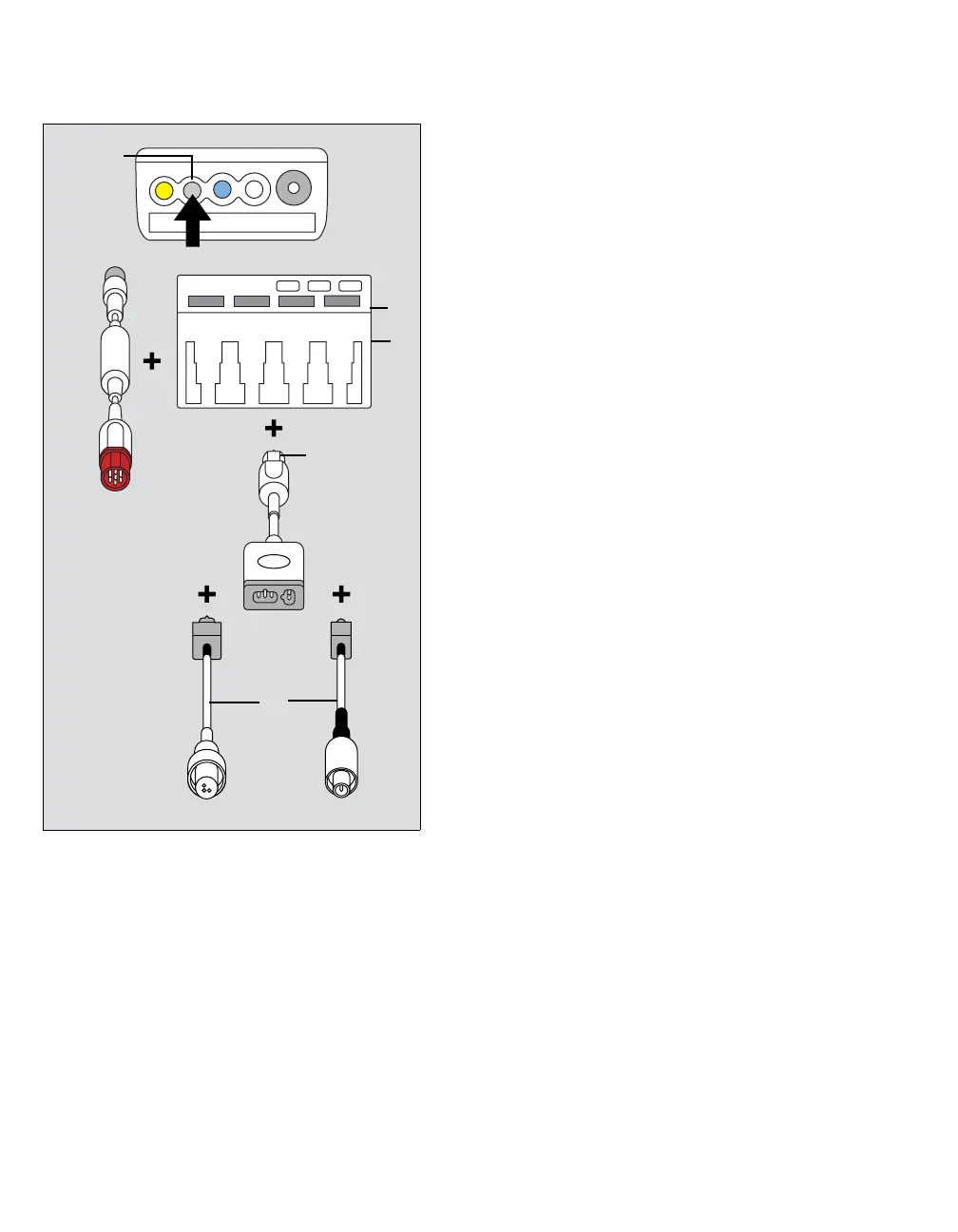
Cardiac output (C.O.)
324 Instructions for use – Infinity Acute Care System – Monitoring Applications VG6.n
A M540 hemodynamic port
B Gray connector of the hemodynamic cable
C Red connector of the hemodynamic cable
D Hemodynamic pod port
E Cardiac output port
F Pod connector of the cardiac-output
intermediate cable
G Thermistor port of the cardiac-output
intermediate cable
H Thermistor cables
To connect the cardiac output hardware using
the Hemo4 and the Hemo2 pod
1 Connect the gray connector of the
hemodynamic cable (B) to the gray
hemodynamic port (A) of the M540.
2 Connect red connector of the hemodynamic
cable (C) to the Hemo4/Hemo2 pod port (D).
3 Connect the pod connector of the cardiac-
output intermediate cable (F) to the cardiac
output port of the Hemo4/Hemo2 pod (E).
4 Connect the catheter and the thermistor cables
(H) to the thermistor port of the cardiac-output
intermediate cable connector (G).
346












 To Next Page