Vigor2910 Series User’s Guide
7
1
1
.
.
2
2
.
.
6
6
F
F
o
o
r
r
V
V
i
i
g
g
o
o
r
r
2
2
9
9
1
1
0
0
V
V
G
G
i
i
L
L
E
E
D
D
E
E
x
x
p
p
l
l
a
a
n
n
a
a
t
t
i
i
o
o
n
n
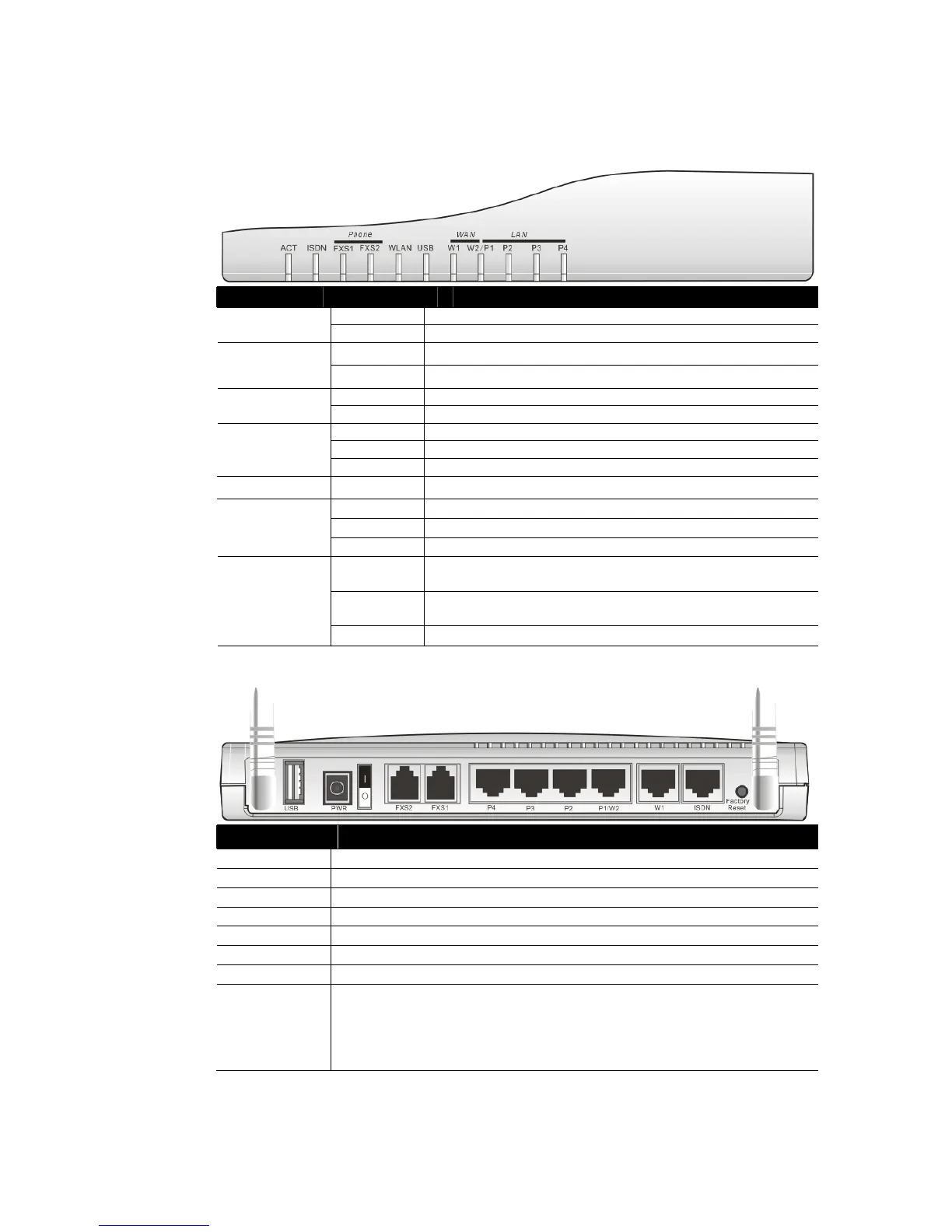
LED Status Explanation
Blinking The router is powered on and running properly. ACT (Activity)
Off The router is powered off.
On
The ISDN network is correctly setup.
ISDN
Blinking
A successful connection on the ISDN BRI B1/B2 channel.
On The phone is off hook (the handset of phone is hanging). FXS1/FXS2
Blinking A phone call is incoming or on-line.
On Wireless access point is ready.
Blinking Wireless traffic goes through.
WLAN
Off Wireless access point is turned off.
USB * On The USB interface printer or 3G USB modem is ready.
Orange A normal 10Mbps WAN link is ready.
Green A normal 100Mbps WAN link is ready.
WAN(W1-W2)
Blinking Ethernet packets are transmitting.
Orange A normal 10Mbps connection is through its corresponding
port.
Green A normal 100Mbps connection is through its corresponding
port.
LAN (P1, P2,
P3, P4)
Blinking Ethernet packets are transmitting.
C
C
o
o
n
n
n
n
e
e
c
c
t
t
o
o
r
r
E
E
x
x
p
p
l
l
a
a
n
n
a
a
t
t
i
i
o
o
n
n
Interface Description
USB* Connecter for a USB printer or 3G USB modem.
PWR
Connecter for a power adapter with 12-15VDC.
ON/OFF
Power Switch.
FXS2 & FXS1
Connecters for telephone set and analog phone with VoIP communication.
LAN P4 – P1 Connecters for local networked devices.
W2/W1 Connecter for accessing Internet with the ADSL,ADSL2/2+ line
ISDN Connecter for NT1 (or NT1+) box provided by ISDN service provider.
Factory Reset Restore the default settings.
Usage: Turn on the router (ACT LED is blinking). Press the hole and keep for
more than 5 seconds. When you see the ACT LED begins to blink rapidly than
usual, release the button. Then the router will restart with the factory default
configuration.
Note: For the USB port can be used to connect 3G USB modem or USB printer, therefore
the original name (printer) is changed into USB in the future.



 To Next Page