Vigor2910 Series User’s Guide
105
3
3
.
.
8
8
.
.
6
6
L
L
A
A
N
N
t
t
o
o
L
L
A
A
N
N
Here you can manage LAN-to-LAN connections by maintaining a table of connection
profiles. You may set parameters including specified connection direction (dial-in or
dial-out), connection peer ID, connection type (ISDN connection, VPN connection -
including PPTP, IPSec Tunnel, and L2TP by itself or over IPSec) and corresponding security
methods, etc.
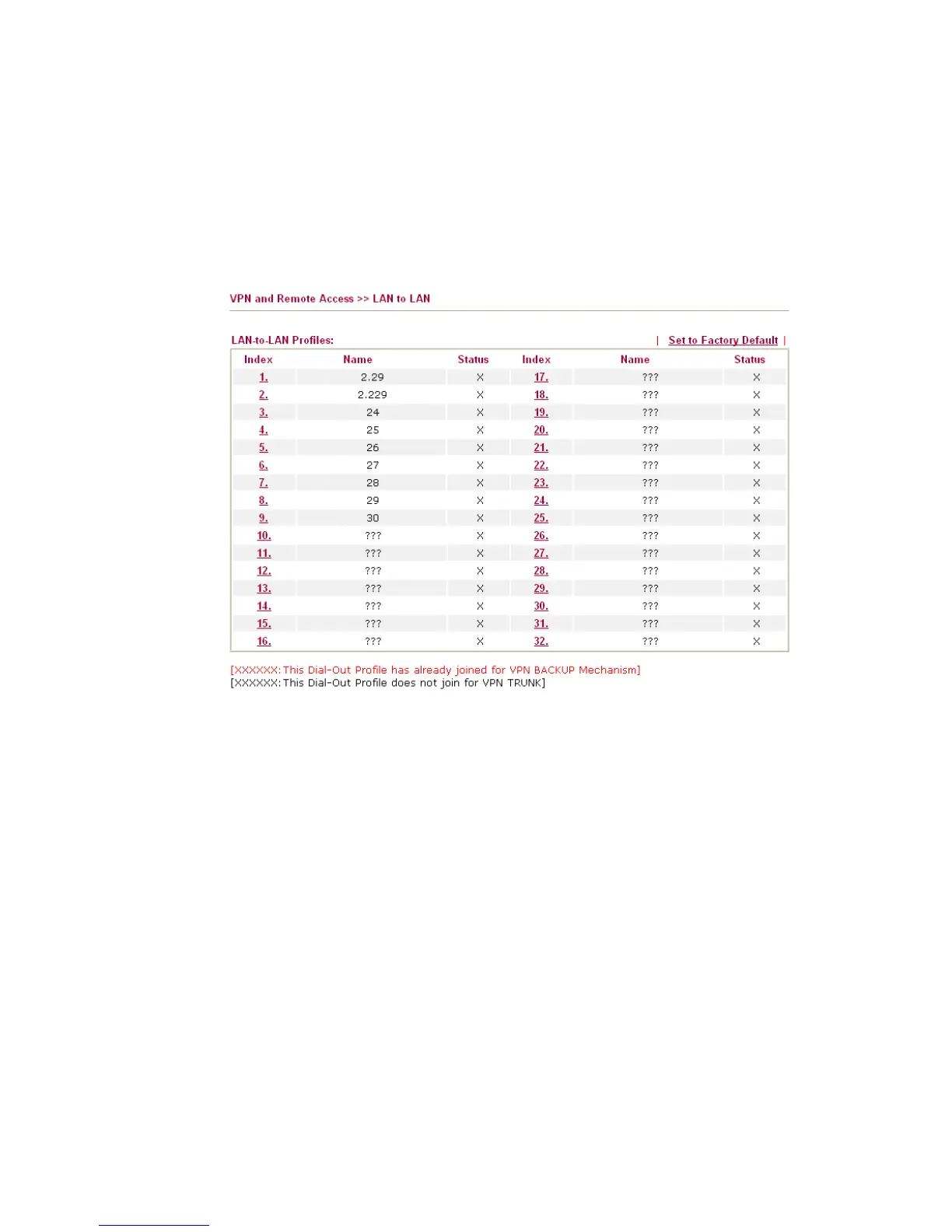
The router provides up to 32 profiles, which also means supporting 32 VPN tunnels
simultaneously. The following figure shows the summary table.
Set to Factory Default
Click to clear all indexes.
Name
Indicate the name of the LAN-to-LAN profile. The
symbol ??? represents that the profile is empty.
Status
Indicate the status of individual profiles. The symbol
V and X represent the profile to be active and
inactive, respectively.
LAN-to-LAN profiles are suitable for dial-out usage. If the profile name displayed in red, it
means that the profile has been grouped into VPN TRUNK. If the profile name displayed in
black, it means that profile is not grouped into VPN TRUNK and can be invoked
individually.



 To Next Page