Vigor2910 Series User’s Guide
57
3
3
.
.
4
4
O
O
b
b
j
j
e
e
c
c
t
t
s
s
a
a
n
n
d
d
G
G
r
r
o
o
u
u
p
p
s
s
For IPs in a range and service ports in a limited range usually will be applied in configuring
router’s settings, therefore we can define them with objects and bind them with groups for
using conveniently. Later, we can select that object/group that can apply it. For example, all
the IPs in the same department can be defined with an IP object (a range of IP address).
3
3
.
.
4
4
.
.
1
1
I
I
P
P
O
O
b
b
j
j
e
e
c
c
t
t
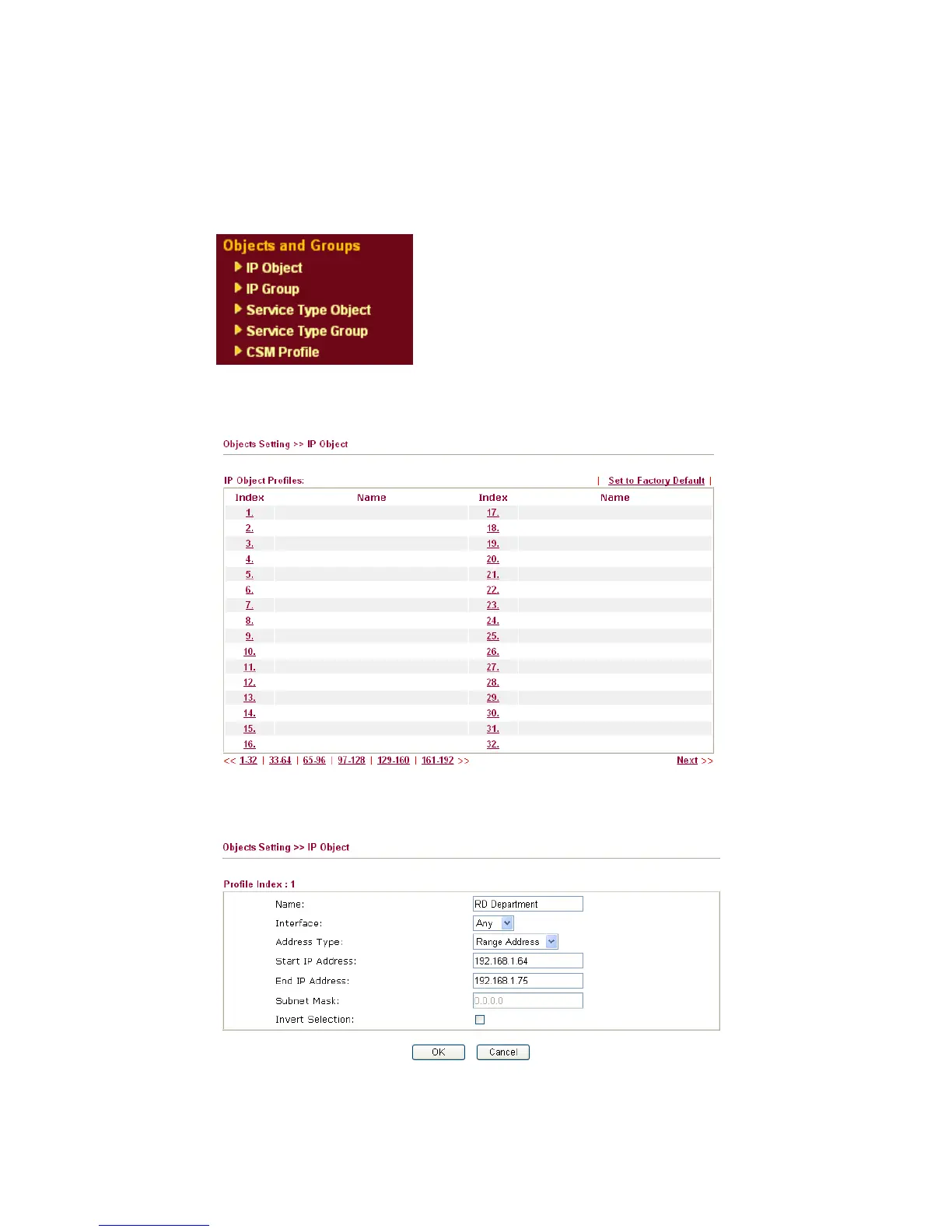
You can set up to 192 sets of IP Objects with different conditions.
Set to Factory Default Clear all profiles.
Click the number under Index column for settings in detail.
Name Type a name for this profile. Maximum 15 characters are
allowed.



 To Next Page