Vigor300B Series User’s Guide
176
Source IP
Display the source IP address for the filter.
Destination IP
Display the destination IP address for the filter.
Service Type
Display the protocol used for such filter.
Queue Number
Display the queue number that such filter is categorized.
H
H
o
o
w
w
t
t
o
o
a
a
d
d
d
d
a
a
n
n
o
o
u
u
t
t
g
g
o
o
i
i
n
n
g
g
f
f
i
i
l
l
t
t
e
e
r
r
f
f
o
o
r
r
t
t
h
h
e
e
Q
Q
o
o
S
S
p
p
o
o
l
l
i
i
c
c
e
e
r
r
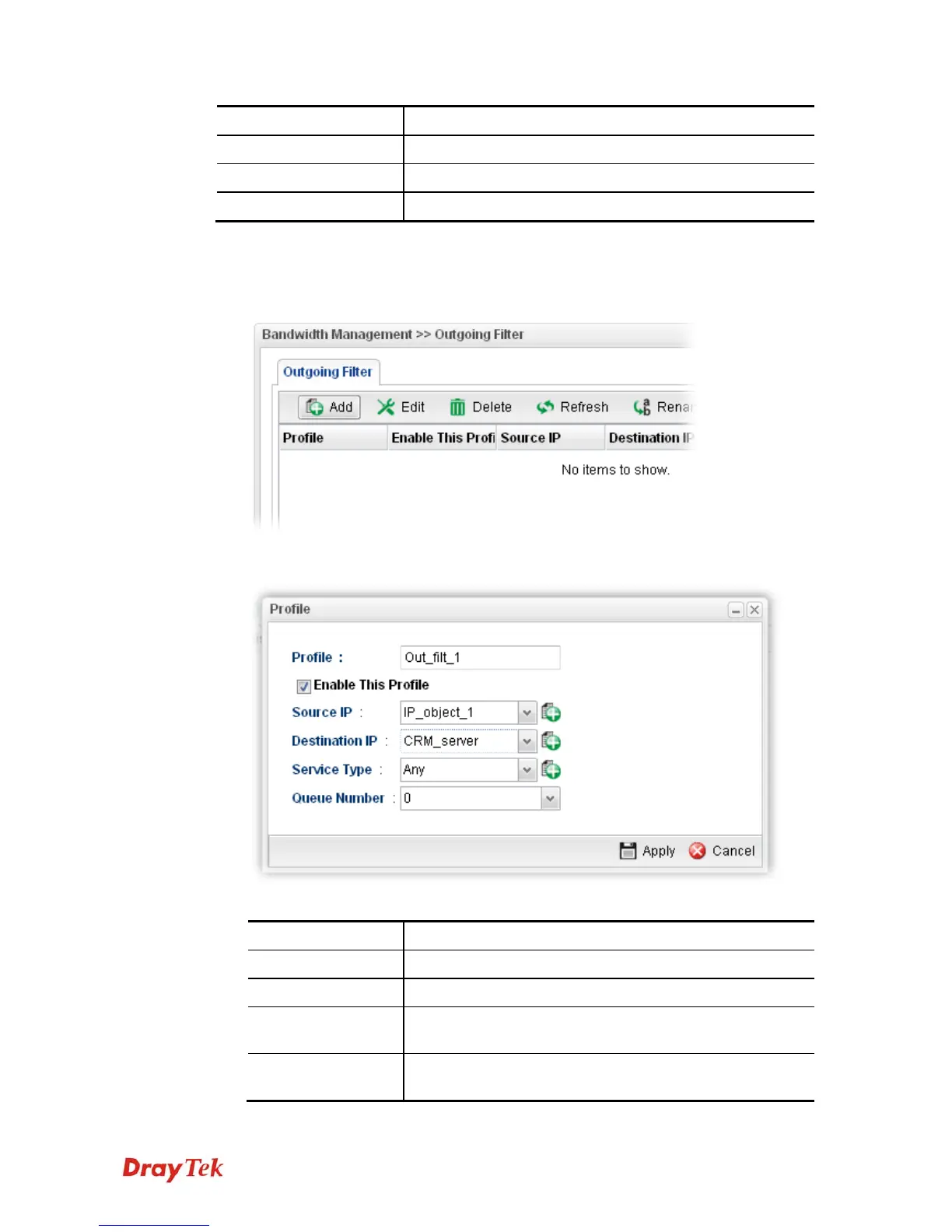
1. Open Bandwidth Management>> Outgoing Filter.
2. Simply click the Add button.
3. The following dialog will appear.
Available parameters are listed as follows:
Item Description
Profile
Type the name of the filter profile.
Enable This Profile
Check this box to enable such profile.
Source IP
Type the source IP address with subnet mask value to be
applied for this filter.
Destination IP
Type the destination IP address with subnet mask value to be
applied for this filter.



 To Next Page