8
Installation
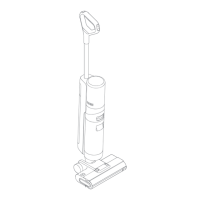
Installing the handle
Insert the end of the handle vertically into the port on the top of the unit until you
hear a click.
Charging
Place the charger against a wall on level ground and connect it to a power source.
Fully charge the unit before first use.
Place the unit on the charging stand, the lightning flashes on the screen to indicate
the charging status. When charging, the number on the screen represents the
current percentage of battery power. When the number reaches 100, the battery is
fully charged and the unit will switch off.
Note:
Fully charge the device before using it for the first time.
The screen will turn off in five minutes while the device is fully charged. If no action
is taken within ten minutes, the device will turn off. To prolong battery life, the
battery will automatically continue to cool down for approximately one hour after
prolonged use.
Use Instructions
Filling the Clean Water Tank
Press the Clean Water Tank release button to remove the tank. Open the tank lid
and fill the tank with clean water.
Adding Cleaning Fluid
For optimal cleaning results, add 10ml of detergent to the Clean Water Tank using
the bottle cap. Gently shake the tank before use.
Note: Do not add any liquids other than the officially approved cleaner. The cleaner can
be purchased from the official online store.



 To Next Page
 Loading...