7/29
STEP 9
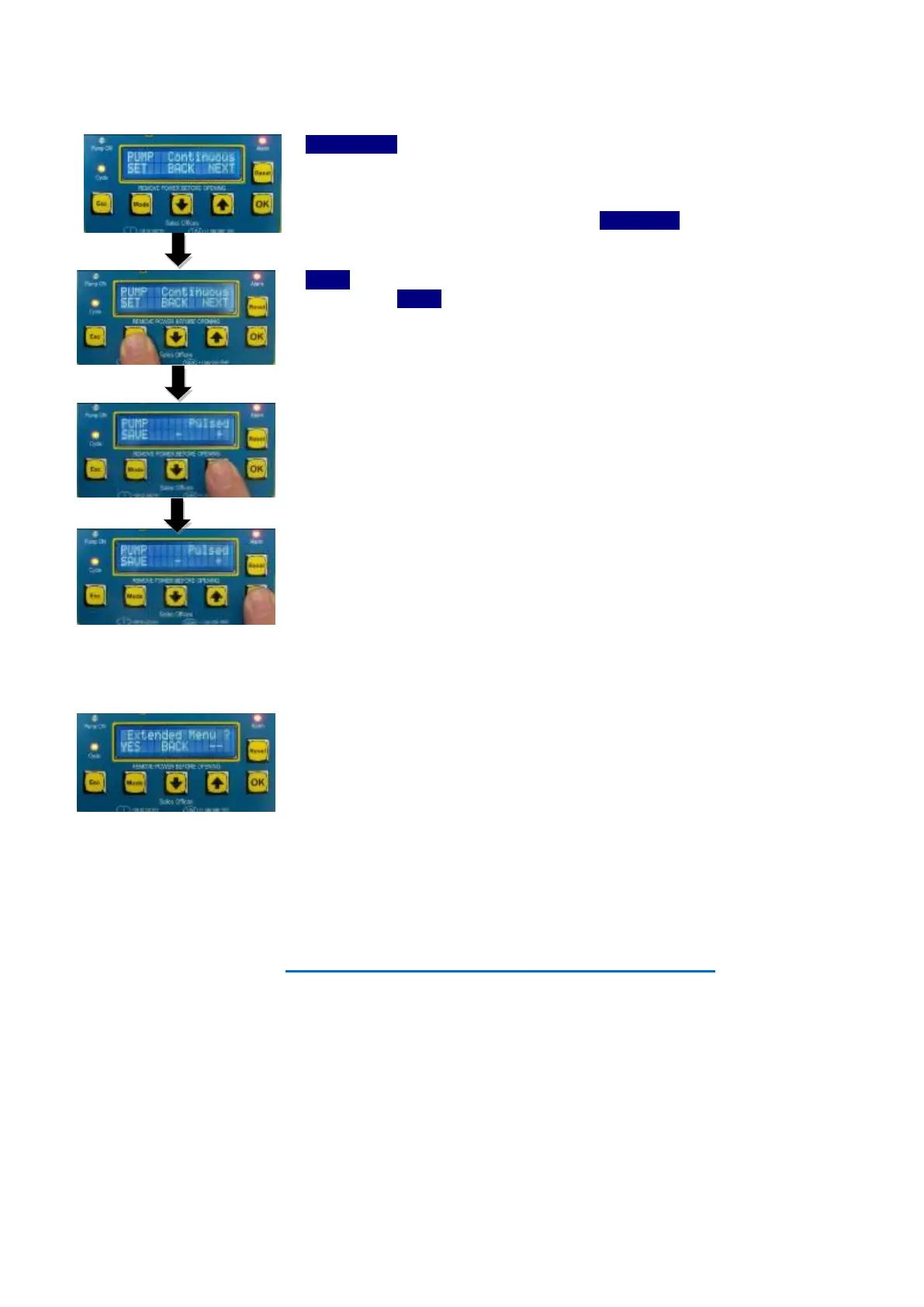
Set pump Type – You must tell the VIP5 if you are using a continuously energized pump system or if it requires
to be pulsed to work correctly.
CONTINUOUS
: The VIP5 Controller by default, can operate both electric and
reciprocating pneumatic pumps that require a continuous command output.
Example of such pumps are Dragon Series, Sumo, Cannon Pump, Smart, Piccola,
Pneumatic Barrel Pumps. These are known as
CONTINUOUS
pump type.
PULSED
: If however you are using a pump that requires a pulsed output the you
must selected
PULSED
.
Examples of such systems would be a Locopump piloted by an (3/2) air solenoid
valve.
To change the setting, press MODE button.
Then use the UP and DOWN arrows to change the value.
Once, you have selected your desired PUMP Type, press OK button to save and
return to the Parameter Menu.
STEP 10
Complete the Setup
At this point, the basic parameters have been set. The VIP5 Controller will ask if you
wanted to set the advanced options. These allow a much more granular control of
the lubrication cycle for complex systems and many more control options. You can
read about the other option in section 9 of the manual.
Press OK button to save the setting and exit programming mode.
Setup Completed - The VIP5 will now start a lubrication cycle



 To Next Page