Copyright 2010 Baker Hughes Company.
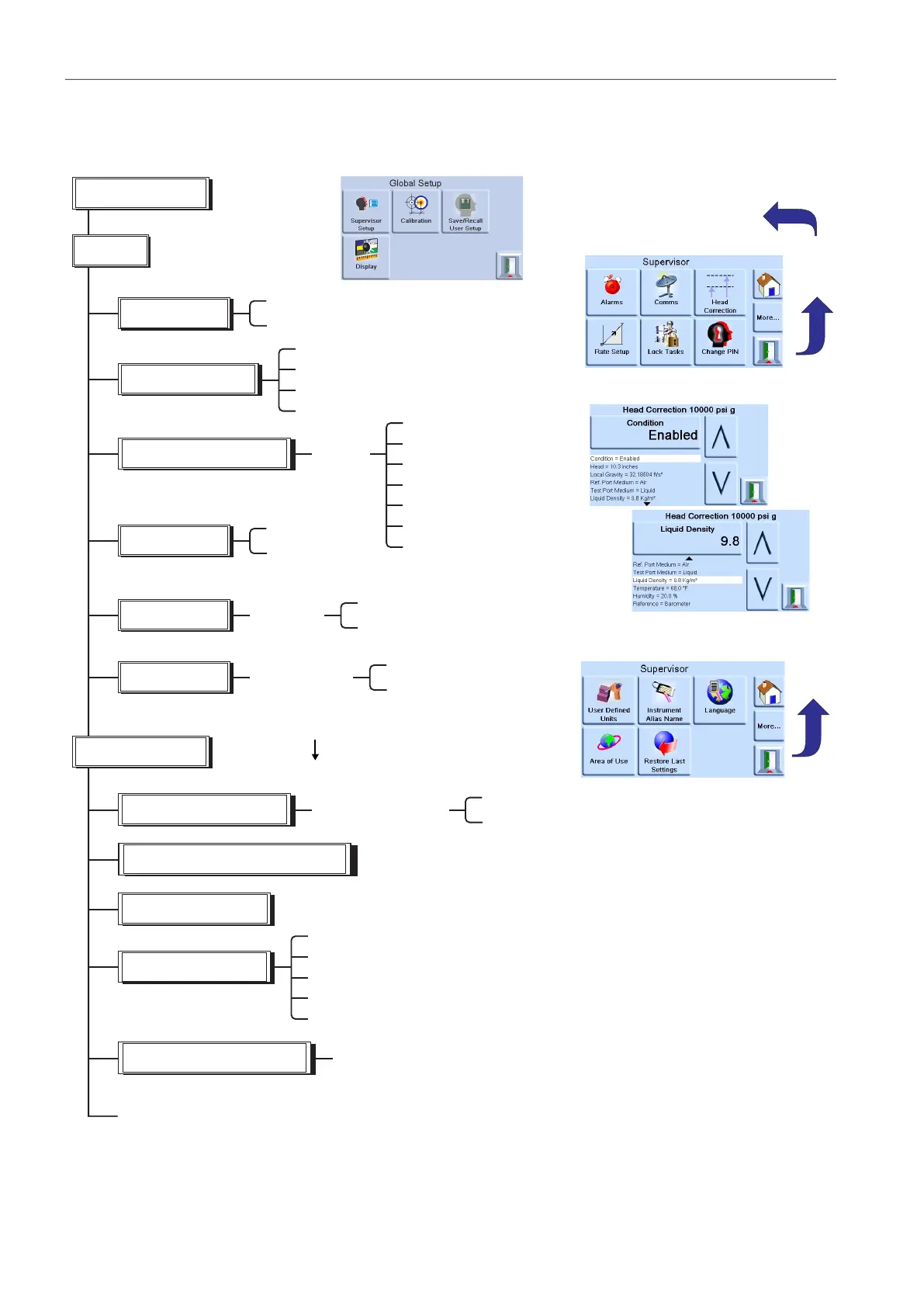
The supervisor setup menu provides facilities for changing settings. These are made during
installation.
enter four digit code
(0268)
-
Alarms
Communications
Restore last settings
Supervisor
More
next page:
-
PIN
Pressing the escape key stores
settings and returns to global
set-up.
Enable/disable high pressure
Enable/disable low pressure
IEEE488
RS232
USB
Ethernet
Gas head correction
Enable/
disable
Head - in or m
Local gravity - m/s
2
Barometric - mbar
Reference port medium*
Test port medium*
Temperature (gas)
Humidity (gas)
*air or nitrogen
Lock
Lock/unlock individual tasks
Lock/unlock all tasks
Lock tasks
Change PIN
Enter new PIN
Re-enter new PIN
Enter new
supervisor PIN
User defined units
Enter the name of the defined units
Enter the equivalent value in Pascals
User defined units -
user unit 1
Instrument alias name
Language
Restore previous defaults Y/N?
Rate set-up
/second
/minute
Area of Use
Europe
North America
Japan
Asia
Rest of World
Additional selections for options enabled: Aeronautical etc.


 To Next Page