Copyright 2010 Baker Hughes Company.
English–PACE Indicators Instruction Manual | 45
Supervisor Setup
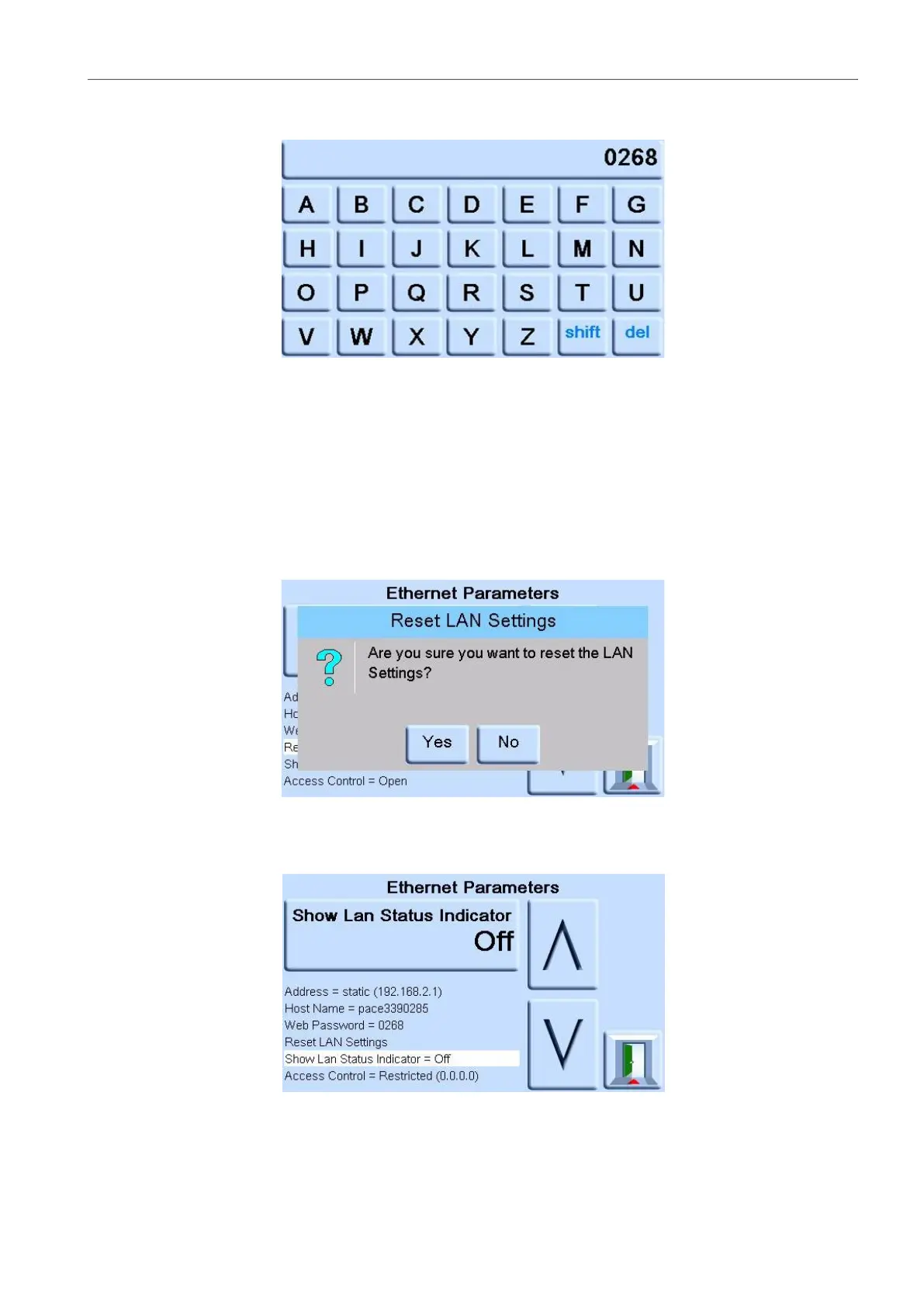
b. Press the top touch pad on the screen to enter the WEB PASSWORD screen. The
keyboard screen opens.
c. Use the keyboard to input the new web password and then press the top touch area on
the screen to set the new password. The screen automatically returns to the
ETHERNET PARAMETERS screen.
7. To reset the LAN settings, complete the following:
a. On the ETHERNET PARAMETER screen, use the UP and DOWN arrows on the right
of the screen to highlight the RESET LAN SETTINGS field.
b. Press the RESET THE LAN SETTINGS touch pad on the top touch pad of the screen.
c. The RESET LAN SETTINGS sub-screen asking for confirmation of the reset. Press
YES to confirm reset of the LAN settings.
8. To turn the LAN status indicator on or off, complete the following:
a. On the ETHERNET PARAMETER screen, use the UP and DOWN arrows on the right
of the screen to highlight the SHOW LAN STATUS field.


 To Next Page