Drucker Diagnostics – Customer Service: +1-814-692-7661 – CustomerService@DruckerDiagnostics.com | Page 7
DELETING A CYCLE
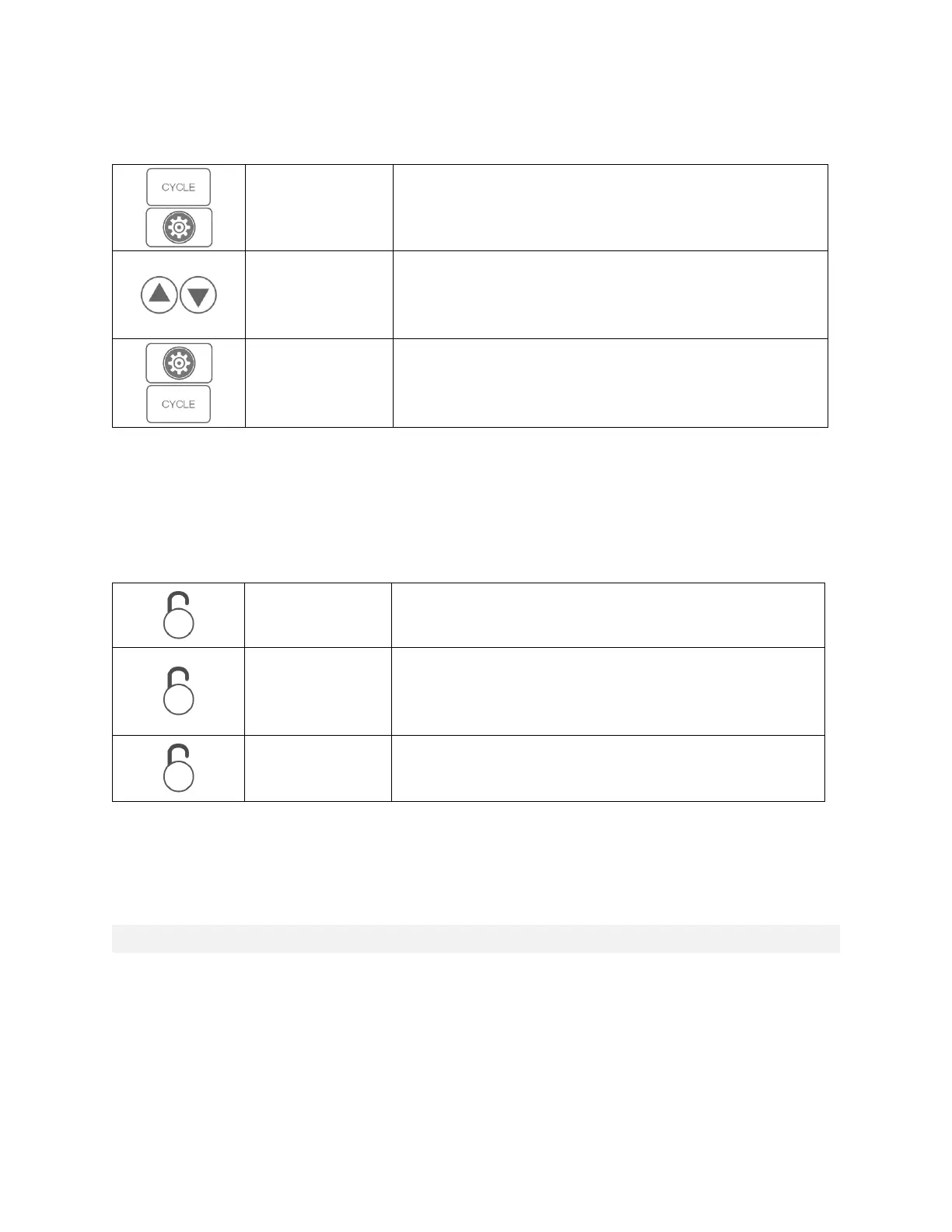
With the desired cycle selected, access the menu and enter the
advanced menu.
Using the UP and DOWN buttons, navigate to DELETE. Exit the
menu. WARNING: CYCLE WILL BE DELETED IF MENU IS EXITED
WITH DELETE SELECTED
Press the CYCLE button to Delete the cycle
CYCLE LOCK
To ensure repeatability, the centrifuge can be locked either on one cycle (Single Cycle Lock) or restricted to the saved
cycles (Preset Lock). The Single Cycle Lock also prevents making changes to the selected cycle parameters. The Preset
Lock allows selection of any saved cycle and prevents changing the parameters of saved cycles.
Select desired cycle. With lid open, press and hold the UNLOCK
button. One beep will confirm that cycle selection is locked.
Continue holding the UNLOCK button to enter Preset Lock. Two
beeps will confirm that cycle selection is now locked. NOTE: If
Single Cycle Lock is set, it must be canceled before Preset Lock
can be set.
Hold the UNLOCK button. Three beeps will confirm that the cycle
selection is now unlocked.


 To Next Page