Drucker Diagnostics – Customer Service: +1-814-692-7661 – CustomerService@DruckerDiagnostics.com | Page 5
FREE MODE
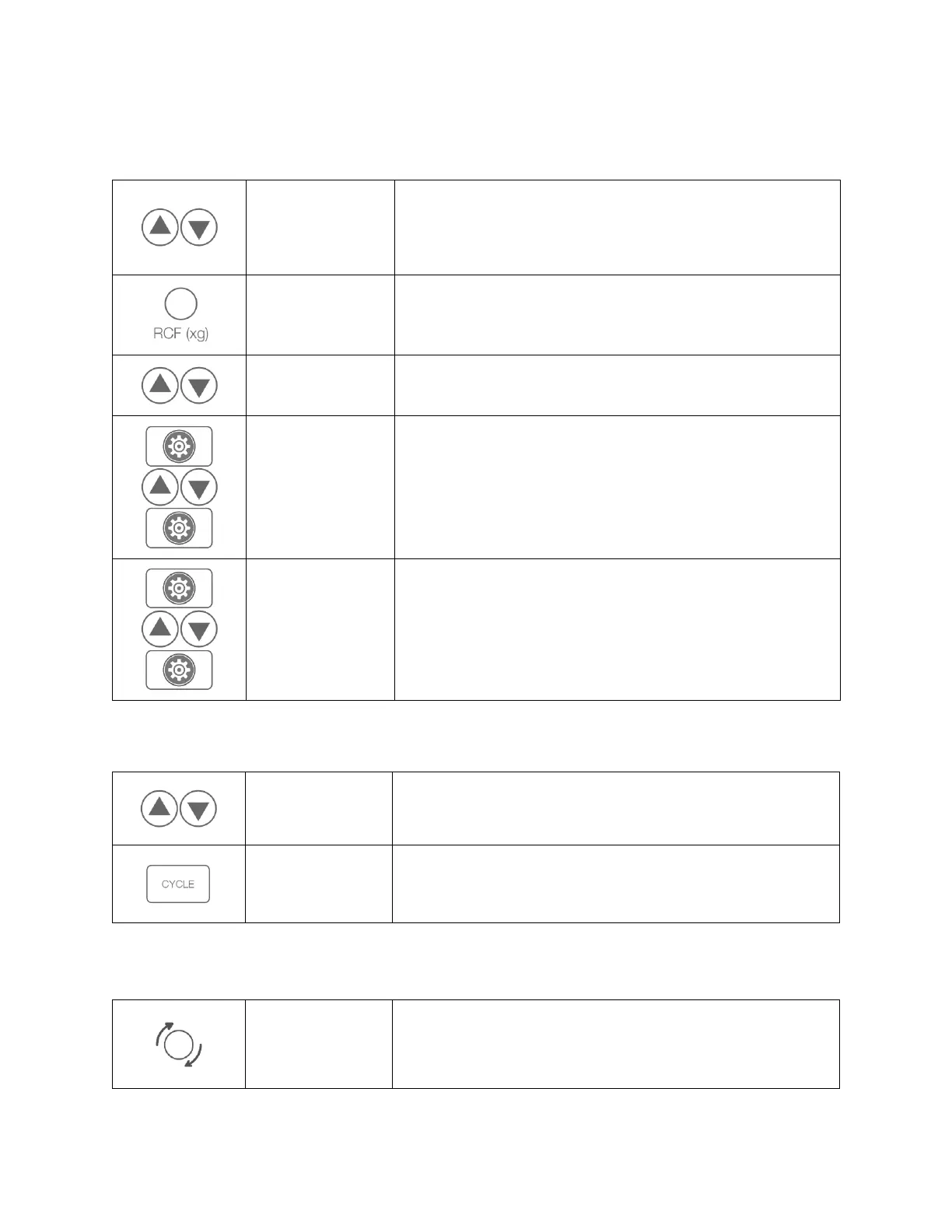
Change time, RPM or g-force for a single cycle.
To change the speed (RPM) shown on the top display, use the up
and down buttons next to that screen. The CYCLE number is
replaced with a “--“in the display, and the top screen displays the
speed.
Press and hold the RCF (xg) button while changing the displayed
setting on the top screen, using the up and down buttons next to it.
The RPM will automatically adjust.
Press the up and down buttons next to the TIME display.
Access the menu.
Press the down key next to the top screen until it shows “Brake”.
To turn brake on and off, use the up and down buttons next to the
TIME display.
Exit the menu.
Access the menu.
Press the up and down keys next to the upper screen until
“Beeper” shows on the upper screen. Switch ON or OFF with the
keys next to the lower screen. This setting will apply to all cycles.
Exit the menu.
Refer to previous table (Free Mode) to change speed and time to
desired values.
Hold the CYCLE button until you hear a double beep.
With the lid open and the unit powered, press and hold the START
button. The cycle count will be displayed until the START button is
released.


 To Next Page