13
HSPA(3G) Alarm Communicator Installation Manual
Entering ASCII Characters at Keypad
1. Press [*] and use scroll buttons
[<] [>]
to display “ASCII Entry” on the LCD screen.
2. Press [*] to select ASCII entry mode.
3. Use the [<] [>] scroll keys to display the character you want and press [*] to save and exit
ASCII.
4. Repeat the steps above to enter another ASCII character.
HS2016/2032/2064/2128 Initial Programming
Please refer to Panel Manual section ‘Alternate Communicator set-up’ for details. Perform the fol-
lowing steps to ensure that the communicator and the panel work together as intended.
These sections must be programmed at the panel keypad. Enter [*][8][Installer Code][Section
Number]. Record any values that are modified from their default, in the appropriate worksheets
for the panel or communicator.
1. In panel section [
377
] ‘Communication Variables’, subsection
[002]
‘Communication Delays’,
sub-subsection [1] ‘Communication Delay’,
program
060
(seconds).
2. In panel section [382] ‘Communicator Option 3’ set option [5] ON
NOTE: If this option is OFF, the yellow status LED on the communicator will indicate ‘Panel
Supervision Trouble’ (2 flashes) and the unit can not be programmed via the PC-LINK
cable.
NOTE: Account number in communicator section [851][021] automatically syncs with panel sys-
tem account number in section [310][000] ‘System Account Code’.
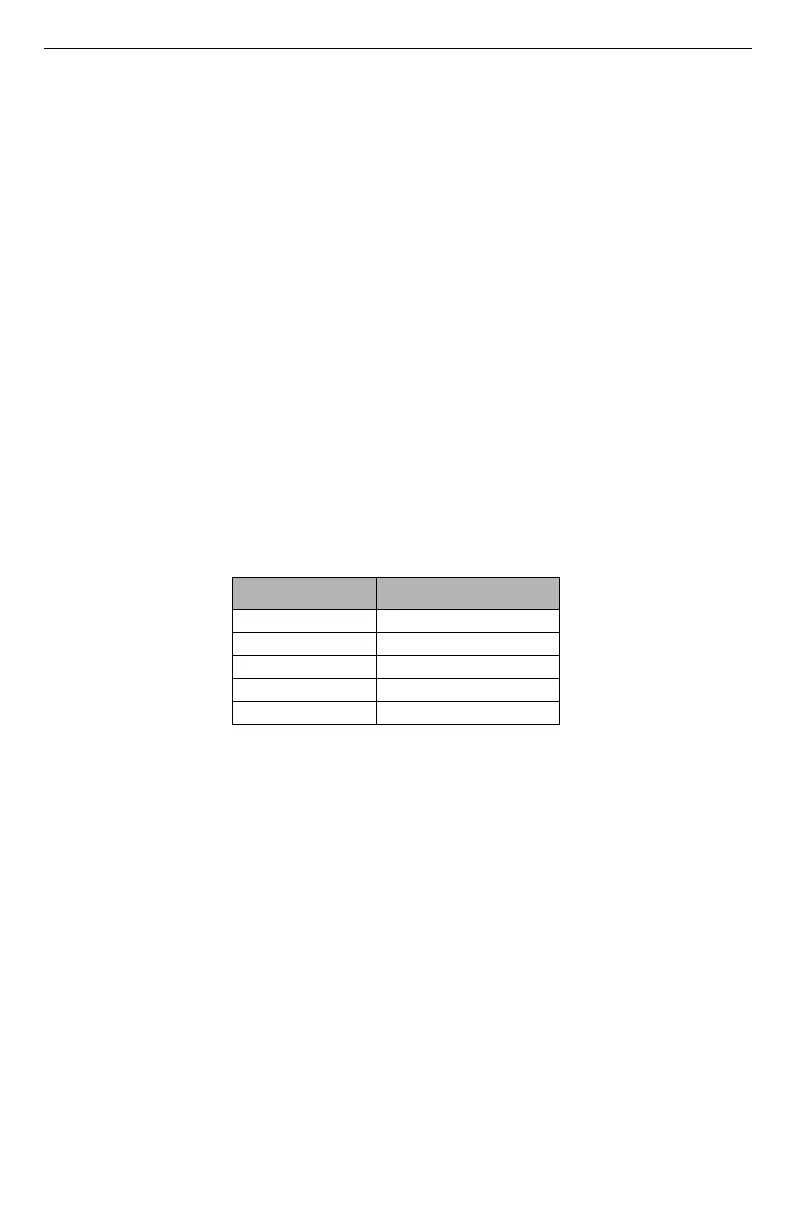
3. In panel sections [300] ‘Panel/Receiver Communication Paths’ subsections [001] to [004], pro-
gram the subsection with 02 to 06
NOTE: Refer to panel manual for additional information.
4. In panel section [350] ‘Communication Formats’, program the communication format as: CID
(03) or SIA FSK (04).
5. In panel sections [311] - [318] ‘Partition Call Directions’, program the call direction options for
the system.
6. In panel section [401] ‘DLS/SA Options’ set toggle option [2] ‘User Enable DLS’ to ON in
order to perform panel DLS session through cellular or Ethernet.
NOTE: Before leaving the premises, the installer should verify all programmed communications
paths. See programming options section [851][901] to send immediate test transmissions.
NOTE: Sending test transmissions to receivers that are not programmed will generate FTC Trou-
ble.
Communicator Troubles displayed on an HS2016/2032/2064/2128
The communication trouble is the only trouble that will appear on the keypad Liquid Crystal Dis-
play (LCD) when encountered by a communicator installed in a HS2016/2032/2064/2128. For
more information about the trouble on the communicator module refer to the panel event buffer or
by accessing *2 to view the individual trouble types. Log entry will show Fault or Restore for each
of the following events:
• Alt. comm SIM lock Trouble/Restore
• Alt. comm Cellular Trouble/Restore
• Alt. comm Ethernet Trouble/Restore
Table 5: Dialing Strings
Val u e Communication Method
02 Auto Routing
03 Ethernet 1
04 Ethernet 2
05 Cellular 1
06 Cellular 2



 To Next Page