8
MXCP44 OPERATION
Press TUNE
nn
or TUNE
ll
formorethan2secondsto
seekthenextstrongstation.
Press TUNE
nn
or TUNE
ll
momentarilytochangeone
radiofrequencyatatime.Pressandholdtoadvancequickly.
Press BANDtoselectbetweenFM1,FM2,FM3andAM1,AM2
bands.Sixpresetscanbesavedineachband.
Upto18FMstationsand12AMstationscanbestored.
Tostoreastation,selectthedesiredbandandstation.
Pressandholdthedesiredpresetbuttonformorethan2
seconds.Whenstored,thepresetnumberwillappearinthe
display.Thestationcanberecalledanytimebypressingthe
correspondingpresetbutton.
Press AS/PSformorethan2secondstoautomaticallystore
allstrongeststationsinthecurrentband.
Afterthesixstrongeststationsareset,ascanofeachstored
presetwillbegin.PressAS/PS or TRACK
ll
tocancel.
Press AS/PSmomentarilytoscanpresetstationsforfive
secondseach.Toselectastationduringthescan,press
AS/PSagainorpressthecorrespondingpresetbutton.
Seek Tuning
Manual Tuning
Band
Storing and Recalling
Station Presets
Automatically Store
Stations
Preset Scan
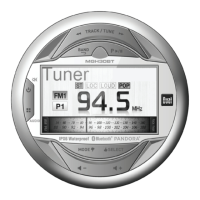
Tuner Operation



 To Next Page