23
X2DMA400 OPERATION
SiriusXM Vehicle Tuner Operation
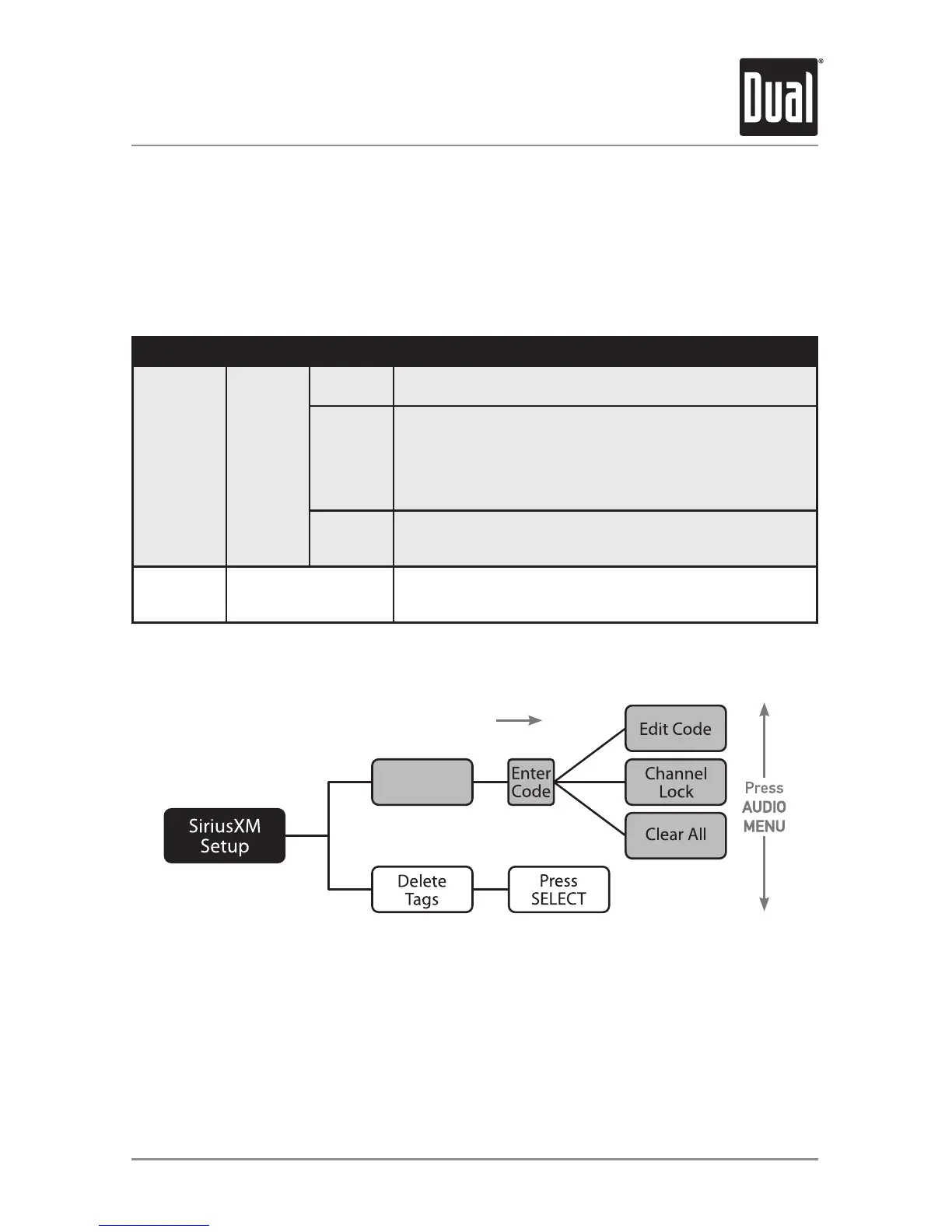
SiriusXM Setup Menu
Function Action Options Description
Parental
Controls
*Enter
Code
(default:
0000)
EDIT
CODE
Choosethisoptiontoprogramanew4-digitcode.Enterthe
newcodeusingtheinputmethoddescribedbelow*.
CHANNEL
LOCK
Allowschannelstobelocked,requiringthe4-digitcodetobe
enteredbeforethechannelbecomesavailableinthechannel
lineup.Onceselected,thechannellistwillappear.
• Turnthetuning knobtocyclethroughthelistofchannels
• Press SELECTtolockthedesiredchannel.
• PressingSELECTonalockedchannelwillunlockit.
CLEAR
ALL
Choosethisoptiontoresetthelockedchannelsbacktothe
factorydefault.Allcurrentlysubscribedchannelswillbe
unlocked.
DeleteTags
(iTunes
Tagging)
Press SELECT to
confirm
DeletesallTagsthataresavedinmemory.(Doesnotaffect
TagsthathavebeentransferredtoaniPoddevice.)
ToaccesstheSiriusXMsetupmenuoptions,pressandholdAUDIO/MENUformorethan
3seconds,pressAUDIO/MENUtocyclethroughmenuoptionsuntil"SIRIUSXMSETUP"
appears,thenpressSELECT. Press AUDIO/MENUtocyclethroughthelistofsubmenu
options.
*Toentera4digitcode,choosefromthetwooptionsbelow:
•Enterthe4digitcodeusingtheremotecontrol,bypressingthenumbersdirectly.The
defaultcodeis"0000"ifthecodehasnotbechangedwiththe"EDITCODE"feature.
Press SELECTtoconfirm.
•Turnthetuning knobtoselectthefirstdigit,thenpressSELECT.Continuewiththe
remainingdigitsuntilall4digitshavebeenentered.PressSELECTtoconfirm.
Parental
Controls
Press SELECT
SiriusXMSetupMenuNavigation


 To Next Page