E
12
LCD display functions
When the engine is switched on (key moved from OFF
to ON), the instrument panel checks all instruments
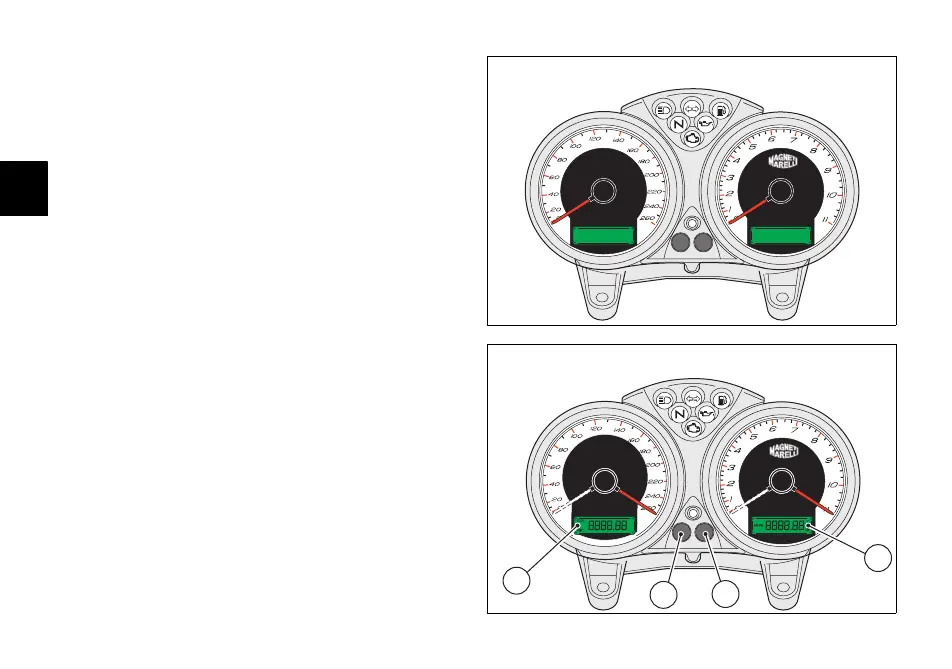
(dials, display, indicator lights), see (fig. 5 and fig. 6).
LCD functions (1)
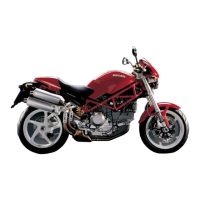
If the button (A, fig. 6) is pressed with the ignition key at ON,
the display shows the trip meter and odometer alternately.
Resetting the trip meter
If the button (A, fig. 6) is held for more than 2 seconds while
TRIP (trip meter) is active, the display is reset (LCD 1).
LCD functions (2)
If the button (B, fig. 6) is pressed with the ignition key at ON,
the display shows the clock and oil temperature.
Clock setting
Press the button (B, fig. 6) for at least 2 seconds.
Select AM/PM by pressing the button (A, fig. 6). Press the
button (B) to change to hour adjustment. Press (A)
repeatedly to change the hour indication. Press the button
(B) to change to minute adjustment.
Press the button (A) to increase the minutes; hold the
button pressed for more than 5 seconds to increase the
rate of change. Press the button (B) to complete the
adjustment.
x1000
min
Km/h
-1
OFF
fig. 5
1
2
A
B
CHECK
fig. 6







 To Next Page