10
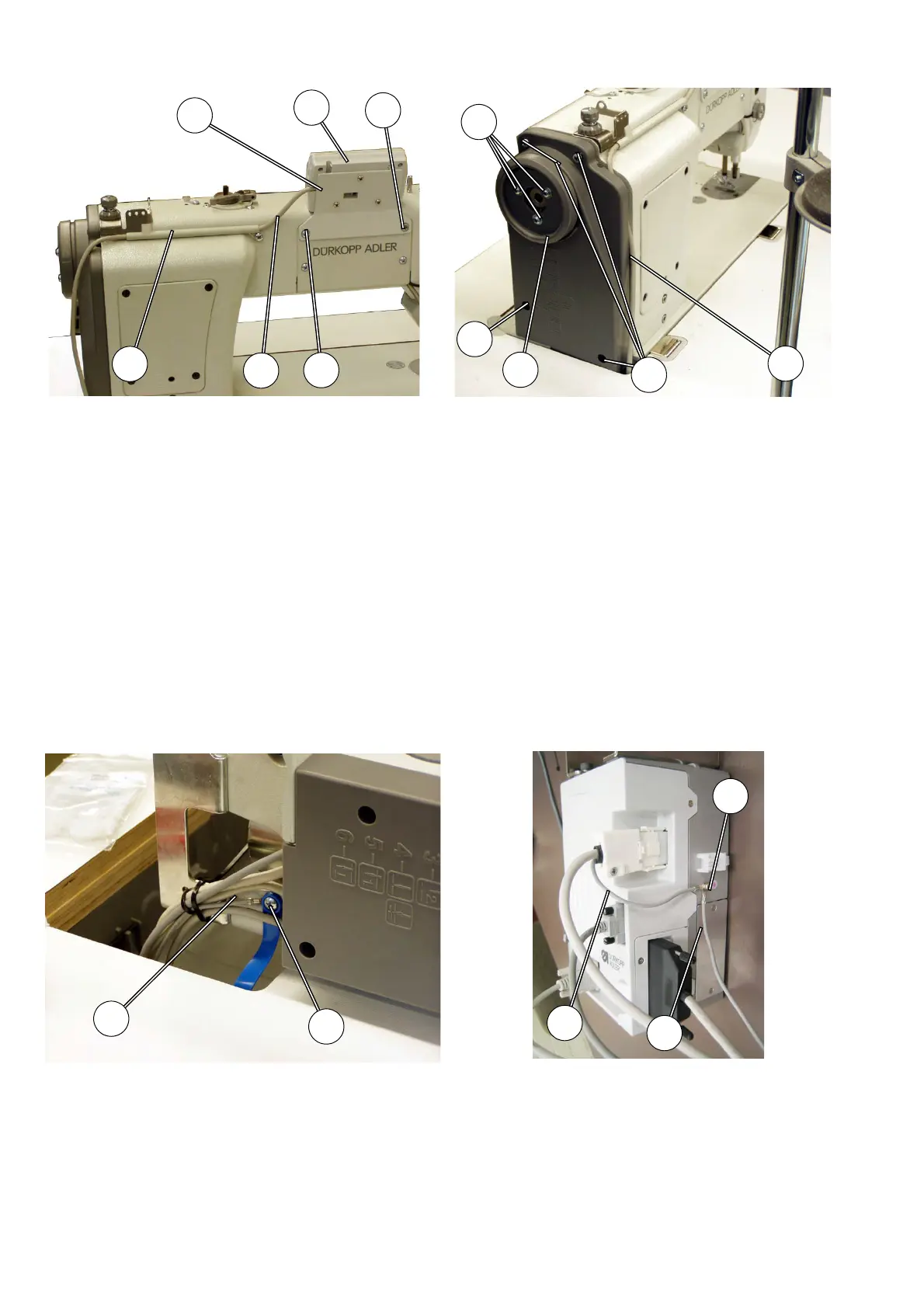
5.5 Fitting the operating panel
– Screw the operating panel 3 to the extension bracket 2.
– Remove fixation screws 1 and 4 on the rear cover.
– Screw on the operating panel extension bracket 2 using the
screws 1 and 4.
– Screw the connecting cable 5 of the operating panel with holder 6
onto the arm.
– Loosen screw 8 on the cover 9.
– Loosen screws 11 on the hand wheel 10.
– Introduce the complete length of the connecting cable 7 into the
cover.
– Tighten screws 8 on the cover 9.
– Tighten screws 11 on the hand wheel 10.
5.6 Earthing
The earthing cable 13 on the sewing machine head bleeds off static charges
of the machine head via the motor control unit to the mass.
– Lay the earthing cable 13 from the machine head down to the
motor control unit.
– Screw the earthing cable 13 and the earthing cable 14 onto
screw 15 of the control unit.
Fig. 11 Fig. 12
Fig. 13 Fig. 14




 To Next Page