EasyManua.ls Logo

Durabook S14I - Left View

Durabook S14I
81 pages
Print Icon
To Next Page IconTo Next Page
To Previous Page IconTo Previous Page
Loading...
Before You Start
EN-9
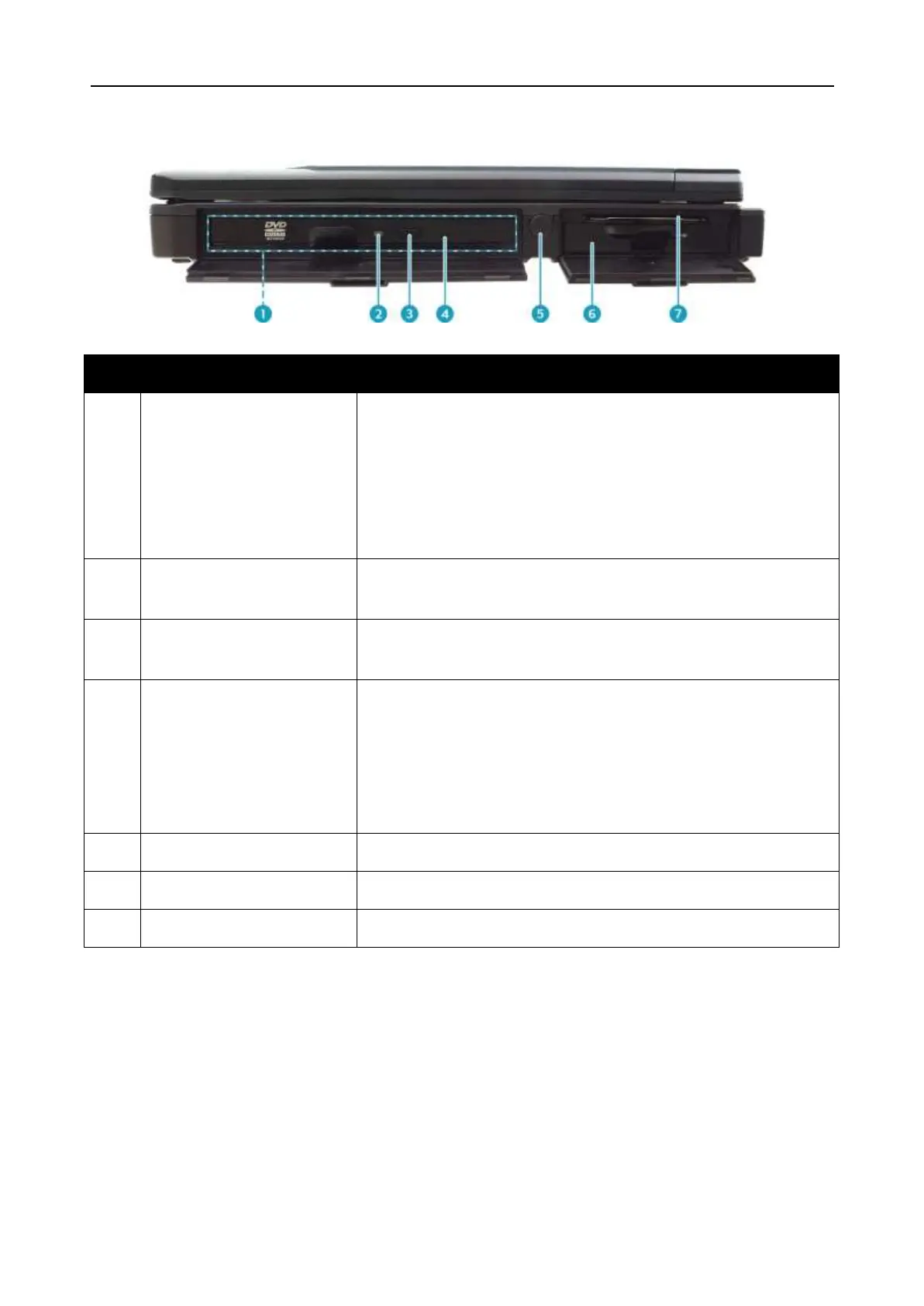
Left View
No.
Item
Description
1
Media bay
Varies depending on SKU:
Optical disk drive
Second battery pack
Express Card 54 slot x 1 and PCMCIA Type II x
1; or PCMCIA Type II x 2
2
ODD LED indicator
(for ODD SKU)
A blinking ODD LED indicates ODD activity.
3
Eject button
(for ODD SKU)
Push to open the tray.
4
Pin Hole Eject
(for ODD SKU)
If the Eject button fails to work properly, insert a
paper clip into this hole to open the tray.
CAUTION!
Turn off the notebook before performing manual
ejection.
5
Stylus compartment
Contains the stylus.
6
Battery compartment
Contains the battery.
7
Smart card reader
Use to insert smart cards.

Table of Contents