60
2.4. On-board computer
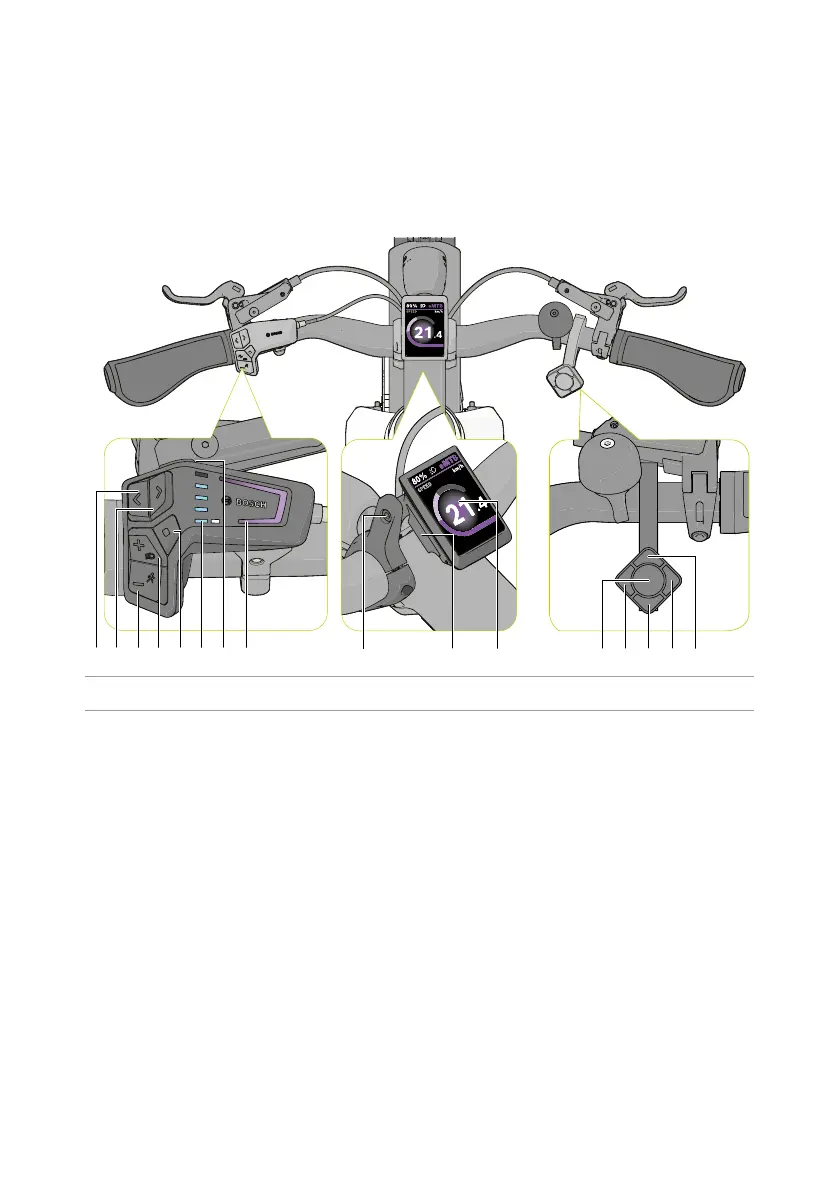
TheDutchIDPhantomisedwithaBoschKioxon-boardcomputertocontroltheelectric
power unit and display cycling and trip data. A summary of the main parts of the on-board
computer is shown below.
mn Q
U I O FDSAP
W E R T Y
Figure 3 - Main parts of the on-board computer.
n Back
Totheleinthedisplay
m Forward
To the right in the display
Q Decrease assist level
Down in the display
Acvatewalkassist(pressandhold)
W Increase assist level
Up in the display
Bikelighngon/obuon(pressandhold)
E Seleconbuon
R BaerylevelLEDs
T On-boardcomputeron/obuon
Y LED status
U Holderadjusngscrew
I Holder
O Display
P Cadenceon/obuon*
A Cadence+5*
S Cadence+1*
D Cadence-5*
F Cadence-1*
*Onlyforautomacgears



 To Next Page