70
4.4. Removingthebaery
6
CAUTION
Ҍ Placethebaeryonaclean,drysurfaceonceyouhaveremovedit.
Ҍ Ensurethatnodirtand/ormoistureentersthebaeryconnector.
Ҍ Keepthebaerylockedintoplaceatallmesduringusetopreventthebaeryfromfalling
out of the holder.
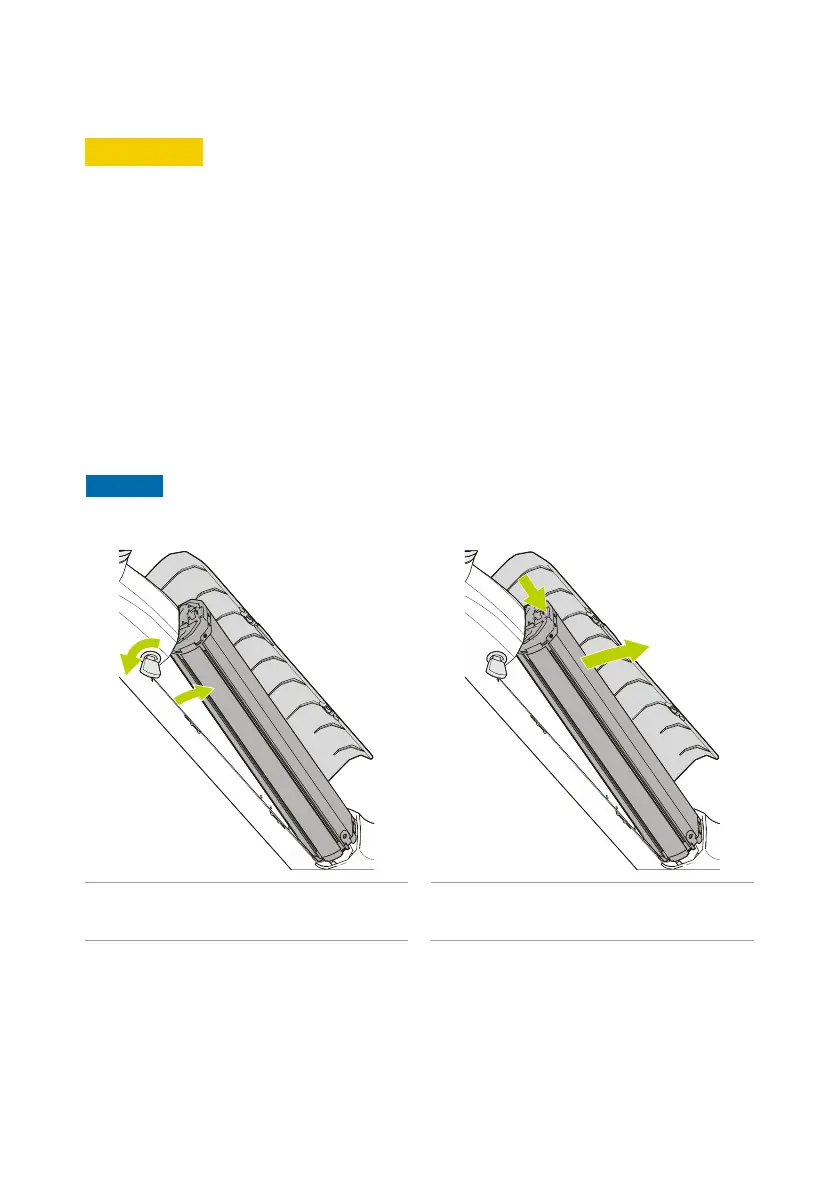
Followthestepsbelowtounlockandremovethebaeryfromthee-bike.
1. Openthebaerycovery.
2. Insert the bike key fintothelockofthebaeryholderg.
3. Turn the bike key fcounterclockwisetounlockthelockofthebaeryholderg .
4. Press the lock jonthetopofthebaery.
5. Carefullyltthetopofthebaeryoutoftheupperbaeryholderh.
6. Lithebaerykoutofthelowerbaeryholderz.
7. Remove the bike key ffromthelockofthebaeryholderg.
NOTICE
To ensure that others cannot remove the bike key, do not leave the bike key in the lock.
Figure 11 - Turn the bike key counterclockwise to
unlock the lock of the baery holder.
Figure 12 - Press the lock and pull the baery
out of the top holder.



 To Next Page