Owner's Guide
15
Part: XXXXX Rev XX
234
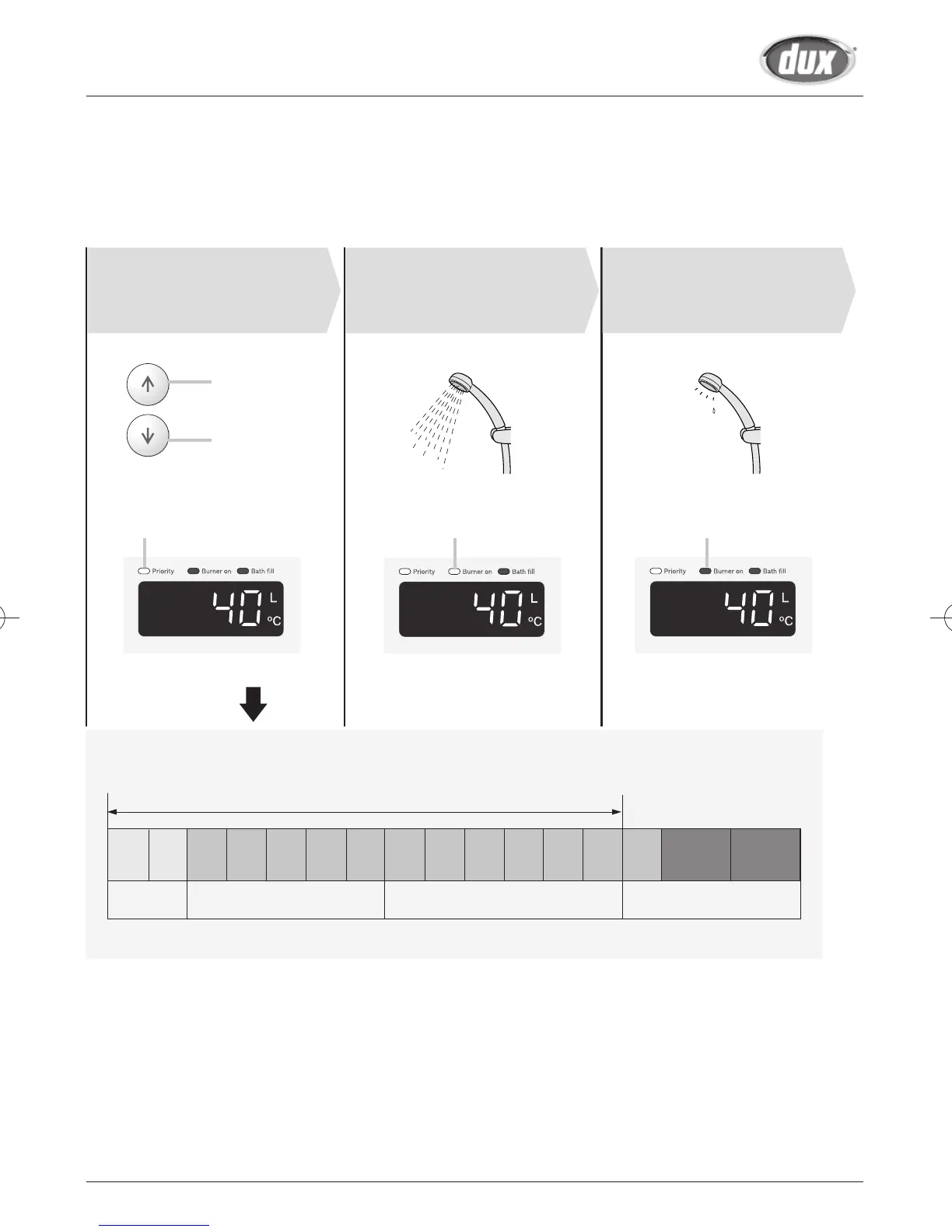
Set temperature.
( )
( )
Always check the
temperature setting
before use.
Hot
Cold
Check the indicator lights. ON OFF
Water temperature
Turn on hot
water.
Turn off the hot
water.
°C
:
The temperature settings below are examples. The temperature setting
necessary depends on the usage, the length of piping or seasons.
Bathroom and Bathroom 2 controller are these ranges.
[50 degree models: Main and Bathroom and Bathroom 2 controller are these ranges.]
37 38 39 40 41 42 43 44 45 46 47 48 50 55 60 75
Shower, hot water supply, etc. Hot water supply, etc.
*Initial factory setting is 40°C
High temperature
26ENA6N/L only
* For most residential applications, the recommended setting temperature is 50°C or less.
For applications that occasionally require a higher temperature setting, locate the remote controller
in a convenient location.


 To Next Page