Instrument/controls - Description and function
2017-11-22 4812325556EN 17
Instrument/controls - Description and
function
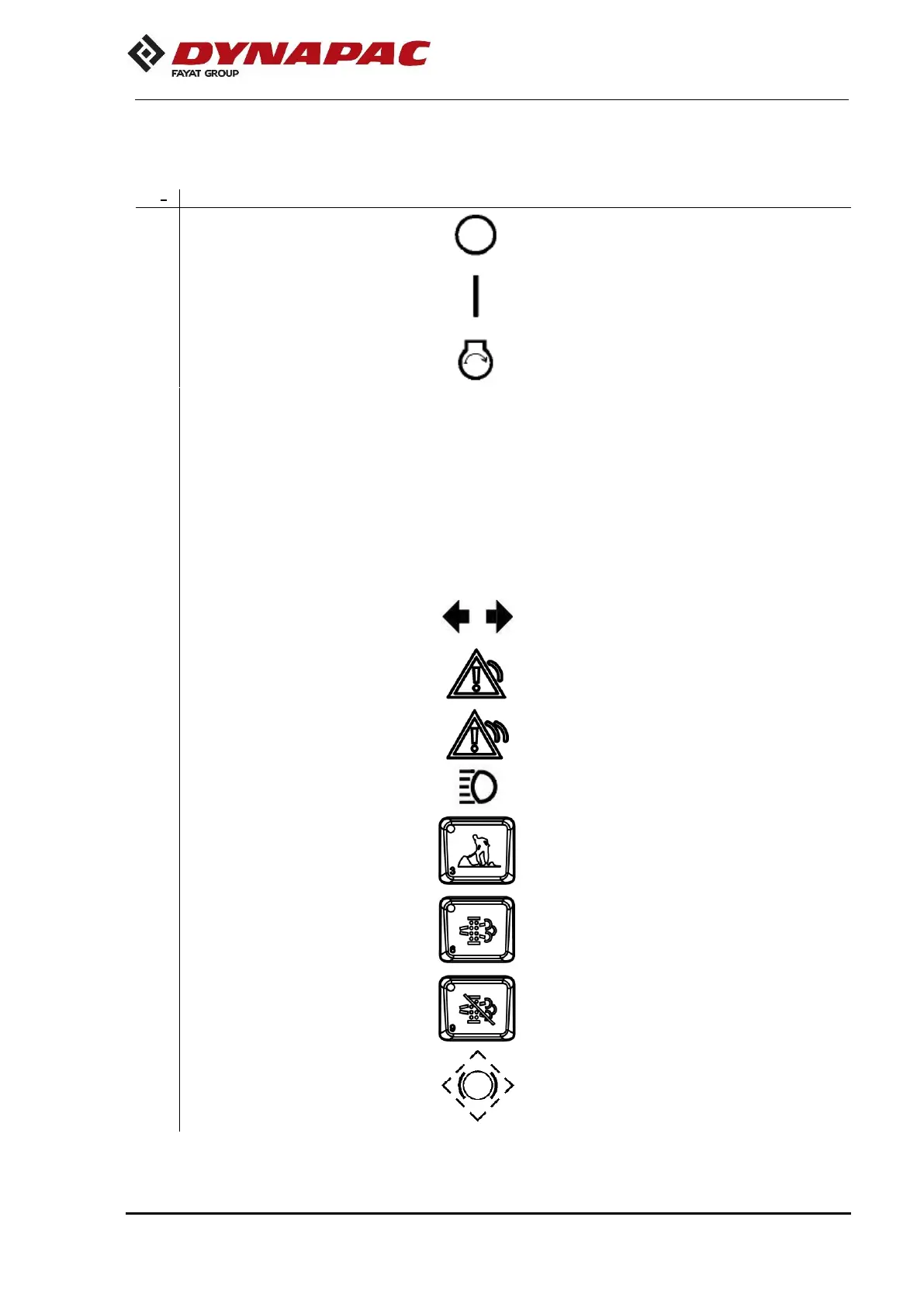
The electric circuit is off.
All instruments and electric controls are on.
The starter is activated.
To turn on the machine, the lever must be in
"Neutral ". The direction of travel and the
machine speed is regulated with the forward
- reverse lever. If is moved forward, the roller
moves forward, backward moves back.
The roller speed is proportional to the
distance between the lever and the neutral
position. The further away from neutral, the
higher the speed.
It shows that the direction lights are
activated (activation via switch at the
steering column).
Indicates that there are general problems in
the machine. See the multifunction screen
for the description.
Indicates that there are flaws in the machine.
See the multifunction screen for the
description.
It shows that the high beam lights are on
The roller starts always in the high speed
mode. The low speed mode is obtained
when activated.
Enable the regeneration
(Tier 4 Engine)
Press to enable the regeneration Refer to
the “Operation” section
(Tier 4 Engine).
Disable the regeneration
(Tier 4 Engine)
Press to disable the regeneration. Refer
to the “Operation” section
(Tier 4 Engine).
Press to test the brake drive mechanism


 To Next Page