Instrument/controls - Description and function
2017-11-22 4812325556EN 21
Control panel – General description (cont.)
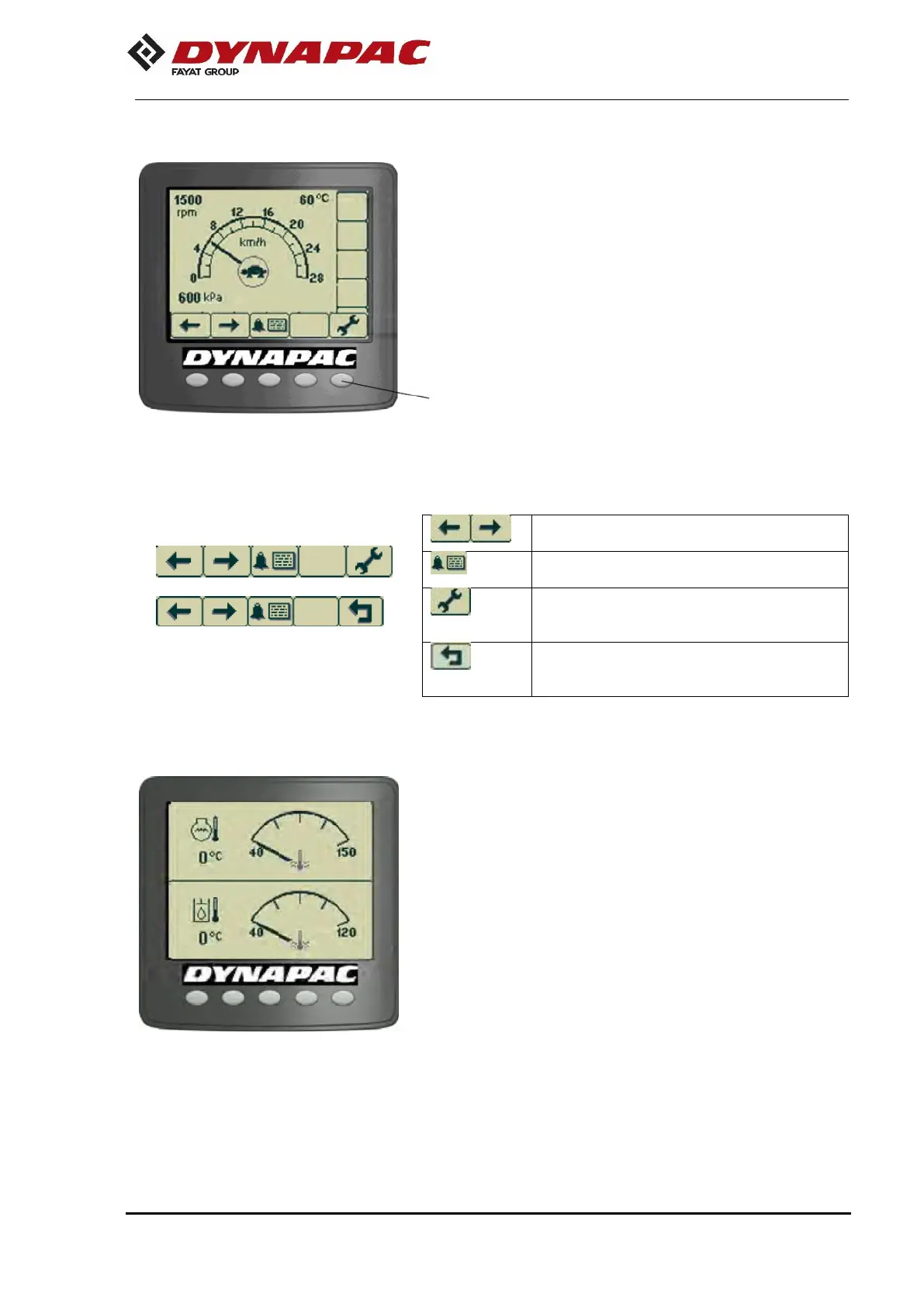
A menu field is shown by pressing one of the selection buttons.
It is visible for a short time, then it fades out if no selection is
made. A menu field appears again by pressing one of the
selection buttons (1).
Scroll/selection buttons to choose the
available functions.
Alarm log button to show the alarms of the
engine and machine.
Settings/menu selection button, which
opens the main menu. Settings can be
changed in the main menu.
Exit/return button, returns 1 step at once.
Pressing the button for approximately 2
seconds displays the main menu again.
The temperature screen shows the engine oil (top of the
screen) and hydraulic oil temperature (bottom of the screen).
The values are shown in Celsius or Fahrenheit, according to
the choice of unit system.
Fig. – Main working screen with the menu
selection buttons
Fig. – Temperature screen


 To Next Page