DS47LT3, LT4 User Manual 13
Connecting Multiple Displays for Video Wall Applications
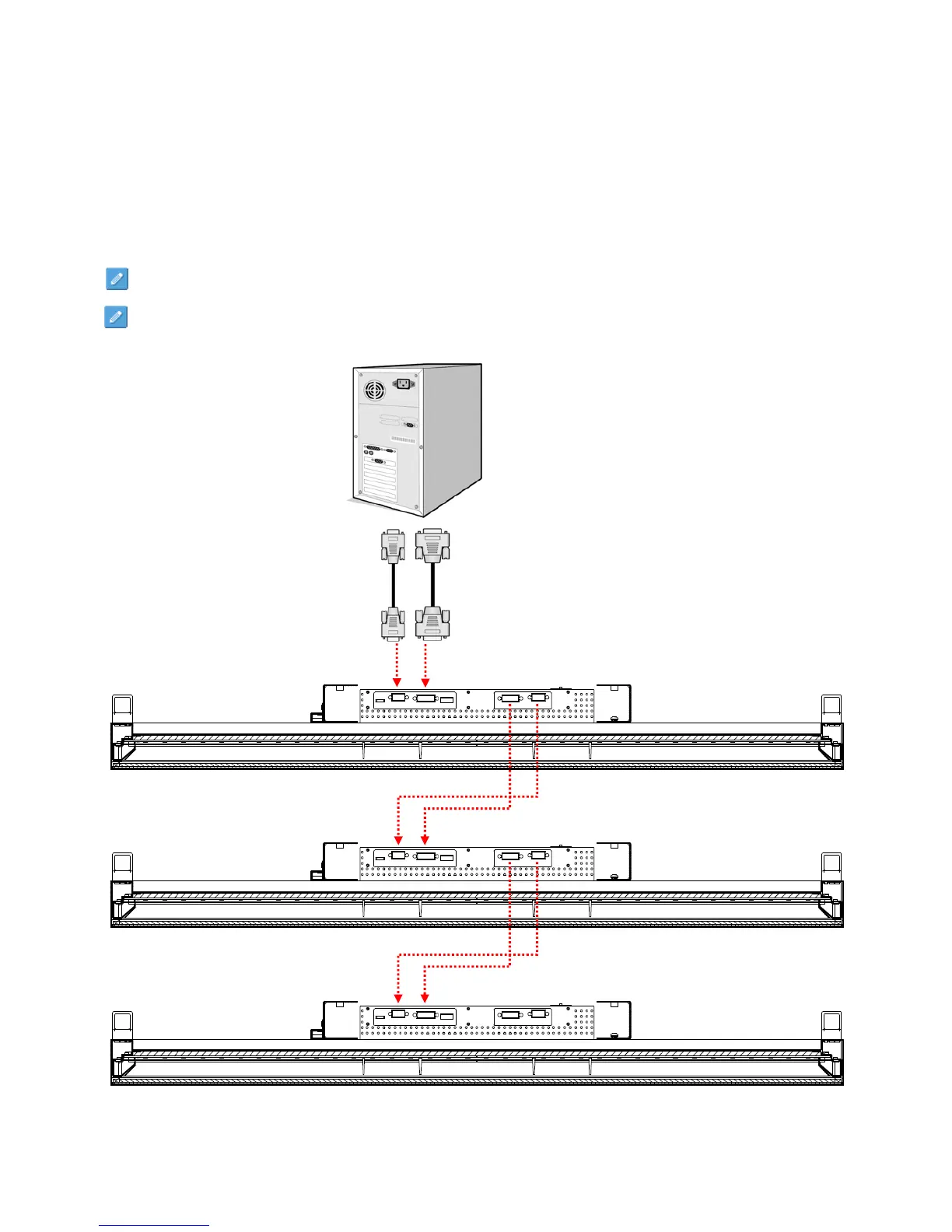
To daisy chain more than one display for a video wall application, connect a video source to the first display in the
chain. Connect the DVI-OUT of the 1
st
display to the DVI-IN of the 2
nd
display. Using the RS-232 cable provided,
connect the RS-232 OUT of the 1
st
display to the RS-232 IN of the 2
nd
display. Repeat connection for remaining
displays. Use the OSD Menu to configure the size of the video wall and the position of each display.
Note: The maximum number of DS47LTx’s in a Video Wall is 36 (6 × 6).
Note: The DynaScan “Display Manager” application is required to be installed on the PC in order to use the
External Control feature.
DISPLAY 1
DISPLAY 2
DISPLAY 3
DVI (OUT)
DVI (IN)
Video Source
RS-232 (IN)
RS-232 (OUT)
DVI (OUT)
DVI (IN)
RS-232 (OUT)
RS-232 (IN)
DVI (OUT)
DVI (IN)
RS-232 (OUT)
RS-232 (IN)



 To Next Page