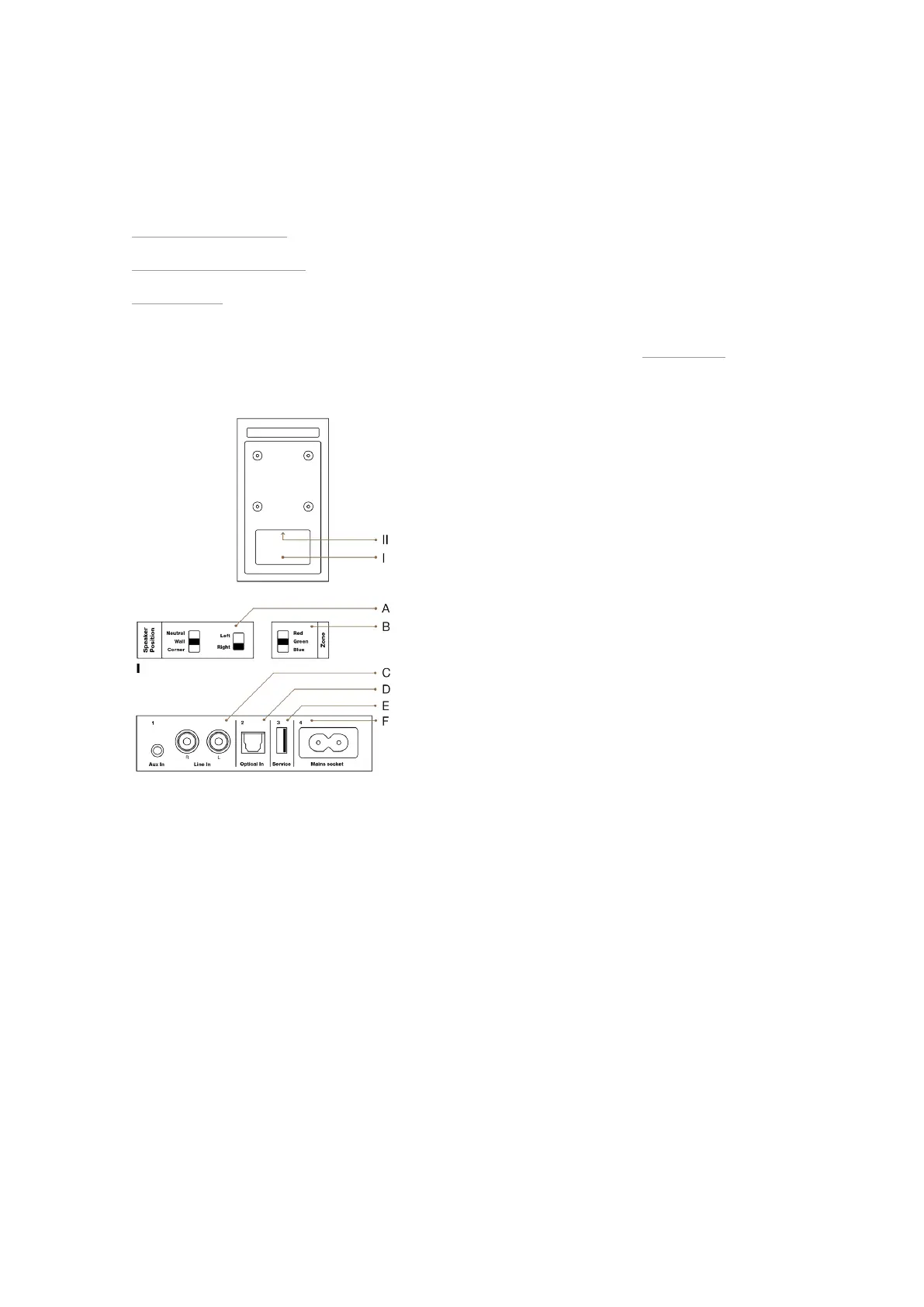
Connections and Control Elements
On this page:
▪ Elements on the rear panel
▪ Buttons on Top of the Cabinet (Xeo 10)
▪ Remote Control
This section describes the connections and control elements. Please contact your Dynaudio Xeo distributor if you
have any problems with connection and start-up. Distributor addresses can be found at dynaudio.com.
Elements on the Rear Panel
The Xeo 10/20/30 set consists of a master and a slave unit. The master unit carries the audio input interfaces.
A: Speaker position
Sound adjustment (depending on the position of the speakers)
▪ Neutral = with free-standing placement
▪ Wall = if placed near a wall
▪ Corner = if placed in a corner
Speaker placement
▪ Left = left speaker for stereo mode
▪ Right = right speaker for stereo mode
B: Speaker ID/Zone
Selection of audio zones: Speakers assigned to dierent zones can be controlled separately via the remote
control. The zones are identified as Red, Green, and Blue.
Connections and Control Elements 11



 To Next Page