38
Channel 5 Knob Description and Function
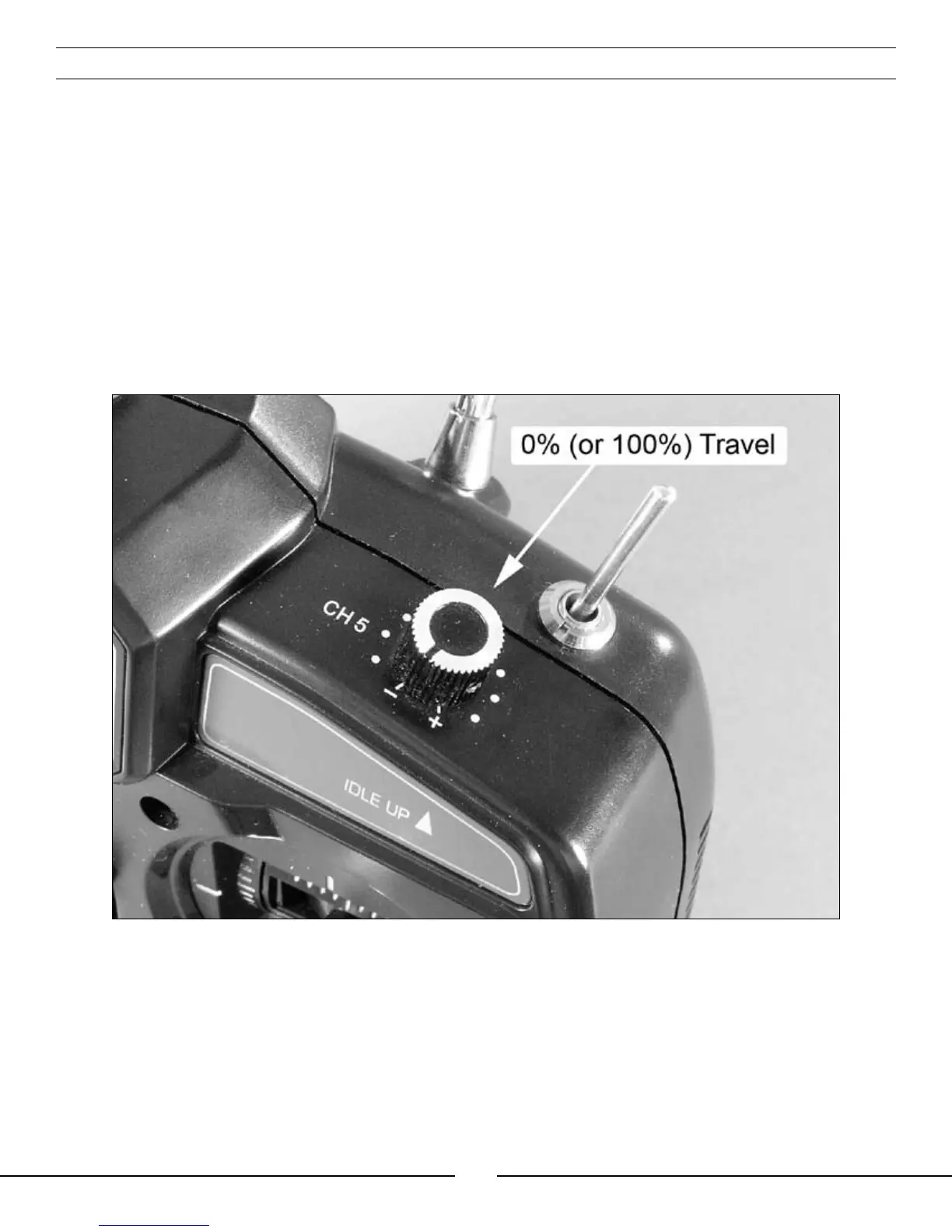
The transmitter included with your Blade™ CP Pro is equipped with an optional-use “Channel 5” knob (labeled as
“CH 5”) on the top right panel, just ahead of the “Idle Up” flight mode switch.
This knob allows you to control function of the transmitter’s 5th channel. This channel remains un-used for flying
the Blade CP Pro, however, it is available for use in controlling a variety of potential optional features including
actuation of an additional servo, electronic components or even for setting the gain of a gyro remotely from
the transmitter (when using an optional heading lock gyro equipped with this feature, as shown in the “Optional
Heading Lock Gyro Installation and Setup” section found on pages 40–47). It allows full proportional control of the
5th channel from approximately 0–100% travel.
Although no servo reversing is available for this channel, the knob can be operated in either direction for
control. You can use either the most clockwise (+) or most counterclockwise (-) position for 0 or 100% travel,
and you will achieve approximately 50% travel with the knob in the middle position, pointing directly to the rear
of the transmitter.



 To Next Page