19
THE ______
4 5
6 7
8 9
10 11
12
13
• Removing the cartridge with filter (video available
on your personal customer page).
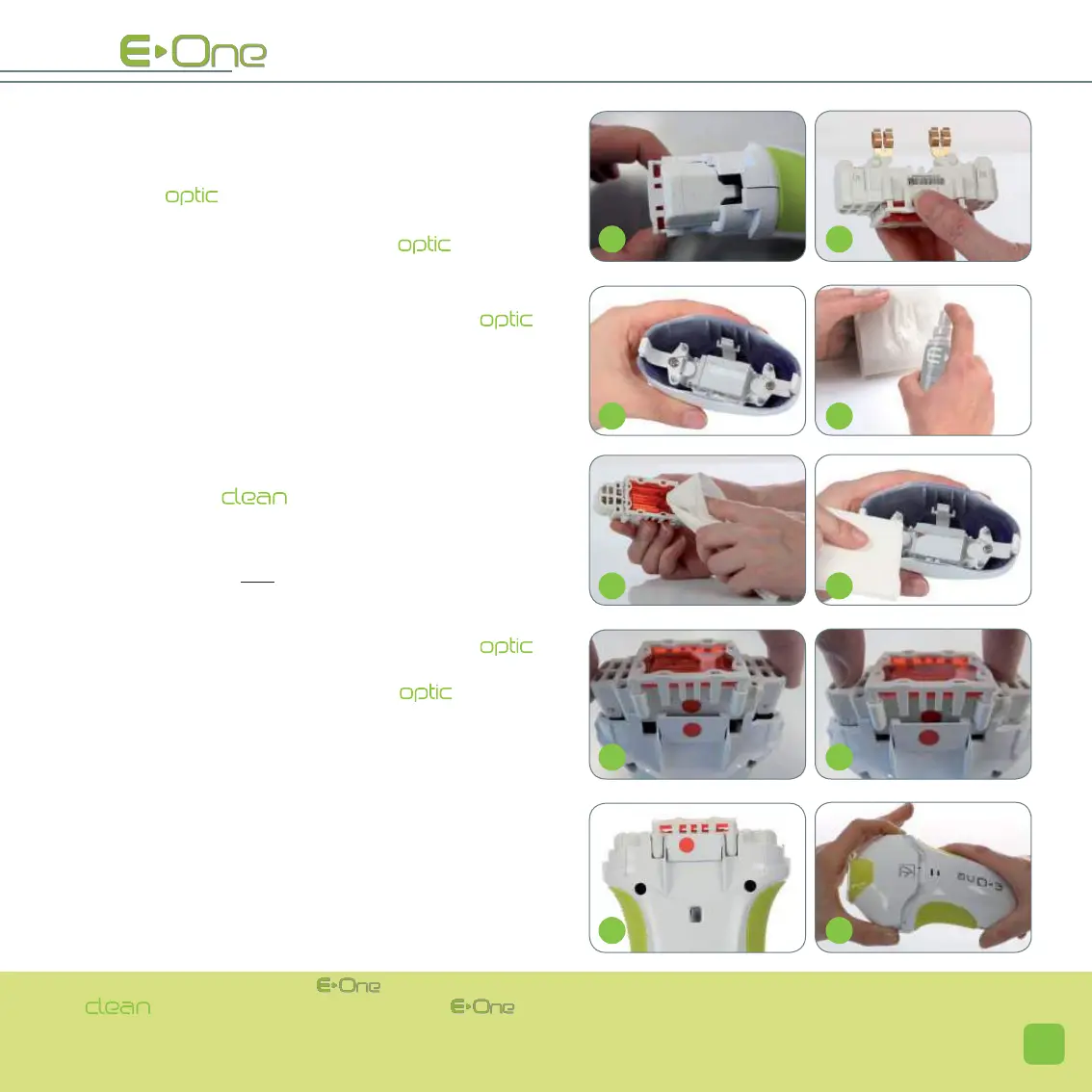
> Once the mobile head is removed, the cartridge
with filter is then visible in the applicator (2).
> Remove the cartridge from the applicator: press fir-
mly on the filter support (3) and pull (4). The
cartridge with filter now presents itself to you (5); it is
imperative to hold it only by the plastic parts.
• Cleaning of the internal optical parts.
> Once the filter cartridge is removed, the transparent
optical glass is also accessible (6).
> Using the spray : spray it on a lint-free cloth
beforehand (7).
NOTE: Never spray directly on the optical parts.
> Afterwards clean only the accessible side of the filter
with this cloth (8). Repeat the same procedure for the
accessible part of optical glass (9).
NOTE: The filter must never be separated from its
cartridge.
> When cleaning is complete, take the cartridge
and align it with the applicator with the help of the red
dots (10). Push it into the slide way of the applicator by
pressing on it (11), so as to ensure that it is properly in
position (12).
> Re-attach the mobile part of the applicator by pres-
sing simultaneously on the locking tabs of the mobile
head (13), making sure to align the internal red dot of the
head with the red dot of the applicator.
NOTE: For better efficiency of the
, t is recommended to clean the filter before each use with the spray
provided when you purchased the
. Any damaged filter due to non-compliance with the
procedure for use is not covered by the manufacturers warranty.
S
S
S
SS


 To Next Page