21
STEP 3
STARTING AND SETTING UP YOUR
REMINDERS:
The definitions of the icons are indicated on pages 14 and 15.
Your is already equipped with an Optic cartridge.
Therefore you do not need to enter any activation code to run
your device.
• Connect the to its power cord.
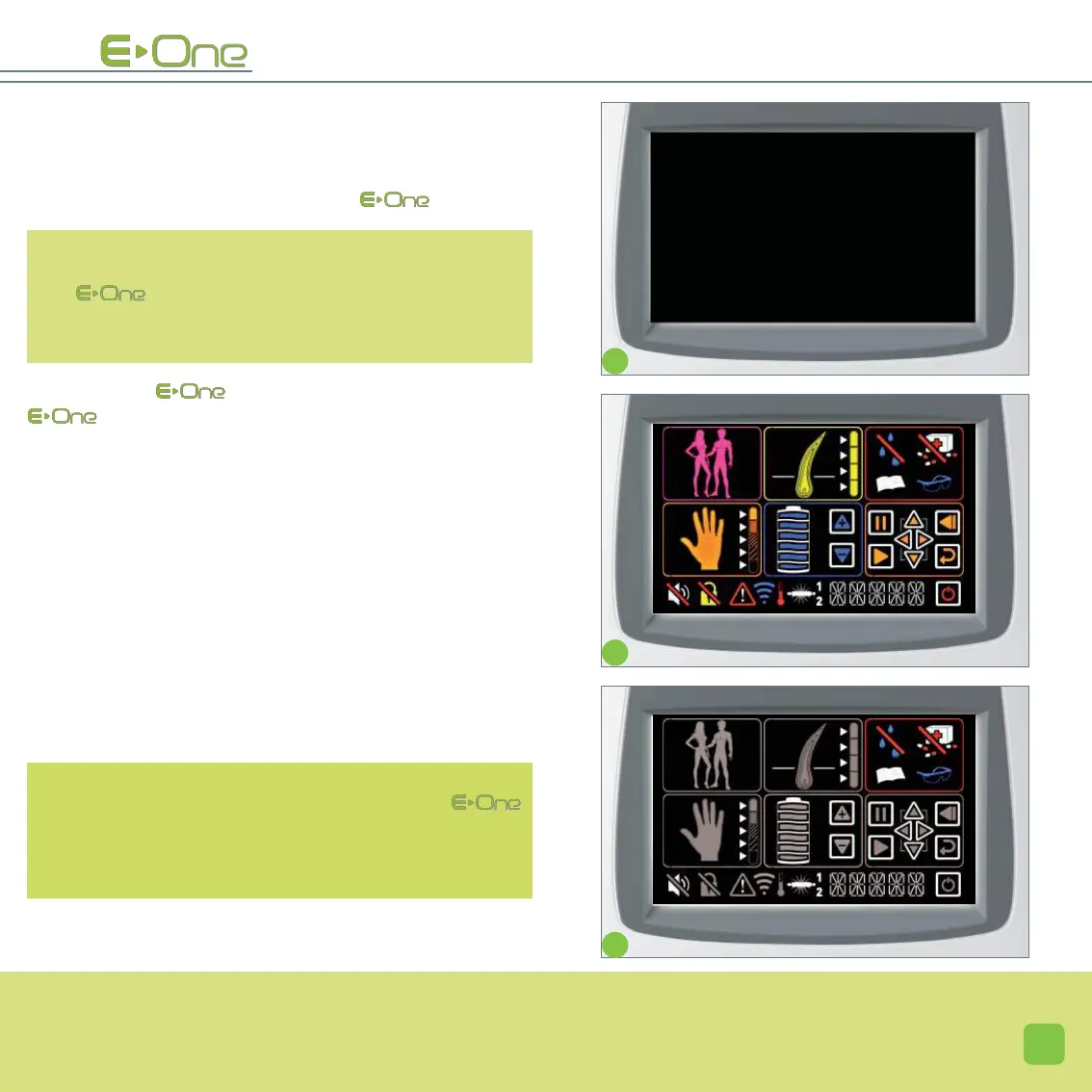
issues 3 beep sounds; the screen is black (screen A).
Just press anywhere on the screen to enable all icons to
appear (screen B). These icons are explained on pages
14 and 15. The menus are displayed temporarily. Only the
safety icons keep blinking.
• Unlock the safety features (screen C).
It is mandatory to validate each safety feature by pressing
one by one on each safety icon (the order of validation does
not matter).
Once all the safety icons are validated, all the other settings
icons for the flash will be available.
If an icon has not been validated, it will continue to
blink. You will not be able to set up or use your
so long as all the safety features have not been confir-
med and pressed.
A
B
C
HE ______


 To Next Page