EC5000
- 62 - - 63 -
Description of Functional Parameter
5
—————
FUNCTION
A33 Frequency reference7
A32 Frequency reference6
A31 Frequency reference5
A30 Frequency reference4
A29 Frequency reference3
A28 Frequency reference2
A27 main Frequency
RUNNING(SET)VALUE
F1 0.0S
F3 20.0S
F2 10.0S
R4 0.0S
F3 30.0S
F2 20.0S
F1 10.0S
1
SET VALUE
A47 step 7 mode
A46 step 6 mode
A45 step 5 mode
A44 step 4 mode
A43 step 3 mode
A42 step 2 mode
A41 step 1 mode
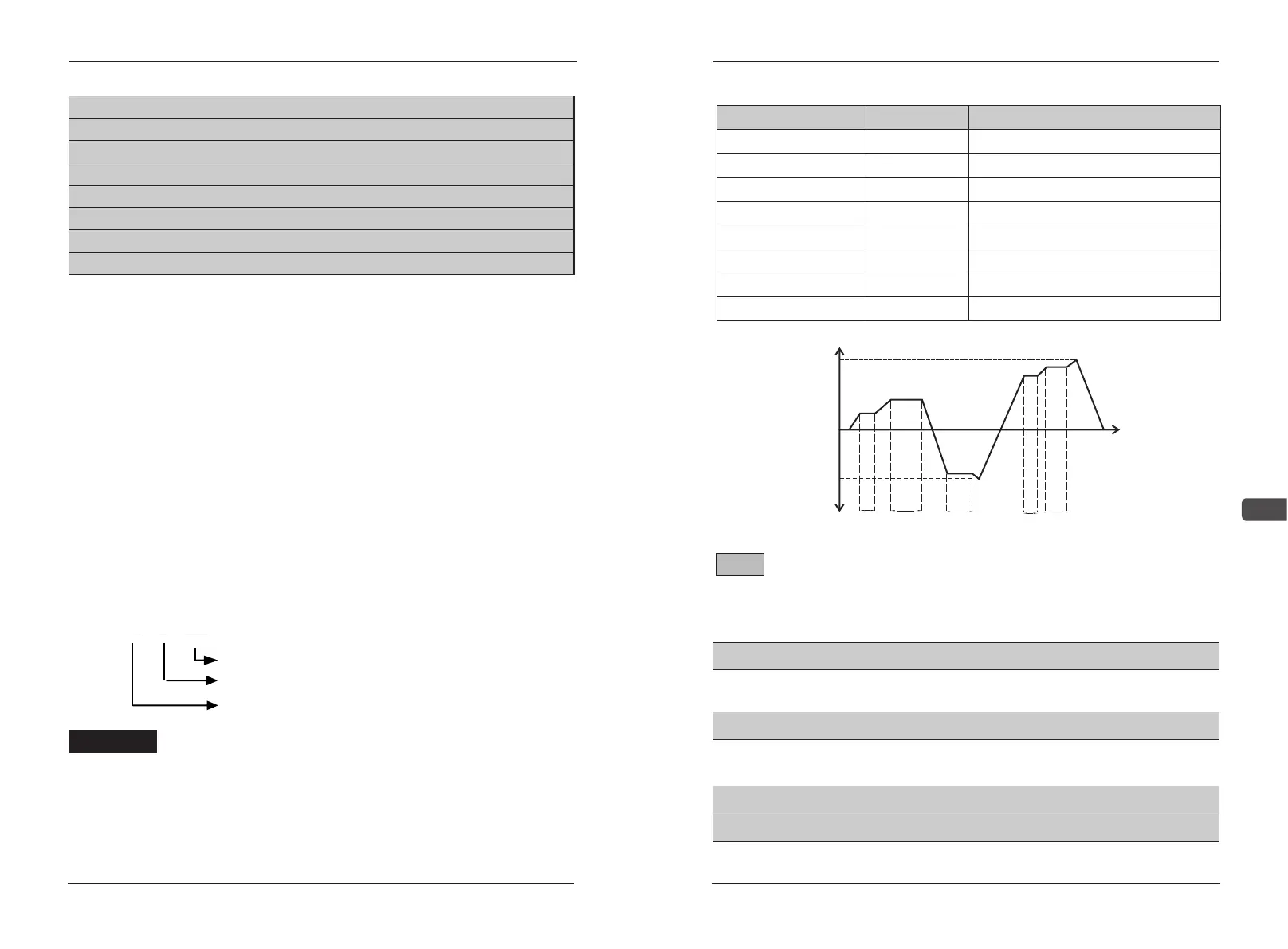
A40 mode running
output frequencyMotor Speed
10s 20s
30s
10s 20s
Time
1 speed
2 speed
3 speed
4 speed
5 speed
6 speed
7 speed
During above running example, if press STOP key, timer also stops. If restart
again, it return to the original speed and continue. If need to stop during
running, press RESET key.
Program pace:
F
2
100
pace running time 100S
pace accelerate/retard time 2
pace motor running direction: F is anti-clockwise R is
clockwise
Example:
EC5000
Notice!
A40 Running mode setting limits:0~3 factory default:0
A41 Step 1 mode setting limits:F1~R4 0~4000S factory default:F1 0S
A42 Step 2 mode setting limits:F1~R4 0~4000S factory default:F1 0S
A43 Step 3 mode setting limits:F1~R4 0~4000S factory default:F1 0S
A44 Step 4 mode setting limits:F1~R4 0~4000S factory default:F1 0S
A45 Step 5 mode setting limits:F1~R4 0~4000S factory default:F1 0S
A46 Step 6 mode setting limits:F1~R4 0~4000S factory default:F1 0S
A47 Step 7 mode setting limits:F1~R4 0~4000S factory default:F1 0S
Mode running(inner simple PLC logic control):
0:run according to common control way
1:inner control multi-speed, this mode stops after running for one
week
AC drive runs with the inner data step by step when run order is
given. It stop running automatically one week later. AC drive restart when
running order is given again.
2:Inner control multi-speed: when repeated running order is given,
AC drive repeat running step by step according to the inner data. Orders
are not accepted except order of STOP, External Error Instant STOP
when AC drive is running.
3:Inner control multi-speed: after running order is given, AC drive
runs the inner data step by step. It runs with the last speed after one
week.
Prog ram pa ce mod e f un cti on is t o s et run ni ng d ir ect io n,
accelerate/retard time and running time. Set the idle program pace to be
“0”, they will be jumped and change to the next pace.
Description of Functional Parameter
Note!
A48 JOG accelerate setting limit: 0.0~3600.0S factory default:10.0S
Inching operation acceleration time: Set the max frequency corresponding
to 100% of the time. Unit:0.1S
A48 JOG accelerate setting limit: 0.0~3600.0S factory default:10.0S
Inching operation deceleration time: Set the max frequency corresponding
to 100% of the time. Unit:0.1S
B01 S2 function setting limit: 0~26 factory default:0
B02 S3 function setting limit: 2~26 factory default:2


 To Next Page